


Becoming Sensei - Training the Trainer Along With Training the System

Overview
Digital asset management and delivery is one of the most useful features of AEM. While it's tempting to release Adobe Sensei and Smart Content Service in the wild and hope for the best, if not set up properly, it can become a daunting task for content managers, digital marketers and content authors to understand how to train the system before taking advantage of its full potential. Thankfully, there are great resources online and AEM best practice guidance to take advantage of machine learning and automatic tagging of assets.
Smart Content Tagging that Fits Your Enterprise Taxonomy
Going through smart content training currently, I can recommend these great resources to use as guides:
Tag Modeling and Training the System
Once there's sufficient level of understanding on what a training model is, it's time to use your tag library and train the system to recognize your enterprise taxonomy:
On-Going Periodic Training, Add, Remove, Promote Tags
Once you set it, don't forget it! Smart content improves with continuous grooming of tags.
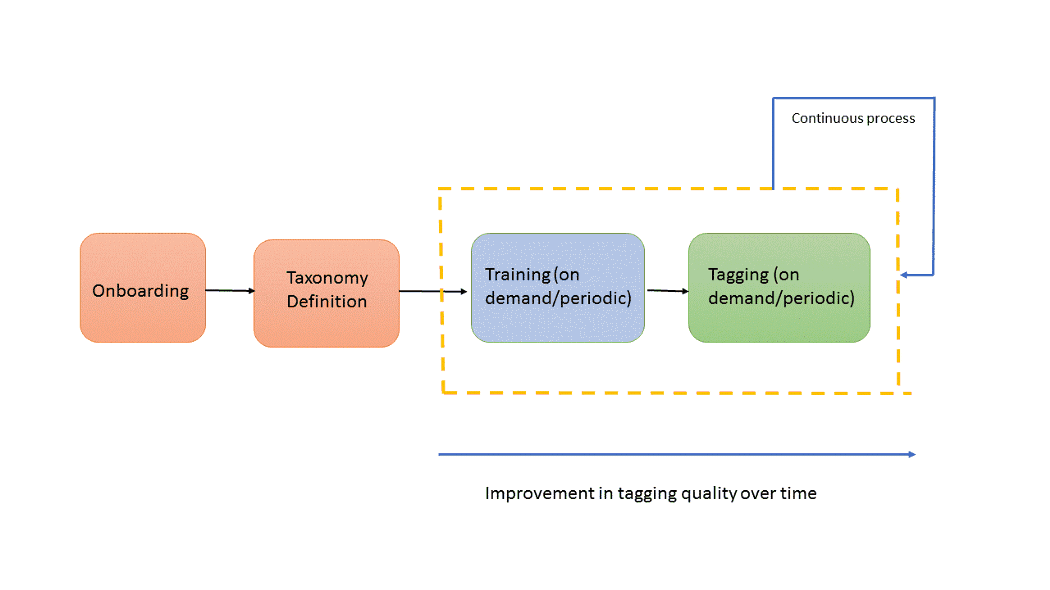
Content managers and authors can add tags that describe visual elements and visual aspects that machine learning might not be able to detect on its own. Also, deleting tags is an important ingredient of fine-tuning your smart content service, as well as promoting tags that should be elevated based on your business goals and enterprise taxonomy.
Remember to be very matter-of-fact with your model training, so you can just focus on periodic adjustments and tagging quality control. Before setting up your model, review tagging-related limitations and best practices. Content authors and digital marketers will really appreciate the accurate, time-saving and easy to use digital asset management and delivery that AEM has to offer. And your 'go to market' speed with impactful, eye-catching content will be Sensei-worthy.
Q&A
Please use this thread to ask questions