Asset Preview Issue in AEM 6.4.7 | Community
Skip to main content
Level 4
May 13, 2025

Asset Preview Issue in AEM 6.4.7

  • May 13, 2025
  • 1 reply
  • 616 views

Hi,


We have an issue with previewing assets in AEM 6.4.7 version.

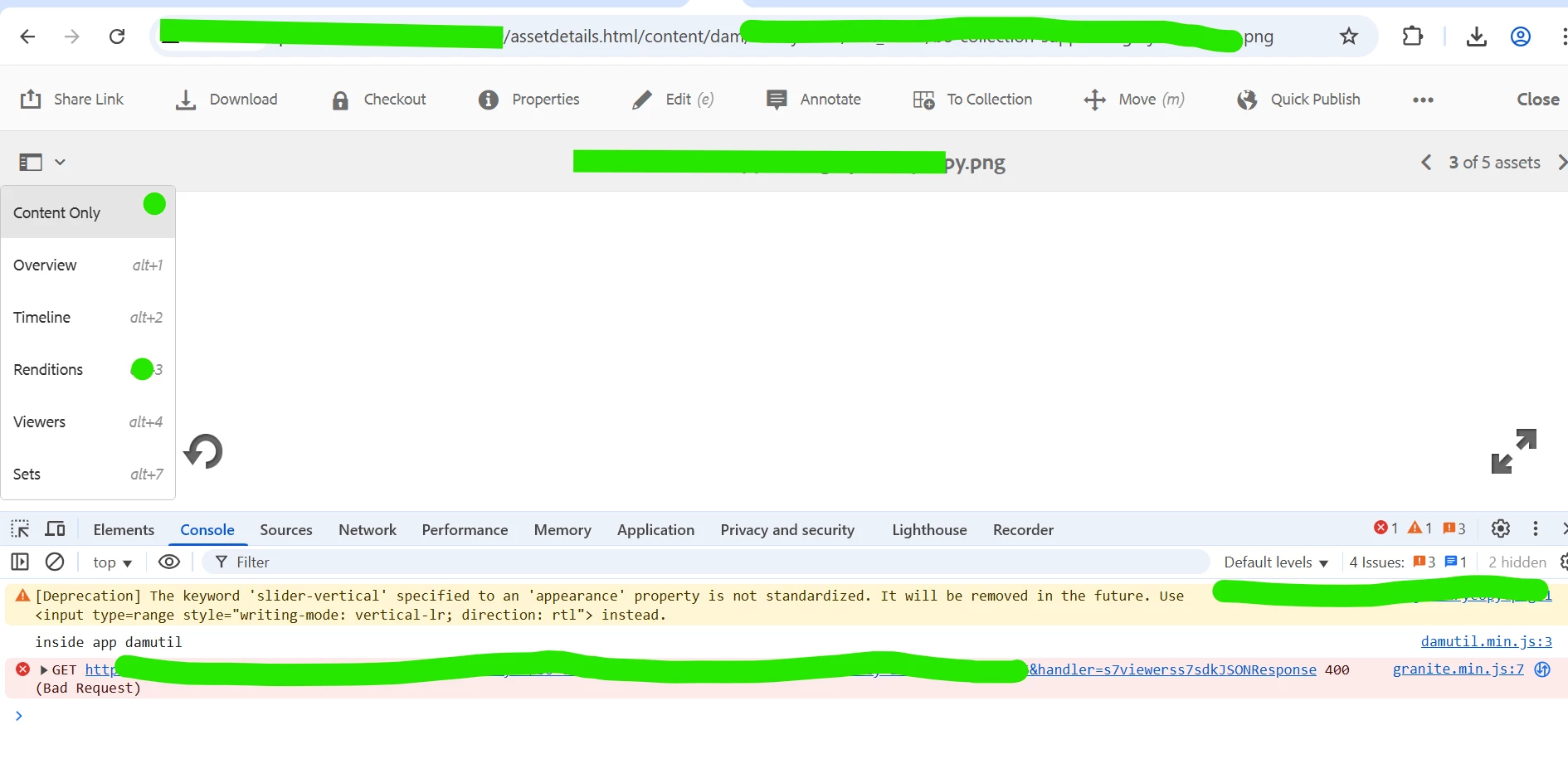
Whenever we upload an asset, it gets uploaded successfully(after completion of Dam Asset Update workflow) but once we click on the asset to preview it, we do not see the image. It shows a blank screen as shown in the screenshot.

Only when we select 'Renditions' from the left panel as highlighted below we are able to see all the renditions but if we select 'content only' from left panel we do not see the image in full screen. I do not see any specific error related to this in error logs or Dynamic media logs but the only error that shows up in console is as shown in the screenshot - a 400 Bad request from s7viewerss7sdkJSONResponse. 

Any thoughts on this ?
 

1 reply

K_M_K_Srikanth
Level 2
May 14, 2025

Hi @shibani06 


Can you 

  • Re-run the DAM Update Asset workflow manually on a problematic asset to regenerate renditions and metadata.

  • Validate that dc:scene7File and similar properties are present on the asset node (via CRXDE).


Supriya_Savre
Level 4
May 20, 2025

Hi @shibani06,

Did the shared solution help you out? Please let us know if you need more information. Otherwise kindly consider marking the answer as ‘correct’.

If you've discovered a solution yourself, we would appreciate it if you could share it with the community.


SHIBANI06Author
Level 4
May 21, 2025

There is no solution yet, will let you know if it works