Archetype does not exist error while creating project using archetype 49 | Community
Skip to main content
Level 3
August 8, 2024
Solved

Archetype does not exist error while creating project using archetype 49

  • August 8, 2024
  • 2 replies
  • 2393 views

I am getting archetype does not exist error while creating a project as mentioned.

Details regarding the versions -
AEM version - 6.5.0
Service pack - 6.5.17
Maven version - 3.9.8
Archetype - 49 

Command that I am trying to use -

mvn archetype:generate -B -DarchetypeCatalog=remote -DarchetypeGroupId=com.adobe.com -DarchetypeArtifactId=aem-project-archetype -DarchetypeVersion=49 -DaemVersion=6.5.17 -DsdkVersion=2021.11.6058.20211123T163652Z-211000 -DappTitle="New Site" -DappId="newsite" -DgroupId="com.newsite" -DfrontendModule=general -DincludeDispatcherConfig=y -DincludeErrorHandler=y -DincludeDynamicMedia=y

Command Prompt Snapshot for reference -
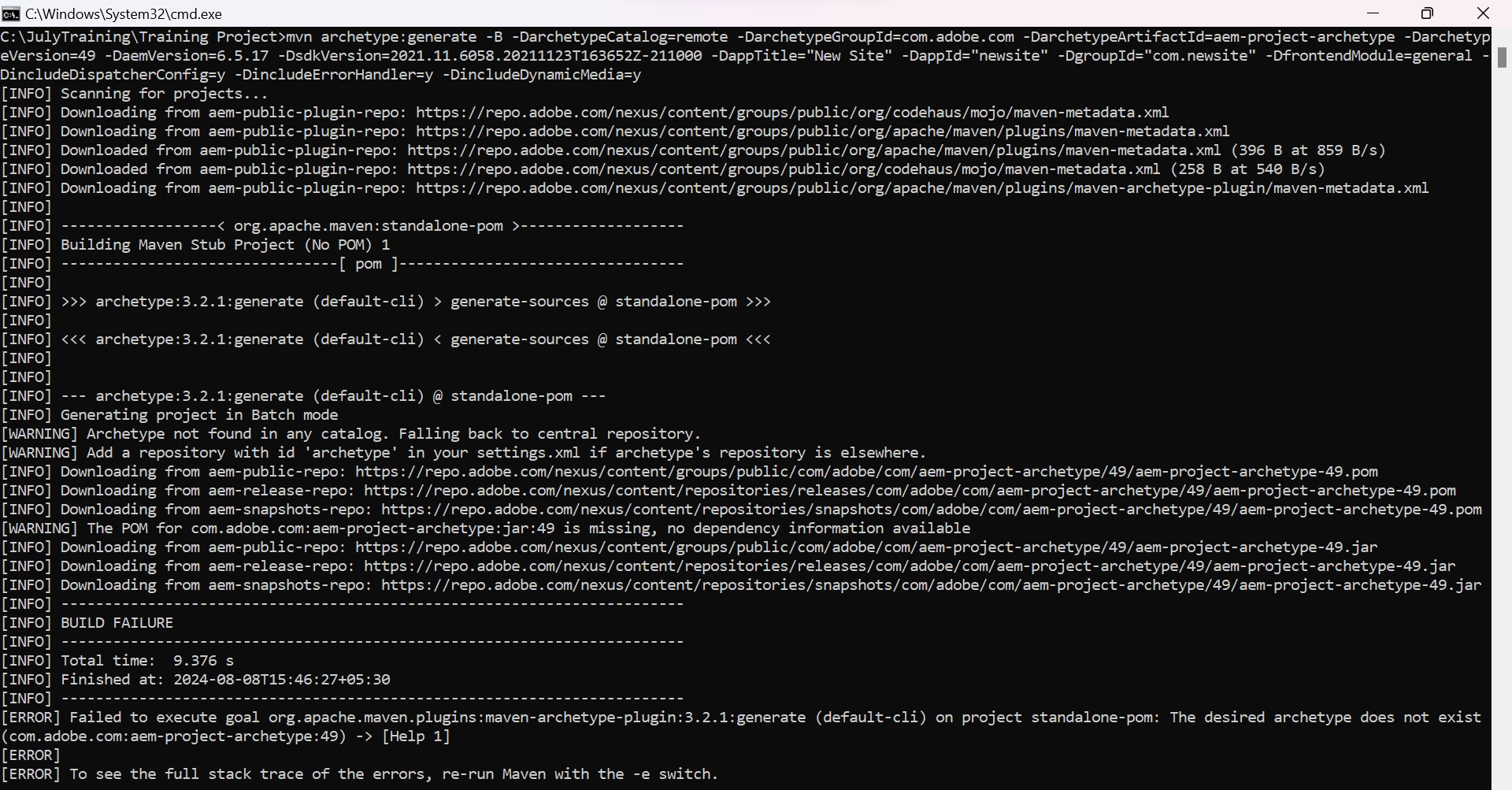


I have attached below the settings.xml that I am using.


This post is no longer active and is closed to new replies. Need help? Start a new post to ask your question.

2 replies

narendiran_ravi
Level 6
August 8, 2024
mvn -B org.apache.maven.plugins:maven-archetype-plugin:3.2.1:generate

Can you try mentioning the archetype plugin version like above instead of using like mvn -B archetype:generate. I just tried the below command and it is generating properly.  
mvn -B org.apache.maven.plugins:maven-archetype-plugin:3.2.1:generate -D archetypeGroupId=com.adobe.aem -D archetypeArtifactId=aem-project-archetype -D archetypeVersion=49 -D archetypeRepository=https://repo1.maven.org/maven2/ -D aemVersion=cloud -D appTitle="mysite" -D appId="mysite" -D groupId="com.mysite" -D frontendModule=general -D includeExamples=n

Manasi29Author
Level 3
August 8, 2024

Hello @narendiran_ravi  Thanks for the response. This works, I tried with mentioning the plugin version.
But can you please elaborate how these two commands differ?

Also I tried placing a folder structure in .m2, containing maven versions and release details which my colleague had but I did not have that folder in my .m2. When I place this folder in my .m2 the command which I shared works fine and the project is built successfully.

Can you please elaborate how this below folder structure is generated in .m2 and how does adding the plugin version affect the build?

Please refer below snapshots for the folder structure I am talking
about.


EstebanBustamante
Community Advisor and Adobe Champion
August 8, 2024

Hi, 

Please check the official documentation which shows an example of the command you should follow as well as the available options while generating the project from the archetype:https://github.com/adobe/aem-project-archetype?tab=readme-ov-file#usage 

You should do something like this:

mvn -B org.apache.maven.plugins:maven-archetype-plugin:3.2.1:generate \ -D archetypeGroupId=com.adobe.aem \ -D archetypeArtifactId=aem-project-archetype \ -D archetypeVersion=49\ -D appTitle="My Site" \ -D appId="mysite" \ -D groupId="com.mysite"

 Please validate your options as well against the documentation.


Hope this helps

Esteban Bustamante
Manasi29Author
Level 3
August 8, 2024

Thank you for your response @estebanbustamante.
I just had this doubt that, the command having the archetype version works absolutely fine.
I would like to know how these two commands differ, how they work internally and why the other one failed?

EstebanBustamante
Community Advisor and Adobe Champion
August 8, 2024

The issue is that your command uses the default version of the Maven plugin to generate the archetype. In contrast, the working command specifies the exact Maven plugin and version needed for creating the archetype. The archetype was designed to be compatible with a particular archetype plugin and version, which is why the default configuration does not work.


Check this: https://github.com/adobe/aem-project-archetype/issues/400 


Hope this helps

Esteban Bustamante