
Applying Folder Metadata Schema in Bulk
Hi there,
In our Adobe Assets instance, our Files folder structure is 103 Geographic Area / Locales, then 26 Business Divisions, with 73 different content types underneath them, each of which has a Private or Public folder underneath it. This was the recommended structure from our Adobe consultants.
This means we have 390,988 lowest level folders.
We want to assign the same Folder Metadata Schema to them all, so that we can set default values. We then will set specific folder default values by folder by editing the folder Properties and putting in the right values, which mostly clone the Folder structure so that the folder structure becomes searchable and usable metadata, rather than just the Folder location.
Guidance from our Adobe consultants is that this can only be done via the UI, rather than in bulk on the back end.
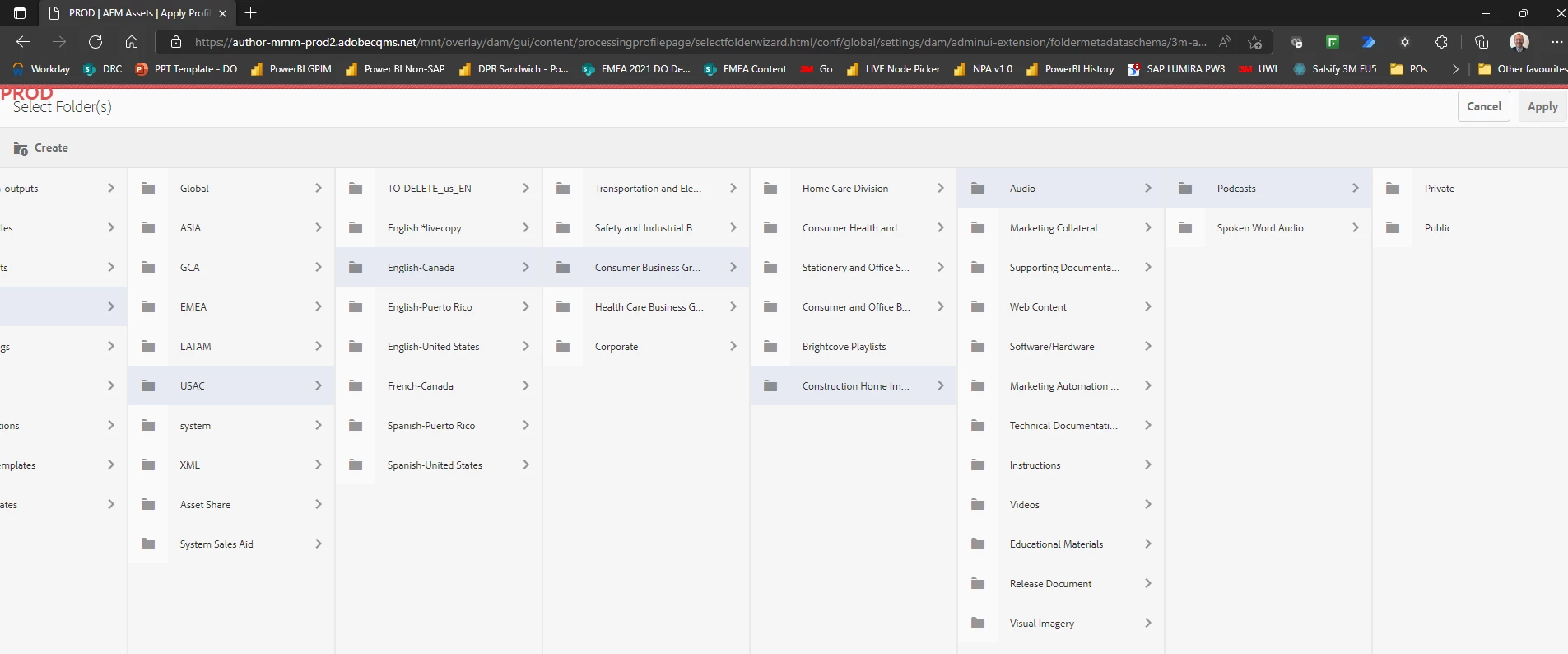
I've written scripts to automate it via Power Automate Desktop and am running them through but it is, as you would expect, very slow going, as it firstly opens the Folder Metadata Schema page with the schema preselected (URL example below), navigates through the hierarchy, then selects the two bottom folders and hits Apply.
The second part of assigning the defaults will be faster, as there are direct URLs to the Properties pages of each folder, so it's really just open it and run a little Javascript to set the values, then simulate hitting save, so much less at the mercy of the extremely variable UI performance.
What quicker ways are there to do this? Can this be done via the back end instead? This folder metadata schema info must get stored somewhere, same for the default value.
Or, even to speed it up a bit if that's not feasible, does anyone know if it's possible to construct a URL that would automatically drop me into this part of the UI in the Create Metadata Schema, with a specific folder path pre-selected, via some other query parameter in the URL? I can set the metadata profile and bypass the selection screen, but then need to navigate through the folder structure, which is slow and unreliable:
I want to get to the level "Podcasts" selected, so that I can select the Private and Public folders and hit Apply:
Thanks!
Paul.