Angular based pages not loading on IE. | Community
Skip to main content
Level 2
July 21, 2020
Solved

Angular based pages not loading on IE.

  • July 21, 2020
  • 2 replies
  • 1684 views

Hi All,

We have Angular based pages on our site. However those are not loading on IE9-11.


ERROR Error: Uncaught (in promise): ReferenceError: 'fetch' is undefined

ReferenceError: 'fetch' is undefined


Has anyone faced this ?

This post is no longer active and is closed to new replies. Need help? Start a new post to ask your question.
Best answer by BrianKasingli

@sachindey11,

It looks like you are trying to test an older browser that does not support a modernise Web Browser API. Taking a look at the caniuse.com, it seems the fetch is not supported in IE11 and lower. This problem looks like a vanilla JavaScript issue, and not with the AngularJS framework.

If you wish to get fetch to work on IE11 and lower, you can check out the fetch polyfill library, https://github.com/github/fetch, or simply use a modernised JavaScript library like axios; however, axios only supports IE11.

Also, many companies stopped supporting IE 11 and lower because these are legacy browsers. You should definitely check with your product analyst or project manager to get a list of devices and browsers that you need to support.
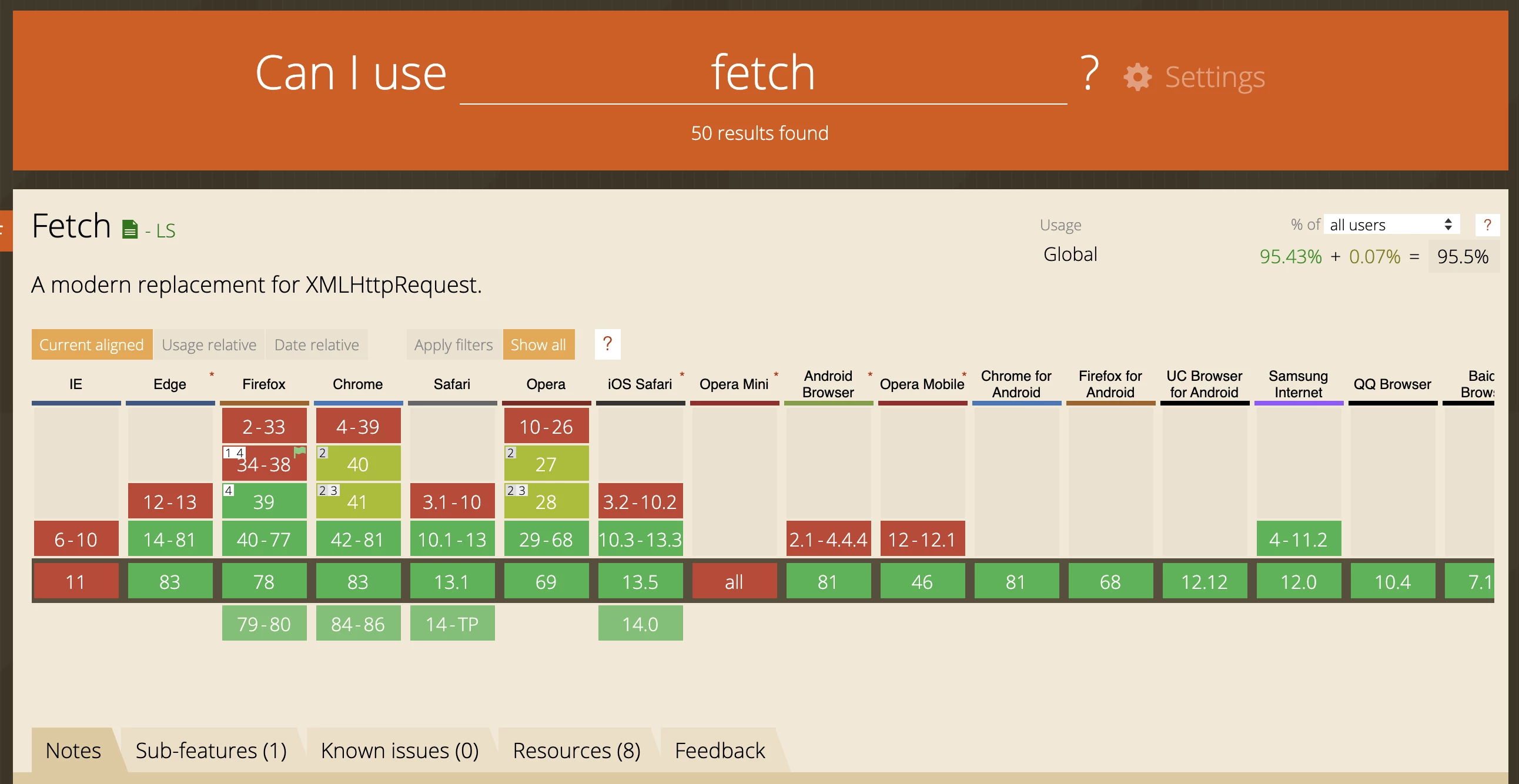
To sum it up, Fetch is unsupported from IE 11 and lower, so this is the main reason why you are seeing such errors in the console.

Regards,

Brian

2 replies

BrianKasingli
Community Advisor and Adobe Champion
BrianKasingliCommunity Advisor and Adobe ChampionAccepted solution
Community Advisor and Adobe Champion
July 21, 2020

@sachindey11,

It looks like you are trying to test an older browser that does not support a modernise Web Browser API. Taking a look at the caniuse.com, it seems the fetch is not supported in IE11 and lower. This problem looks like a vanilla JavaScript issue, and not with the AngularJS framework.

If you wish to get fetch to work on IE11 and lower, you can check out the fetch polyfill library, https://github.com/github/fetch, or simply use a modernised JavaScript library like axios; however, axios only supports IE11.

Also, many companies stopped supporting IE 11 and lower because these are legacy browsers. You should definitely check with your product analyst or project manager to get a list of devices and browsers that you need to support.

To sum it up, Fetch is unsupported from IE 11 and lower, so this is the main reason why you are seeing such errors in the console.

Regards,

Brian

Level 2
July 22, 2020
Thanks for your reply brian. I have tried axios but that did not solve the issue..Angular app works fine on internet when running alone but when integrated with AEM i face the 'Fetch is undefined',.....
Level 2
July 30, 2020

I was able to resolve this in the below manner:


Polyfill.js(Added 2 libraries)

import 'custom-event-polyfill';
import 'whatwg-fetch';


Package.json(added this)

"browserslist": [
"defaults"
]