After installing Service Pack project bundle goes in installed state AEM | Community
Skip to main content
Level 4
July 23, 2019
Solved

After installing Service Pack project bundle goes in installed state AEM

  • July 23, 2019
  • 6 replies
  • 4429 views

hi,

i am using AEM 6.4 currently.

recent service pack is 6.4.5.0

after installation one of the project bundle is breaking.

error is :org.apache.sling.api.resource,version=[2.10,2.11) -- Cannot be resolved

where this is predefined bundle and my current version is 2.20.0 and it is in active state.

anyone faced similar issue?

kindly suggest solution.
This post is no longer active and is closed to new replies. Need help? Start a new post to ask your question.
Best answer by joerghoh

Do not mix up the bundle version with the java package versions!

In your case your bundle requires the java package "org.apache.sling.api,resource" in the version range 2.10 - 2.11]. But that cannot be resolved.

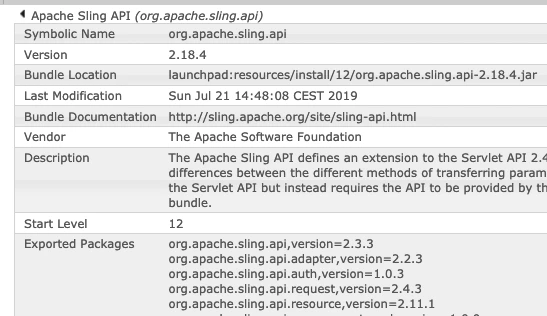
In my local AEM 6.5 it looks like this:

See the package version 2.18.4 of teh Apache Sling API bundle, while the version number of the exported java package "org.apache.sling.api.resource" is 2.11.1.

But as already recommended: Check the uber.jar you are working with. It should be for 6.4.5.

6 replies

Adobe Employee
July 23, 2019

To clarify OOTB bundles are fine but your bundle stays in Installed state?  If so then you will have to update the bundles in your project to match the ones that are updated in 6.4SP5 which is 2.20. 

July 23, 2019

It's only a version issue - simply change the version in your MF file in the OSGi bundle to reflect the one exposed in AEM.

Adobe Employee
July 23, 2019

I had worked on a similar issue and we traced the incorrect version was being set from "crx-quickstart/conf/sling.properties" file.

So, check the "sling.properties" and correct the version

Also, check the POM file while building the code and make sure you are using the latest uber jar(6.4.5).

joerghoh
Adobe Employee
joerghohAdobe EmployeeAccepted solution
Adobe Employee
July 23, 2019

Do not mix up the bundle version with the java package versions!

In your case your bundle requires the java package "org.apache.sling.api,resource" in the version range 2.10 - 2.11]. But that cannot be resolved.

In my local AEM 6.5 it looks like this:

See the package version 2.18.4 of teh Apache Sling API bundle, while the version number of the exported java package "org.apache.sling.api.resource" is 2.11.1.

But as already recommended: Check the uber.jar you are working with. It should be for 6.4.5.

Level 4
July 24, 2019

yes when for updating maven dependency in my project.

i added it to POM

<Embed-Dependency>org.apache.sling.api;</Embed-Dependency>

<Import-Package>!org.apache.sling.*;</Import-Package>

org.apache.sling.scripting.javascript.wrapper.ScriptableResource Unable to adapt object.

java.lang.ClassNotFoundException: [JavaPackage org.apache.sling.api.resource.ValueMap]

so not sure whether to go ahead with this change or not.

any suggestion?

joerghoh
Adobe Employee
Adobe Employee
July 25, 2019

Doing this change to the POM will not help you. In fact it worsens the situation, because your code will use its own copy of the Sling API, and this causes the observed ClassNotFoundException.

Instead you should remove these statements from your pom, and make sure that you use the proper uber.jar matching your AEM version.
