After column overlay in classic UI, the list of columns changes. Why is this happening? | Community
Skip to main content
January 3, 2019
Solved

After column overlay in classic UI, the list of columns changes. Why is this happening?

  • January 3, 2019
  • 2 replies
  • 1236 views

Hi,

I was following the tutorial on how to customize AEM Console by adding a new column in classic UI. Everything works and I can see the new column displaying the data. Only one thing is bothering me:

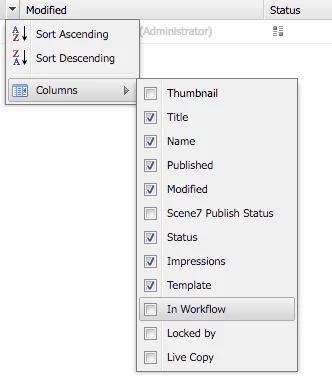
Before the overlay, the OOTB column list is this one:
After overlay:
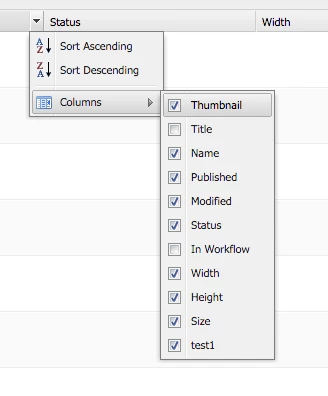
Any idea how I can retain the OOTB list of columns + my new one?

Thank you in advance,

Diana

This post is no longer active and is closed to new replies. Need help? Start a new post to ask your question.
Best answer by Gaurav-Behl

For each property that is not present -

  1. Create a node under '/apps/wcm/core/content/siteadmin/grid/geometrixx/columns' in /crx/de
  2. Apply 3 properties to the newly created node as other existing nodes -
  • xtype - String - gridcolumn
  • usePredefined - String - <value same as node name>
  • jcr:primaryType - Name - nt:unstructured

   3. Add the specific value under /apps/wcm/core/content/siteadmin/grid/geometrixx', 'storeReaderFields'  in the same order.

E.g. To show 'template'

     Create a node with under 'template', usePredefined - 'template' and storeReaderFields value should be 'templateShortTitle'

For Impressions, the storeReaderFielue is 'monthlyHits' 

You may check other values in /libs/cq/ui/widgets/source/widgets/wcm/SiteAdmin.js line # 2000 onwards under CQ.wcm.SiteAdmin.COLUMNS = {... }

Similar approach for damadmin, if required. File - /libs/cq/ui/widgets/source/widgets/wcm/DamAdmin.Actions.js

2 replies

Gaurav-Behl
Gaurav-BehlAccepted solution
Level 10
January 7, 2019

For each property that is not present -

  1. Create a node under '/apps/wcm/core/content/siteadmin/grid/geometrixx/columns' in /crx/de
  2. Apply 3 properties to the newly created node as other existing nodes -
  • xtype - String - gridcolumn
  • usePredefined - String - <value same as node name>
  • jcr:primaryType - Name - nt:unstructured

   3. Add the specific value under /apps/wcm/core/content/siteadmin/grid/geometrixx', 'storeReaderFields'  in the same order.

E.g. To show 'template'

     Create a node with under 'template', usePredefined - 'template' and storeReaderFields value should be 'templateShortTitle'

For Impressions, the storeReaderFielue is 'monthlyHits' 

You may check other values in /libs/cq/ui/widgets/source/widgets/wcm/SiteAdmin.js line # 2000 onwards under CQ.wcm.SiteAdmin.COLUMNS = {... }

Similar approach for damadmin, if required. File - /libs/cq/ui/widgets/source/widgets/wcm/DamAdmin.Actions.js

January 8, 2019

gauravb10066713​ thank you for your answer. that makes total sense. I was trying the template but with the usePredefined - I was  having 'templateShortTitle'. And that is the reason it wouldn't have worked for me. With your suggestion it works like charm.