New Member
Aug 22, 2025 1:28 PM UTC
Solved

AEMaaCS - 535 authentication failed error when sending emails using mailgun host configuration

I have a requirement to configure mailgun as my smtp host in order to share assets over an email using the Asset share common in AEMaaCS. 

When I click on the share option I get th below error message.


Caused by: org.apache.commons.mail.EmailException: Sending the email to the following server failed : proxy.tunnel:30587
	at org.apache.commons.mail.Email.sendMimeMessage(Email.java:1469)
	at org.apache.commons.mail.Email.send(Email.java:1496)
	at com.day.cq.mailer.impl.DefaultMailService.send(DefaultMailService.java:331)
	... 234 more
Caused by: javax.mail.AuthenticationFailedException: 535 Authentication failed

	at com.sun.mail.smtp.SMTPTransport$Authenticator.authenticate(SMTPTransport.java:965)
	at com.sun.mail.smtp.SMTPTransport.authenticate(SMTPTransport.java:876)
	at com.sun.mail.smtp.SMTPTransport.protocolConnect(SMTPTransport.java:780)
	at javax.mail.Service.connect(Service.java:388)
	at javax.mail.Service.connect(Service.java:246)
	at javax.mail.Service.connect(Service.java:195)
	at javax.mail.Transport.send0(Transport.java:254)
	at javax.mail.Transport.send(Transport.java:124)
	at org.apache.commons.mail.Email.sendMimeMessage(Email.java:1459)
	... 236 more

Below are my configuration details.

Configuration: AdvancedNetworking
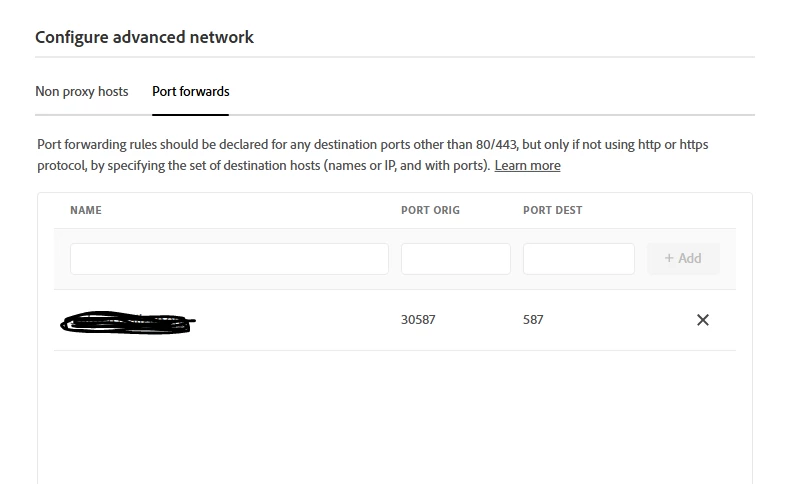
Configuration: com.day.cq.mailer.DefaultMailService.cfg.json

{
"smtp.host": "$[env:AEM_PROXY_HOST;default=proxy.tunnel]",
"smtp.port": "30587",
"smtp.user": "EMAIl_USERNAME",
"smtp.password": "$[secret:EMAIL_PASSWORD]",
"from.address": "noreply@sample.com",
"smtp.ssl": false,
"smtp.starttls": true,
"smtp.requiretls": false,
"debug.email": true,
"oauth.flow": false
}

 Is there anything else that I am missing, does anyone know how I can fix this issue. 


Thank you in advance !

This post is no longer active and is closed to new replies. Need help? Start a new post to ask your question.
veenaktAccepted solution
New Member
Sep 2, 2025 10:14 AM UTC

Hi,

Yes I was able to fix this issue, In-order for the external smtp configuration to work, the ssl and strarttls configurations should be in either of the below combinations.                                                                                                ssl=true and strarttls=false or ssl=false and starttls=true                                                                                    Both ssl and strarttls cannot be true or false at the same time.


and ensure right username and password is added to the environment variables and mapped to the OSGI configuration. 

4 replies

giuseppebaglio
Level 10
Aug 22, 2025 1:47 PM UTC

Hi @veenakt, 

Based on the error message, it seems the server is reachable, but there is an issue with authenticating the username and password. Please verify these details first.

You could use a tool to check the configuration values. You can search for "test SMTP" on Google to see what I mean.

Translate
veenaktAuthor
New Member
Aug 26, 2025 7:27 AM UTC

Hi @giuseppebaglio 


Thank you for the response. I am able to send emails now, by updating the right credentials to the cloud manager environment and mapping them to the OSGI configurations and ensuring ssl and starttls are set to false and true respectively.

Translate
kautuk_sahni
Level 9
Sep 1, 2025 12:14 PM UTC

@veenakt just checking in! Were you able to get this resolved? If one of the replies above helped—whether it completely solved the issue or simply pointed you in the right direction—marking it as accepted can make it much easier for others with the same question to find a solution. And if you found a different way to fix it, sharing your approach would be a great contribution to the community. Your follow-up not only helps close the loop but also ensures others benefit from your experience. Thanks so much for being part of the conversation!

Translate
Kautuk Sahni
veenaktAuthorAccepted solution
New Member
Sep 2, 2025 10:14 AM UTC

Hi,

Yes I was able to fix this issue, In-order for the external smtp configuration to work, the ssl and strarttls configurations should be in either of the below combinations.                                                                                                ssl=true and strarttls=false or ssl=false and starttls=true                                                                                    Both ssl and strarttls cannot be true or false at the same time.


and ensure right username and password is added to the environment variables and mapped to the OSGI configuration. 

Translate