Level 4
November 7, 2022
Beantwortet

aem6.5 richtext modify textarea size

  • November 7, 2022
  • 2 Antworten
  • 1052 Ansichten

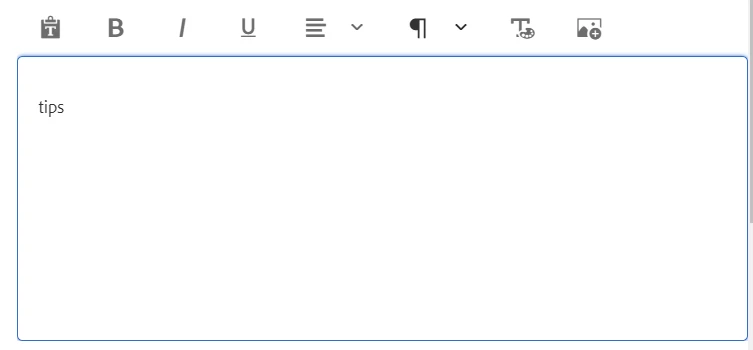
The default textarea is too large. How can I modify the size of the textarea by some fields? Is it possible? Or I must overwrite it and use js to modify it?
 

Dieses Thema wurde für Antworten geschlossen.
Beste Antwort von BrianKasingli

@johann_lu , you can create a custom client library that will only be invoked when you are on the editors.html page. The custom client library should contain CSS that will target the Touch UI RTE, and in summary, shrink down the textarea, as what you are expecting. To create a custom client library specifically for the editors.html page, you can follow this blog article -> https://sourcedcode.com/blog/aem/adding-custom-client-library-for-aem-author-editor-touch-ui


2 Antworten

Manu_Mathew_
Community Advisor
Community Advisor
November 7, 2022

@johann_lu It is possible to override the js/css by targetting the element - something like -

$("[name*='/<fieldname>/']").css("height", "200px");

But not sure, if this this the only way.

BrianKasingli
Adobe Champion and Community Advisor
November 7, 2022

@johann_lu , you can create a custom client library that will only be invoked when you are on the editors.html page. The custom client library should contain CSS that will target the Touch UI RTE, and in summary, shrink down the textarea, as what you are expecting. To create a custom client library specifically for the editors.html page, you can follow this blog article -> https://sourcedcode.com/blog/aem/adding-custom-client-library-for-aem-author-editor-touch-ui
