AEM6.5 local aem is throwing error AuthenticationSupport service missing | Community
Skip to main content
srinivas_chann1
Level 7
December 8, 2021
Solved

AEM6.5 local aem is throwing error AuthenticationSupport service missing

  • December 8, 2021
  • 1 reply
  • 759 views

Hi,


I have done with local set up   using the below packages

aem-service-pkg-6.5.5.zip

com.adobe.fmdita-6.5-3.6.5.35.zip

com.adobe.fmdita-6.5-sp-3.6.6.41.zip

asset-share-commons.ui.apps-1.9.4.zip


and do some code changes using git repository and may shut down my system 3 times or 4 times then start my local set up does not log in and gives the following error .


For the url http://localhost:4502/



http://localhost:4502/crx/de/index.jsp
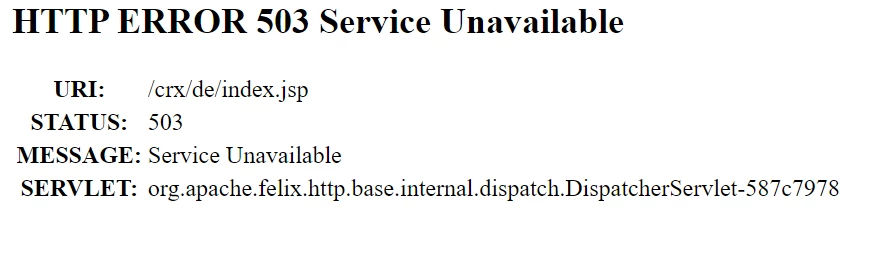
 

How to resolve it

I tried using  below, but does not solve the problem

https://experienceleaguecommunities.adobe.com/t5/adobe-experience-manager/while-starting-up-aem-instance-getting-503-error/m-p/257912


Please provide inputs


Thanks

This post is no longer active and is closed to new replies. Need help? Start a new post to ask your question.
Best answer by SaiAnil

Hi @srinivas_chann1 


We have also faced the similar issue after installing the XML data addon in author instance. Author instance took more time than usual for the first time after installing this. Also please verify the technical requirements to install xml data on.


Technical requirements
Before installing XML Documentation for Adobe Experience Manager, ensure your system meets the
following technical requirements:
Adobe Experience Manager
• Version 6.5 Service Pack 8 and 7
• Version 6.4 Service Pack 8 and 7
• Version 6.3 Service Pack 3

Please refer to the below link if it helps

https://helpx.adobe.com/content/dam/help/en/xml-documentation-solution/3-8-6/XML-Documentation-for-Adobe-Experience-Manager_Installation-Configuration-Guide_EN.pdf


Also please provide error log if still the issue exists. All the bundles are up and running?


1 reply

SaiAnil
SaiAnilAccepted solution
Level 2
December 8, 2021

Hi @srinivas_chann1 


We have also faced the similar issue after installing the XML data addon in author instance. Author instance took more time than usual for the first time after installing this. Also please verify the technical requirements to install xml data on.


Technical requirements
Before installing XML Documentation for Adobe Experience Manager, ensure your system meets the
following technical requirements:
Adobe Experience Manager
• Version 6.5 Service Pack 8 and 7
• Version 6.4 Service Pack 8 and 7
• Version 6.3 Service Pack 3

Please refer to the below link if it helps

https://helpx.adobe.com/content/dam/help/en/xml-documentation-solution/3-8-6/XML-Documentation-for-Adobe-Experience-Manager_Installation-Configuration-Guide_EN.pdf


Also please provide error log if still the issue exists. All the bundles are up and running?