
AEM Sites page properties from Language Master not rolling out to live copy | Community
Skip to main content
AlexNathanson
Level 2
October 10, 2024
Solved

AEM Sites page properties from Language Master not rolling out to live copy

  • October 10, 2024
  • 2 replies
  • 1371 views

There are a number of properties that are not being rolled out from the language master page to the region/language version, even though the fields show that there is inheritance set.  Specifically the Basic: Title, Tags, Page Title, Navigation Title, Subtitle and Description.  Both when rolling out from the language master and also when sync from the live copy page.

Question: why bother having an inheritance checkbox on properties in the /us/en version of a live copy page if it's not going to inherit future changes to the language master version?  Am I missing something?

From what I understand, it will copy these values when the page is first being copied to the live copy, but subsequent changes to language master page won't roll out.  
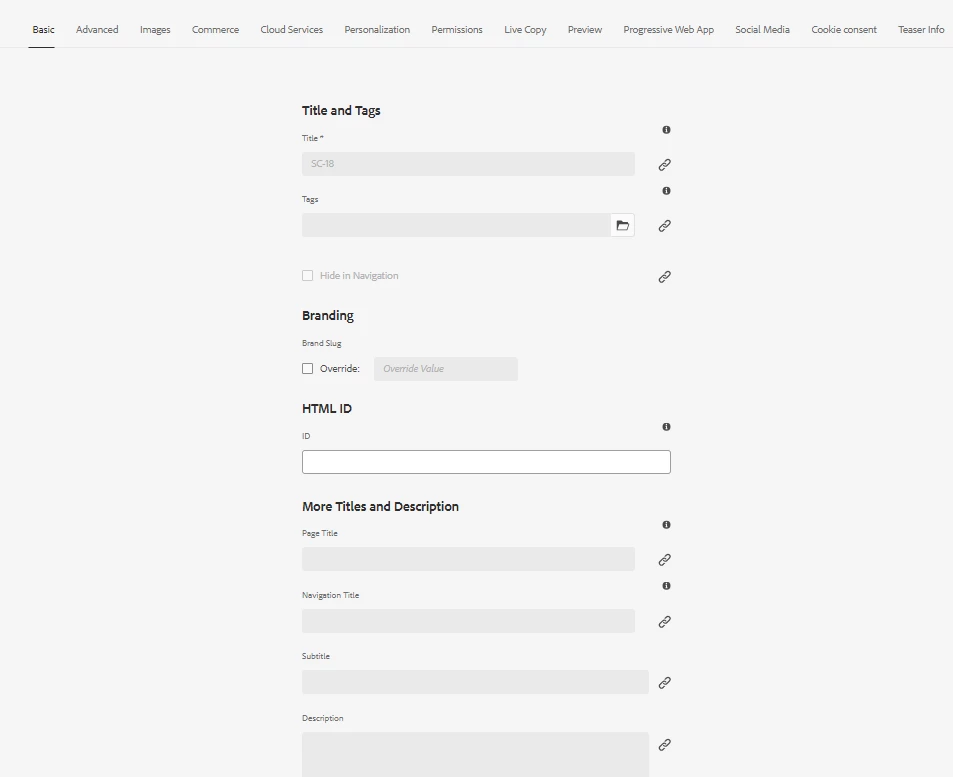
Thanks for any suggestions or recommendations.

This post is no longer active and is closed to new replies. Need help? Start a new post to ask your question.
Best answer by SureshDhulipudi

Please check the rollout configuration.

The rollout configuration must be properly set up to include these properties during the rollout process


Inheritance Checkbox: Indicates that the property should inherit its value from the blueprint page.
Rollout Configuration: Determines which properties are included during the rollout process.

cq:LiveSyncConfig node of the blueprint page, cq:LiveRelationship & cq:LiveSync


https://experienceleague.adobe.com/en/docs/experience-manager-cloud-service/content/sites/administering/reusing-content/msm/overview


Rollout Configuration

Rules that determine which properties are synchronized, how, and when

2 replies

SureshDhulipudi
Community Advisor
SureshDhulipudiCommunity AdvisorAccepted solution
Community Advisor
October 10, 2024

Please check the rollout configuration.

The rollout configuration must be properly set up to include these properties during the rollout process


Inheritance Checkbox: Indicates that the property should inherit its value from the blueprint page.
Rollout Configuration: Determines which properties are included during the rollout process.

cq:LiveSyncConfig node of the blueprint page, cq:LiveRelationship & cq:LiveSync


https://experienceleague.adobe.com/en/docs/experience-manager-cloud-service/content/sites/administering/reusing-content/msm/overview


Rollout Configuration

Rules that determine which properties are synchronized, how, and when

kautuk_sahni
Community Manager
Community Manager
October 16, 2024

@alexnathanson Did you find the suggestion helpful? Please let us know if you require more information. Otherwise, please mark the answer as correct for posterity. If you've discovered a solution yourself, we would appreciate it if you could share it with the community. Thank you!

Kautuk Sahni