
AEM Project with Archetype 26 | AEM 6.4 | Adobe Experience Manager
I have Create a new AEM Project with Archetype 26 and i faced the below issue and resolve it. Please follow the step below for the setup a new project.
1. Setup Java 11(Recommended)
2. Setup AEM 6.5 Instance. Once AEM is setup then installed the "aem-service-pkg-6.5.4.zip" service package.
3. Create a new Project structure using the below command:
mvn -B archetype:generate -D archetypeGroupId=com.adobe.aem -D archetypeArtifactId=aem-project-archetype -D archetypeVersion=26 -D appTitle="My Project" -D appId="myproject" -D groupId="com.myproject.aem" -D artifactId="myproject-aem-project" -D version="0.0.1-SNAPSHOT" -D aemVersion="6.5.4" -D includeDispatcherConfig=n -D includeExamples=n
Whenever run the above command getting below error while creating a project structure with dispatcher modules.
ERROR : Failed to execute goal org.apache.maven.plugins:maven-archetype-plugin:3.1.2:generate (default-cli) on project standalone-pom: java.nio.file.FileSystemException: Project path(Example: /Myproject/): A required privilege is not held by the client. -> [Help 1]
4. To fix the above error i have not included dispatcher modules by adding "includeDispatcherConfig=n" parameter in command, So remove this from command and run.
5. Project structure got created successfully as per the below.
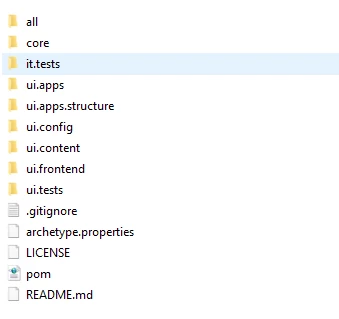
6. Run the command(mvn clean install) to build the project
7. Build is successful.