AEM moves div tag - how to fix? | Community
Skip to main content
May 14, 2018
Solved

AEM moves div tag - how to fix?

  • May 14, 2018
  • 5 replies
  • 1741 views

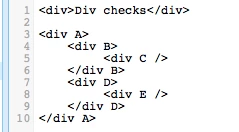
I have an AEM component with the following structure:

<div A>

    <div B>

         <div C />

    </div B>

    <div D>

         <div E />

    </div D>

</div A>

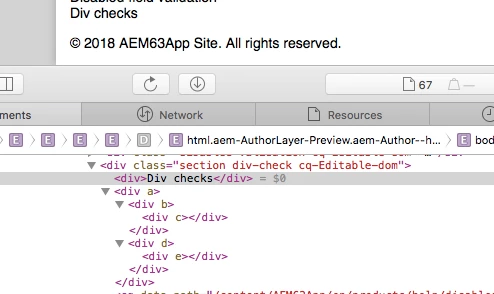
However, it shows in my AEM pages with this structure:

<div A>

    <div B>

         <div C />

    </div B>

</div A>

<div D>

    <div E />

</div D>

What is causing this, and how do I fix it?  Thanks!
This post is no longer active and is closed to new replies. Need help? Start a new post to ask your question.
Best answer by arunpatidar

Could you please share your component code, may be issue with HTML structure.

I tried same in 6.3, working fine for me.

Thanks

Arun

5 replies

smacdonald2008
Level 10
May 14, 2018

The only time i know of why AEM modifies DIVs of a component is related to eidting the component as discussed here -- https://aemcorner.com/aem-how-to-remove-div-wrapper-from-component/

PSDuckieAuthor
May 15, 2018

I tried putting the cq:noDecoration="true" tag in the component that is giving me the trouble, but to no avail.  Am I doing this correctly?

arunpatidar
Community Advisor
arunpatidarCommunity AdvisorAccepted solution
Community Advisor
May 15, 2018

Could you please share your component code, may be issue with HTML structure.

I tried same in 6.3, working fine for me.

Thanks

Arun

Arun Patidar
smacdonald2008
Level 10
May 15, 2018

I agree with Arun - i have developed many AEM components that include nested DIVS and never seen this happen.

kautuk_sahni
Community Manager
Community Manager
May 16, 2018

Can you please share with us the package to debug this?

I have also checked and it is working fine for me on AEM 6.3 and 6.4.

-Kautuk

Kautuk Sahni