AEM List view throws error | Community
Skip to main content
Manu_Mathew_
Community Advisor
Community Advisor
September 19, 2021
Solved

AEM List view throws error

  • September 19, 2021
  • 2 replies
  • 1771 views

Hi


I am not able view AEM sites pages in list view. Have anyone faced similar issue?

AEM Version: 6.5, 6.5.7 service pack installed!
   

This post is no longer active and is closed to new replies. Need help? Start a new post to ask your question.
Best answer by Kishore_Kumar_

Hi @manu_mathew_ ,


I am not able to replicate this in my local. Could you please confirm if you have checked this in vanilla instance ?


If it's not vanilla instance, please check if you had overlaid below path and did some changes which might causing the issue.


/libs/cq/gui/components/coral/admin/page/row


Updated Answer:

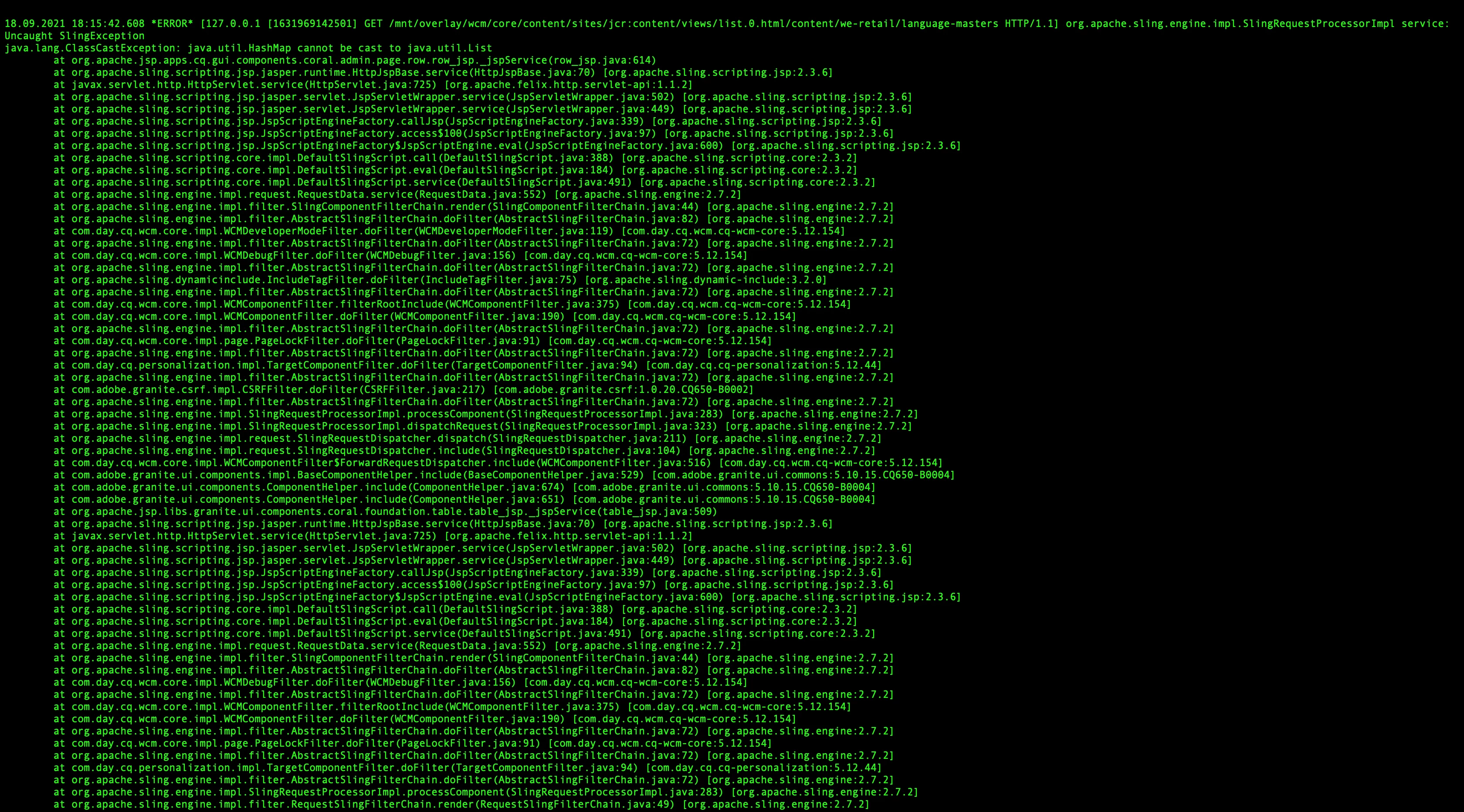
As per your error screenshot, exception is thrown on /apps/cq/gui/components/coral/admin/page/row/row.jsp . So kindly check and fix it to resolve this.

2 replies

Kishore_Kumar_
Level 9
September 19, 2021

Hi @manu_mathew_ ,


I am not able to replicate this issue in my local vanilla instance of 6.5.7.


But just trying to understand, you are getting the issue after doing like below ?


  • When you open the Timewrap option for a page, keep the Timeline side rail option open, and navigate to Sites console, the Failed to Load error occurs (NPR-34951)  (this one is fixed as part of 6.5.7 as per SP release notes)

https://experienceleague.adobe.com/docs/experience-manager-65/release-notes/service-pack/previous-hotfixes-featurepacks.html?lang=en 

Manu_Mathew_
Community Advisor
Community Advisor
September 19, 2021

Hi @kishore_kumar_ 


No this is not related to the Timewrap option. This is happening, when navigated to sites and list view is clicked. Getting the errors as attached in the error logs while doing this operation. 

Kishore_Kumar_
Kishore_Kumar_Accepted solution
Level 9
September 19, 2021

Hi @manu_mathew_ ,


I am not able to replicate this in my local. Could you please confirm if you have checked this in vanilla instance ?


If it's not vanilla instance, please check if you had overlaid below path and did some changes which might causing the issue.


/libs/cq/gui/components/coral/admin/page/row


Updated Answer:

As per your error screenshot, exception is thrown on /apps/cq/gui/components/coral/admin/page/row/row.jsp . So kindly check and fix it to resolve this.

Anudeep_Garnepudi
Community Advisor
Community Advisor
September 19, 2021

@manu_mathew_ 


I see you overlayed /libs/cq/gui/components/coral/admin/page/row/row.jsp 

Just check the code that you have added or modified, you are doing a wrong Type Cast. 

Remove the overlayed jsp(/apps/cq/gui/components/coral/admin/page/row/row.jsp) and check once if issue still exists.


-AG

AG
Manu_Mathew_
Community Advisor
Community Advisor
September 21, 2021

Thanks for the input. @anudeep_garnepudi