AEM Instance Not Starting After Installing Service Package via Package Manager | Community
Skip to main content
Level 2
June 11, 2025
Solved

AEM Instance Not Starting After Installing Service Package via Package Manager

  • June 11, 2025
  • 3 replies
  • 880 views

Hello @everyone,

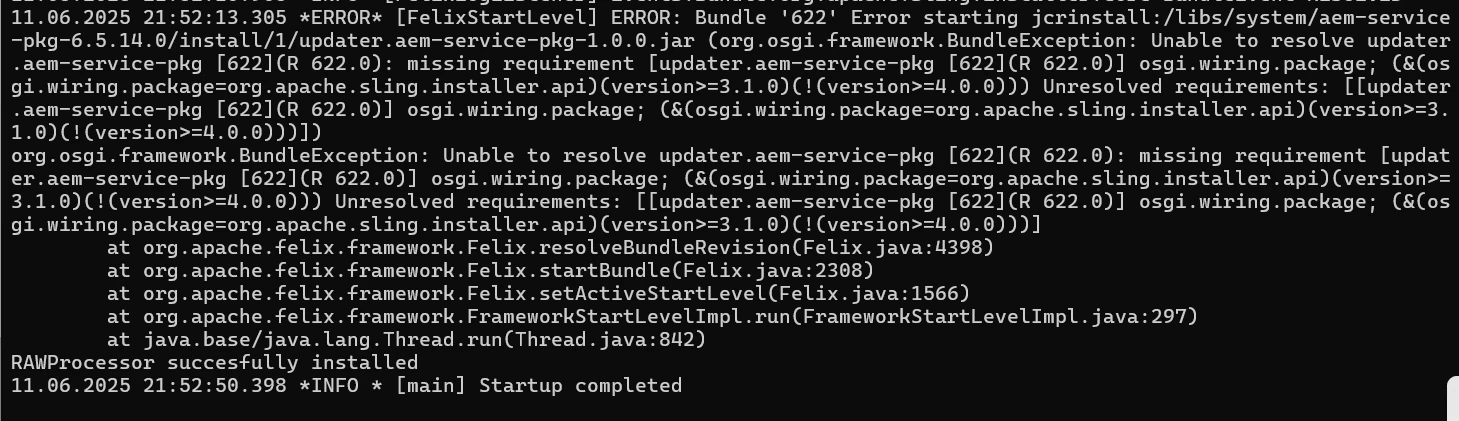
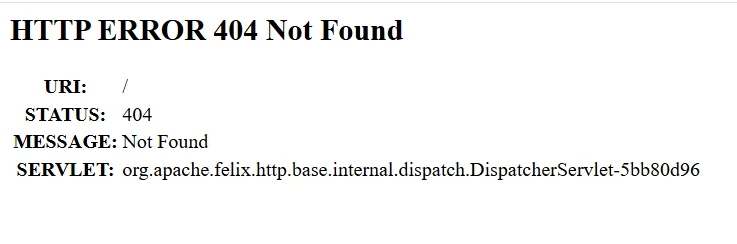
After installing a service package through the AEM Package Manager, my AEM instance fails to start properly. It was working fine before installing service-pkg.

My System Setup:

  • Java: 17.0.12 (LTS)

  • Maven:3.9.9

  • Node: v14.15.4

  • NPM:6.14.8      


Would appreciate any pointers or troubleshooting tips!

Thanks

Best answer by SantoshSai

Hi @yaminikolhe,

Could you please tell us which version of AEM and service pack are you trying to install?

Check error.log & stdout.log

Look for:

  • Bundle Resolution Exceptions

  • ClassNotFoundException

  • UnsatisfiedDependencyException

Check OSGi Console for “Installed” or “Resolved” Bundles.

AEM 6.5 does not support Java 17 natively. It supports up to Java 11 officially (unless running on AEM as a Cloud Service).

Adobe Official Java Support Matrix:
https://experienceleague.adobe.com/en/docs/experience-manager-65/content/implementing/deploying/introduction/technical-requirements

If you're using Java 17, and this is a local SDK or older AEM 6.5 version, that could cause startup issues.

3 replies

SantoshSai
Community Advisor
SantoshSaiCommunity AdvisorAccepted solution
Community Advisor
June 11, 2025

Hi @yaminikolhe,

Could you please tell us which version of AEM and service pack are you trying to install?

Check error.log & stdout.log

Look for:

  • Bundle Resolution Exceptions

  • ClassNotFoundException

  • UnsatisfiedDependencyException

Check OSGi Console for “Installed” or “Resolved” Bundles.

AEM 6.5 does not support Java 17 natively. It supports up to Java 11 officially (unless running on AEM as a Cloud Service).

Adobe Official Java Support Matrix:
https://experienceleague.adobe.com/en/docs/experience-manager-65/content/implementing/deploying/introduction/technical-requirements

If you're using Java 17, and this is a local SDK or older AEM 6.5 version, that could cause startup issues.

Santosh Sai
Level 2
June 12, 2025

@santoshsai 

I’m currently working with AEM as a Cloud Service (AEMaaCS), and  I am encountering bundle resolution errors during startup.

kapil_rajoria
Community Advisor
Community Advisor
June 12, 2025

Hi @yaminikolhe 
Please visit: http://localhost:4502/system/console/bundles and see if any bundle or bundles are in installed or resolved state. Expand them to see what is causing the issue and update the maven dependencies accordingly.
Also, use java 11 as it is most compatible with AEM.

Level 2
June 12, 2025

Thanks for the update @kapil_rajoria 

I’ll ensure that the environment is using Java 11, as recommended for better compatibility with AEM, and I will check if any bundles are in installed or resolved state.

Will keep you posted once the bundles are active and the issue is resolved.

kautuk_sahni
Community Manager
Community Manager
July 2, 2025

@yaminikolhe Just checking in — were you able to resolve your issue?
We’d love to hear how things worked out. If the suggestions above helped, marking a response as correct can guide others with similar questions. And if you found another solution, feel free to share it — your insights could really benefit the community. Thanks again for being part of the conversation!

Kautuk Sahni