AEM GraphQL failing on properties with custom namespaces. How to query properties with custom namespaces? | Community
Skip to main content
Level 2
December 26, 2023

AEM GraphQL failing on properties with custom namespaces. How to query properties with custom namespaces?

  • December 26, 2023
  • 2 replies
  • 845 views

For our project, we created a new namespace `salsify:` under Content Fragment. For example,

salsify:size salsify:class salsify:color

When creating PersistedQuery, the GraphiQL editor converts colon (:) to underscore and the queries are failing. 
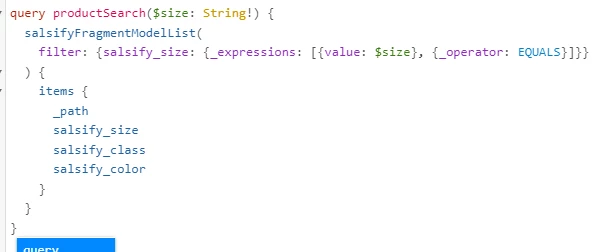
For example, above, property names are actually `salsify:size`, `salsify:class`, `salsify:color`. But graphql editor converts colon to underscores. Now when filtering for input parameters, the query always returns empty items. 

I tried CONTAINS, EQUALS, doesn't work. 


We cant query properties with namespace using graphQL?

This post is no longer active and is closed to new replies. Need help? Start a new post to ask your question.

2 replies

TarunKumar
Community Advisor
Community Advisor
February 2, 2024

HI @saravana_sgws ,

graphQL schema naming convention allows only camelCase, PascalCase or SCREAMING_SNAKE_CASE fields. Colons are not allowed in graphql fields.
AEM replace any special characters to underscores. So salsify:size becomes salsify_size for the AEM schema.

Solution:-
Try to append _ignoreCode:true to the filter. This is not required for normal properties but only for name space

Thanks
Tarun

Kamal_Kishor
Community Advisor
Community Advisor
February 5, 2024
kautuk_sahni
Community Manager
Community Manager
February 6, 2024

@saravana_sgws Did you find the suggestions from users helpful? Please let us know if more information is required. Otherwise, please mark the answer as correct for posterity. If you have found out solution yourself, please share it with the community.

Kautuk Sahni