AEM filling in metadata on upload | Community
Skip to main content
July 21, 2021
Solved

AEM filling in metadata on upload

  • July 21, 2021
  • 1 reply
  • 1121 views

Hi, 


I am having an issue where when new assets are uploaded to a project, AEM seems to be automatically filling in tags, IPTC data, and titles of assets which in turn are giving incorrect asset previews. Is there a behavior that if an asset has already been in AEM, uploaded to a project again with a different name AEM with autofill tags based on some sort of signature in the jpeg? 

This post is no longer active and is closed to new replies. Need help? Start a new post to ask your question.
Best answer by MarkusBullaAdobe

Hi @lazylibrarian1993!

There is no out-of-the-box matching mechanism that synchronizes data between an already existing asset in AEM and a newly uploaded one.

A somewhat related feature is duplicate detection [1]. Once activated it works as follows:

"When a user attempts to upload an asset that exists in Experience Manager, the system checks for conflict and indicates it. The assets are identified using SHA-1 hash stored at jcr:content/metadata/dam:sha1, which means duplicate assets are detected irrespective of the filenames."

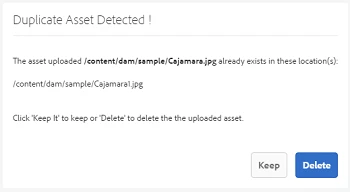
If a user tries to upload an asset that is already present in AEM, he will be presented with an according warning message:
(See [2])


For your use case you would need to build a custom solution.

You may want to check the blog post [3] linked on the above mentioned documentation page that provides some guidance on the implementation around duplicate detection.


[1] https://experienceleague.adobe.com/docs/experience-manager-65/assets/managing/duplicate-detection.html

[2] https://experienceleague.adobe.com/docs/experience-manager-64/assets/managing/managing-assets-touch-ui.html?lang=en#uploading-assets

[3] https://experience-aem.blogspot.com/2019/06/aem-65-find-duplicate-assets-binaries-in-existing-repository.html


Hope that helps!

1 reply

MarkusBullaAdobe
Adobe Employee
MarkusBullaAdobeAdobe EmployeeAccepted solution
Adobe Employee
July 23, 2021

Hi @lazylibrarian1993!

There is no out-of-the-box matching mechanism that synchronizes data between an already existing asset in AEM and a newly uploaded one.

A somewhat related feature is duplicate detection [1]. Once activated it works as follows:

"When a user attempts to upload an asset that exists in Experience Manager, the system checks for conflict and indicates it. The assets are identified using SHA-1 hash stored at jcr:content/metadata/dam:sha1, which means duplicate assets are detected irrespective of the filenames."

If a user tries to upload an asset that is already present in AEM, he will be presented with an according warning message:

(See [2])


For your use case you would need to build a custom solution.

You may want to check the blog post [3] linked on the above mentioned documentation page that provides some guidance on the implementation around duplicate detection.


[1] https://experienceleague.adobe.com/docs/experience-manager-65/assets/managing/duplicate-detection.html

[2] https://experienceleague.adobe.com/docs/experience-manager-64/assets/managing/managing-assets-touch-ui.html?lang=en#uploading-assets

[3] https://experience-aem.blogspot.com/2019/06/aem-65-find-duplicate-assets-binaries-in-existing-repository.html


Hope that helps!

July 23, 2021
Hi Markus, Thank you for the such detailed response! We found that the user was using assets that had XMP and EXIF data on the jpeg that matched existing data on other assets in the DAM (it was an ad that used an AEM asset as a source file) we believed the behavior came from AEM reading that data and auto assigning tags and IPTC data which is an expected behavior.