AEM - DAM - In Dam How can we find the images which are not referenced in any pages | Community
Skip to main content
Level 2
January 29, 2024
Solved

AEM - DAM - In Dam How can we find the images which are not referenced in any pages

  • January 29, 2024
  • 3 replies
  • 2147 views

Hi Team,


In AEM DAM - How can we find the images which are not referenced in any pages i.e. Images not in use through out my site or unwanted images in DAM. 

This post is no longer active and is closed to new replies. Need help? Start a new post to ask your question.
Best answer by somen-sarkar

Hi,

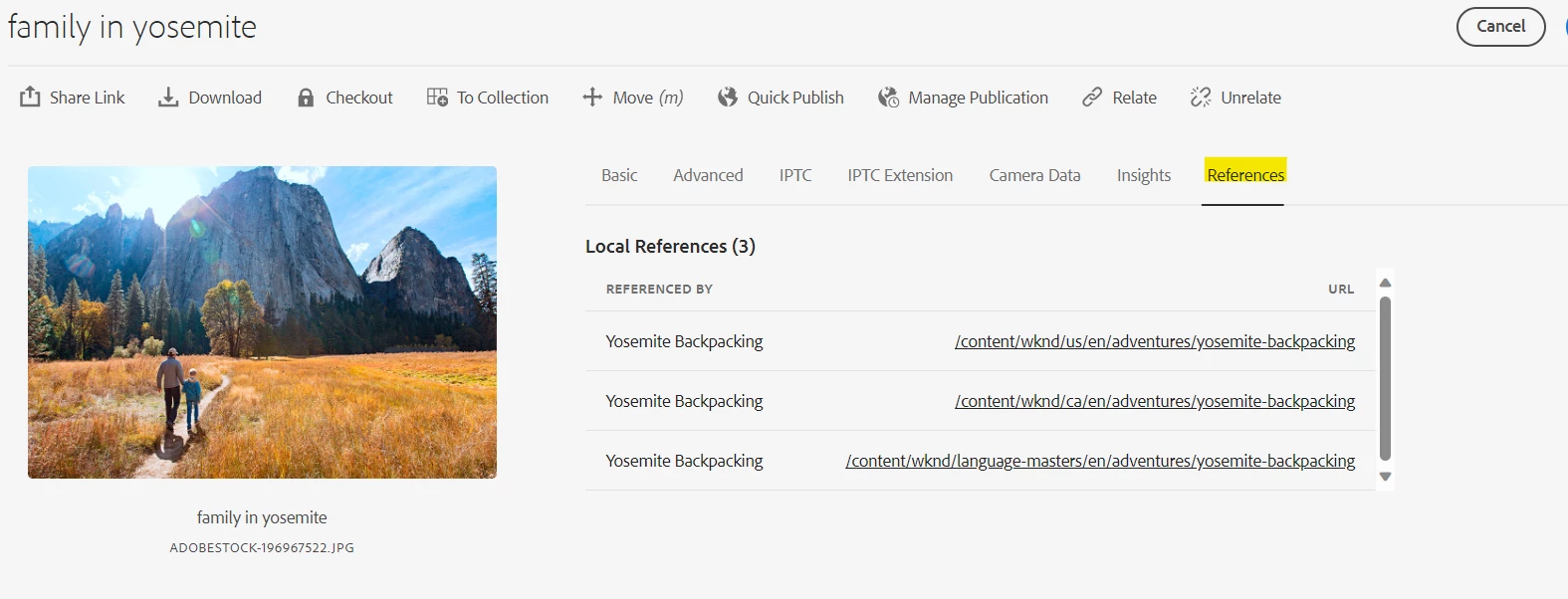
Pls navigate to the respective image in AEM DAM folder and check the properties of the image. You can find all the references mentioned in that tab. 

Also you can use ACS Commons Renovator tool if you want to create a comprehensive report. Pls check the below link for more details . Hope this will be helpful .

https://kiransg.com/2021/11/10/aem-asset-repo-cleanup-acs-commons-renovator/

Thanks,

Somen

3 replies

somen-sarkar
Community Advisor
somen-sarkarCommunity AdvisorAccepted solution
Community Advisor
January 30, 2024

Hi,

Pls navigate to the respective image in AEM DAM folder and check the properties of the image. You can find all the references mentioned in that tab. 

Also you can use ACS Commons Renovator tool if you want to create a comprehensive report. Pls check the below link for more details . Hope this will be helpful .

https://kiransg.com/2021/11/10/aem-asset-repo-cleanup-acs-commons-renovator/

Thanks,

Somen

Level 2
May 7, 2024

HI @somen-sarkar,


Using this I am able to view the report but when I click on download I am getting this error. Can you let me know why this is happens


h1>Error during requesting: '/var/acs-commons/mcp/instances/7A538F48479294AD/_jcr_content/report.xlsx'<h3>Error Message:</h3>
<pre>java.lang.NoSuchMethodError: org.apache.poi.xssf.usermodel.XSSFColor.&lt;init&gt;(Ljava/awt/Color;)V</pre><h3>Processing Info:</h3>
<table style='font-family: monospace'>
<tr><td>Page</td><td>=</td><td>/var/acs-commons/mcp/instances/7A538F48479294AD<td></tr><tr><td>Resource Path</td><td>=</td><td>/var/acs-commons/mcp/instances/7A538F48479294AD/jcr:content/report<td></tr><tr><td>Cell</td><td>=</td><td><td></tr><tr><td>Cell Search Path</td><td>=</td><td><td></tr></table>
<h3>Sling Request Progress:</h3>

 Thanks,

Sindhuja

Raja_Reddy
Community Advisor
Community Advisor
January 30, 2024

Hi @kummari_dilipku 

1.Go to host:port/damadmin, select asset for the asset -> Go to Tools -> references.

2. You may use filters by going to host:port/assets.html/content/dam -> Select asset and use 'Filter' present in sidekick at left


3. There is no OOTB functionality for this but if you are intrested in custom implementation, this post might help you ->

https://stackoverflow.com/questions/35187627/how-to-find-unused-images-from-cq-dam

or

  1. Audit Reports that can help you analyze asset usage. You can access them through the AEM Web Console at http://<your_aem_instance>:<port>/system/console/configMgr.

    • Navigate to the "Day CQ DAM Audit Report" configuration.
    • Enable "Enable DAM Viewers Report" and "Enable DAM Downloads Report."
    • After enabling, you can view the reports at http://<your_aem_instance>:<port>/etc/reports/auditreport.html.

    These reports can give you an idea of how often assets are being viewed and downloaded, which can be indicative of usage.

  2. Asset References: Use a tool like AEM's Query Builder to find references to DAM assets. The Query Builder can be accessed at http://<your_aem_instance>:<port>/libs/cq/search/content/querydebug.html.

    For example, you can use a query to find pages that reference a specific asset:path:/content YOUR_ASSET_PATH/jcr:content//*[jcr:contains(., 'YOUR_ASSET_PATH')]    

    1. Replace YOUR_ASSET_PATH with the path of the asset you want to check.


Kamal_Kishor
Community Advisor
Community Advisor
January 30, 2024

@kummari_dilipku : You can try with this as well: https://kiransg.com/2022/03/26/broken-asset-references-aem/

Note: This is based on understanding that whichever asset is referenced would be published as well when the page which is referencing/using them is activated.

If an asset is not referenced, it would never get published unless you manually publish it for some reason.
thanks.

Kamal_Kishor
Community Advisor
Community Advisor
January 30, 2024
Level 2
January 30, 2024

Thank you.