Feb 21, 2024 11:49 PM UTC
Question

AEM Component Toolbar Icons Missing
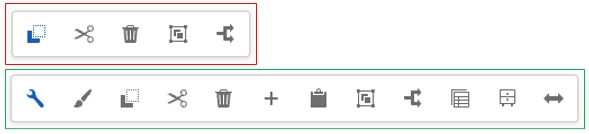
While editing a page (under language masters), sometimes the toolbar for a component won't show all of the icons/options (red box). It seems to happen randomly for various components. I also notice it happens if I start browsing in a different tab/window and then come back to the edit screen.


A quick refresh of the page will fix it, but why is it happening and can it be prevented?

This post is no longer active and is closed to new replies. Need help? Start a new post to ask your question.

3 replies

Imran Khan
Community Advisor
Community Advisor
Feb 22, 2024 3:43 AM UTC

@jacobso1 Please specify the AEM version you are using. Also, can you once try and check behavior in vanilla instance. It may be an issue with particular service pack.

Translate
JacobSo1Author
Feb 29, 2024 8:34 PM UTC

AEM Cloud. I found that its in the Adobe backlog of bugs. I'll just hope it gets fixed soon.

Translate