AEM component design that holds other few custom components | Community
Skip to main content
rsl_lucky
Level 4
May 16, 2020
Solved

AEM component design that holds other few custom components

  • May 16, 2020
  • 2 replies
  • 8504 views

Hi All, needs to incorporate title & other few custom components on a background(bg-img) image. While drag & drop components they do not show up on bg-img they are coming below the image. Any inputs how to achieve using Editable template. Need to drag & drop four components on bg-img.
This post is no longer active and is closed to new replies. Need help? Start a new post to ask your question.
Best answer by Theo_Pendle

Hello @rsl_lucky,

You can do this with existing Core Components and Editable templates by using component policies for the Container component:

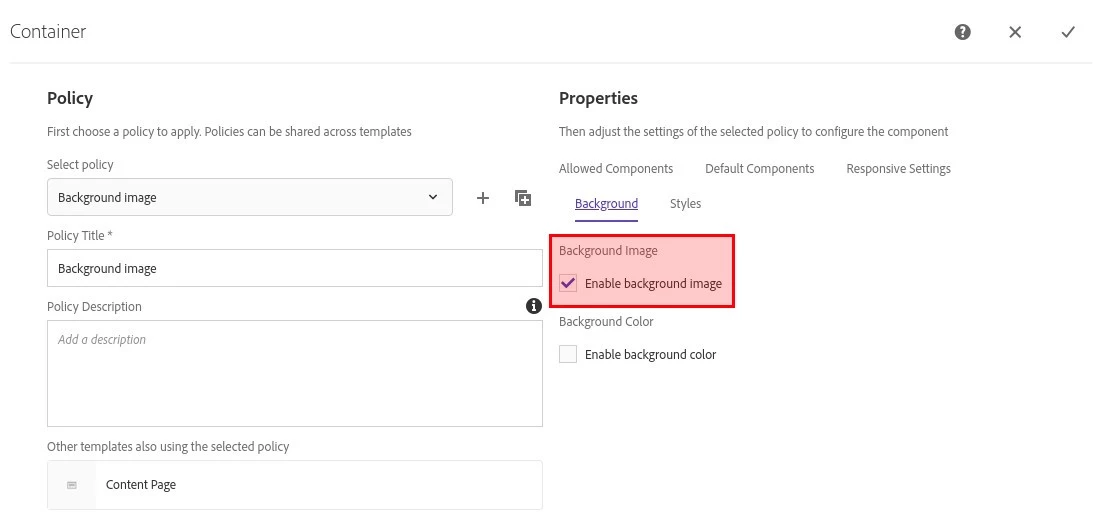
  1. Edit your template and add a policy configuration for the Container. In the Background tab, check the Enable background image box:


  2. Now go to your page, place a Container and edit it to add a background image.
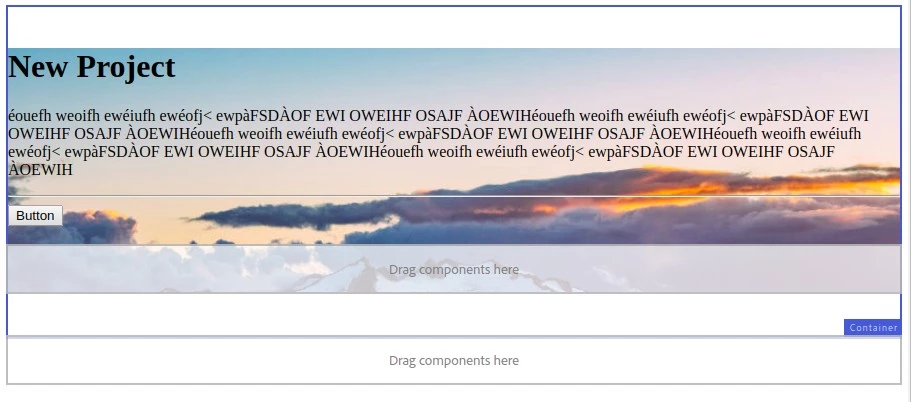
  3. You can add components in the Container which will display above the background image:

Of course, you'll probably want to add some styles to make the result a little better.
 

2 replies

Ankur_Khare
Community Advisor
Community Advisor
May 16, 2020

1.Create a background image component it will act as a container.

2. Add a layout container component inside background container component using data dly include.

3. Drag and drop image container component on your template.

4. Once you drag and drop that componrnt a parsys will come where you can add policies and drag and drop required component.

5. In the outer div of imagd container add a place holder for image so that you csn content author bavkground image and on top of that all thd components will come.

Hope it helps.


rsl_lucky
rsl_luckyAuthor
Level 4
May 17, 2020
Thanks @ankur_khare for the quick turnaround, it would be great if any sample package with image container with placeholder for adding components would really help.
Theo_Pendle
Theo_PendleAccepted solution
Level 8
May 17, 2020

Hello @rsl_lucky,

You can do this with existing Core Components and Editable templates by using component policies for the Container component:

  1. Edit your template and add a policy configuration for the Container. In the Background tab, check the Enable background image box:


  2. Now go to your page, place a Container and edit it to add a background image.
  3. You can add components in the Container which will display above the background image:

Of course, you'll probably want to add some styles to make the result a little better.
 

rsl_lucky
rsl_luckyAuthor
Level 4
May 17, 2020
Thanks theop76211228 for the steps, but would be great if any sample package with image container with placeholder for adding components would really help, am working with Editable template for the first and it would help in my learning.