Level 3
April 10, 2023
Solved

AEM cloud - target _blank & _self issue

Hi Team,

Did anyone face the below issue. If yes please help me to provide your suggestions to resolve it.

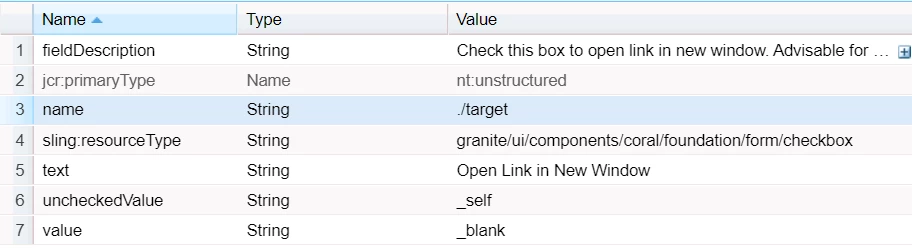
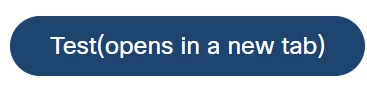
"Opens in a new tab" is getting added when I check the checkbox & it's not adding when the checkbox is unchecked.

AEM version: 2023.1.10912.20230130T173736Z-220900


Thanks!


This post is no longer active and is closed to new replies. Need help? Start a new post to ask your question.
ramya726Accepted solution
Level 2
December 28, 2023

Seems this is added to address accessibility, Please refer the link. Adding the snippet here for easy reference,

Not hiding the accessibility text was actually intended. On a project level, there are (at least) two options:

8 replies

Nandheswara
Level 4
April 10, 2023

Hi Lakshmi,

The properties which you are given in the Screenshot is correct, Might be issue in your HTL code you can check it.

Try with target="${properties.target}"

Thanks

Nandheswara

Translate
Lakshmi9Author
Level 3
April 10, 2023

it wont work

Translate
Nandheswara
Level 4
April 10, 2023

can you provide your dialog xml and htl code then i can check the issue.

Translate
VeenaVikraman
Community Advisor
Community Advisor
April 10, 2023

Hi @lakshmi9 


   I tried this in a vanilla instance and I am not able to replicate this issue. Are you sure this is not hardcoded in your code. Could you recheck ? Else can you share the steps to replicate this issue ? Because I can see you have given only the checkbox field dialog properties , and even after doing the same with my components , I couldn't replicate this issue.


Thanks

Veena ✌

Translate
Lakshmi9Author
Level 3
April 10, 2023

Hi @veenavikraman 

no extra code has been added for this except dialog n html. But observed in the elements below tag is getting added in inside a tag.


<span class="cmp-link__screen-reader-only">(opens in a new tab)</span>


Same observed for OOTB components which is having the same functionality.


Thank you!

Translate
VeenaVikraman
Community Advisor
Community Advisor
April 10, 2023

Please correct me if I am wrong ,


So you created a new component and added the checkbox . Created a HTL file added the code to render the same ? 

Translate
ramya726Accepted solution
Level 2
December 28, 2023

Seems this is added to address accessibility, Please refer the link. Adding the snippet here for easy reference,

Not hiding the accessibility text was actually intended. On a project level, there are (at least) two options:

Translate