AEM Assets References Update Programmatically | Community
Skip to main content
Level 3
July 11, 2022
Solved

AEM Assets References Update Programmatically

  • July 11, 2022
  • 2 replies
  • 4058 views

Hi All,


We have a use-case where we are exposing AEM DAM to an internal 3rd party app. 

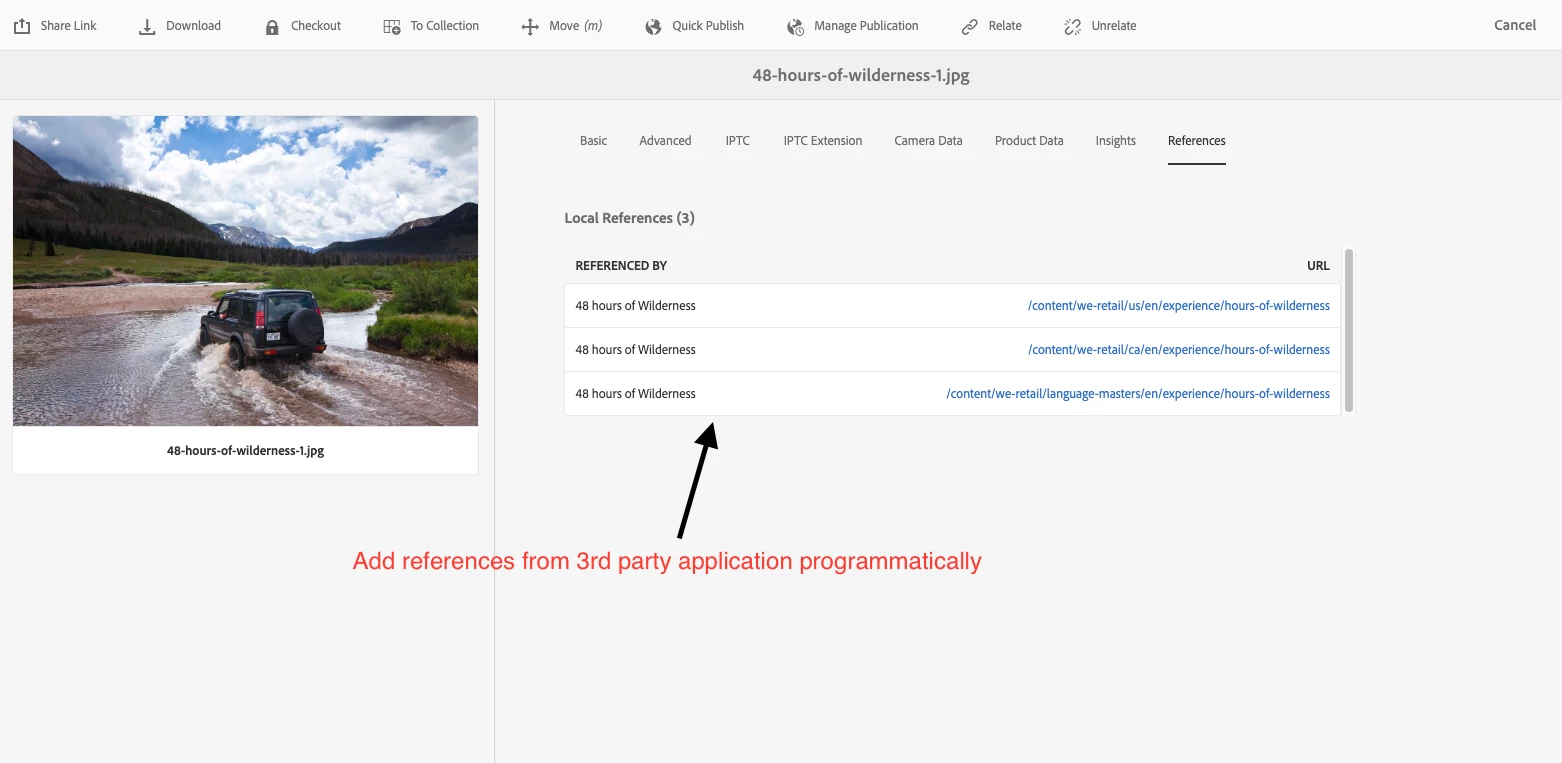
We want to track if assets in AEM are being used/referenced in the 3rd party application. Is there any way we can programmatically update Asset references in AEM? I have already looked into Asset Manager API and could not find a way. 

We were thinking to expose an endpoint from AEM which would hit by third part app. It would add references programmatically in AEM. 


Thanks



Best answer by Aditya_Chabuku

Hi @beast42 , We implemented a similar scenario once. 

Follow these steps & you should be achieving this

  • Storing External Resources under Asset
    • Create a Listener to record every time an asset is being called from a 3rd party API.
    • Capture that URL along with the Title of that call.
    • Store this information under a custom node in that particular asset.
  • Displaying saved External Resources 
    • Create a data source under /libs/dam/remoteassets/content/allreferences
    • add a custom data source java class as sling:resourceType 
      sling:resourceType
      String
      <your custom java servlet with ResourceType>
    • This Servlet will give go & get all external resources you have stored under your custom node.
    • Now, populate them under References tab, for that refer this Internal references JSP /libs/dam/remoteassets/content/allreferences/datasource

This is one of many approaches, but can be easily done.


~Aditya.Ch


2 replies

SantoshSai
Community Advisor
Community Advisor
July 12, 2022

Hi @beast42 ,

There are two aspects considering your scenario  

  1. Rendering references in Reference tab of Asset

    DAM Asset References in AEM are shown based on Query ie. finding where all it has been used and accordingly prepares table and shown in Reference tab.

    Below are reference.html and Reference.Java responsible for the same

    /libs/dam/remoteassets/components/references/reference/reference.html
    /libs/dam/remoteassets/components/references/reference/Reference.java
    You can override it, to have your asset reference listed in this table of Reference tab.

  2. Finding references of Asset

    How can you find reference of asset whether it has been used by 3rd party?

    There can be multiple ways but one I have in my mind is - You can get some String/Boolean value from 3rd party agent and use that for listing in above Reference tab.

Additionally just for your reference - You can also find references of asset programatically - sharing code snippet below

String Pagepath = "/content/we-retail/en"; //This would be your page path
Resource r = resourceResolver.getResource(Pagepath+"/"+JcrConstants.JCR_CONTENT);
Node n = r.adaptTo(Node.class);
AssetReferenceSearch ref = new AssetReferenceSearch(n,DamConstants.MOUNTPOINT_ASSETS,resourceResolver);

Map<String,Asset> allref = new HashMap<String,Asset>();
allref.putAll(ref.search());
for (Map.Entry<String, Asset> entry : allref.entrySet()) {
      String val = entry.getKey();
      out.println(val+"<br>"); // Path of all Asset ref in page
      Asset asset = entry.getValue();
   }

Hope that helps!

Regards,

Santosh

Santosh Sai
beast42Author
Level 3
July 14, 2022

Thanks @santoshsai . We'll explore this approach further.

Aditya_Chabuku
Community Advisor
Aditya_ChabukuCommunity AdvisorAccepted solution
Community Advisor
July 12, 2022

Hi @beast42 , We implemented a similar scenario once. 

Follow these steps & you should be achieving this

  • Storing External Resources under Asset
    • Create a Listener to record every time an asset is being called from a 3rd party API.
    • Capture that URL along with the Title of that call.
    • Store this information under a custom node in that particular asset.
  • Displaying saved External Resources 
    • Create a data source under /libs/dam/remoteassets/content/allreferences
    • add a custom data source java class as sling:resourceType 
      sling:resourceType
      String
      <your custom java servlet with ResourceType>
    • This Servlet will give go & get all external resources you have stored under your custom node.
    • Now, populate them under References tab, for that refer this Internal references JSP /libs/dam/remoteassets/content/allreferences/datasource

This is one of many approaches, but can be easily done.


~Aditya.Ch


Thanks,Aditya Chabuku
beast42Author
Level 3
July 14, 2022

Thanks @aditya_chabuku  . We'll explore this approach further.