AEM Assets - External or internal solution for backup | Community
Skip to main content
Level 2
February 21, 2024
Solved

AEM Assets - External or internal solution for backup

  • February 21, 2024
  • 3 replies
  • 1310 views

Hello Community,


has anyone implemented an external solution for a backup in AEM Assets and can tell me which adapters/APIs were being used?


Or does AEM Assets, out of the box, offer something like a backup? Is it possible to restore files from "yesterday" or 24 hours ago (period x)? Or, if the file is deleted, is the file then gone / overwritten?


Thanks

Frank

This post is no longer active and is closed to new replies. Need help? Start a new post to ask your question.
Best answer by Kamal_Kishor

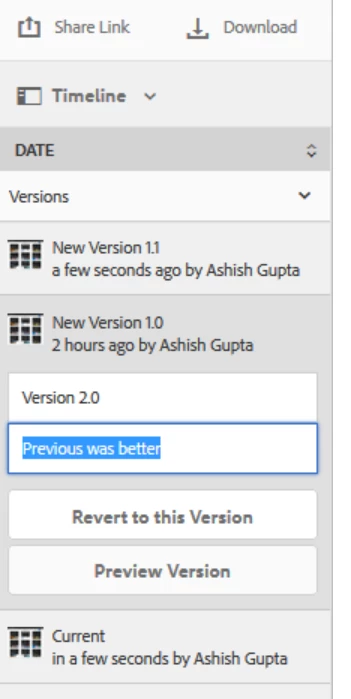
@frank0 : Please refer this to restore to a previous version of an Asset: https://experienceleague.adobe.com/docs/experience-manager-65/content/assets/managing/manage-assets.html?lang=en#asset-versioning

This will not work if the Asset is deleted.
thanks.

3 replies

Kamal_Kishor
Community Advisor
Kamal_KishorCommunity AdvisorAccepted solution
Community Advisor
February 21, 2024

@frank0 : Please refer this to restore to a previous version of an Asset: https://experienceleague.adobe.com/docs/experience-manager-65/content/assets/managing/manage-assets.html?lang=en#asset-versioning

This will not work if the Asset is deleted.
thanks.

arunpatidar
Community Advisor
Community Advisor
February 21, 2024

Hi @frank0 
Assets itself does not have its own backup but AEM backup is performed daily and in case of store whole VM can be restored.

Please check https://experienceleague.adobe.com/docs/experience-manager-65/content/sites/administering/operations/backup-and-restore.html?lang=en as well for different backup options. 

Arun Patidar
Frank0Author
Level 2
February 21, 2024

Ok, thank you both for your input.
Bringing back an entire VM for this is too time-consuming. I think we will work with 'versions' and then have to see.
Do you have any experience that if version 3 is 'broken' (EOF), you can still go back to version 2 or even 1? Is that still possible?

In the meantime, I had also seen this post, which goes in a similar direction to my approach.
Feel free to get in touch, I'm curious to see what else is possible.

Thanks
Frank

Level 2
February 22, 2024

hi @frank0 - you can roll back to any previous version that exist in system. 

kautuk_sahni
Community Manager
Community Manager
February 28, 2024

@frank0 Did you find the suggestions from users helpful? Please let us know if more information is required. Otherwise, please mark the answer as correct for posterity. If you have found out solution yourself, please share it with the community.

Kautuk Sahni
Frank0Author
Level 2
February 28, 2024

@kautuk_sahni and @kamal_kishor  - thank you for asking.
Yes, both answers are correct for me.


But they are two different solutions for me and my team (both of which are correct). Working with versions and restoring is the 'small way' to quickly access an old file version. The backup is then of course the 'bigger option' to restore a large amount of data. I will therefore discuss the 'small option' in the team and give the backup to IT.


Thank you both very much