AEM Asset Hotspots Editor: Unable to change name | Community
Skip to main content
Level 2
October 22, 2021
Solved

AEM Asset Hotspots Editor: Unable to change name

  • October 22, 2021
  • 2 replies
  • 842 views

Hi everyone


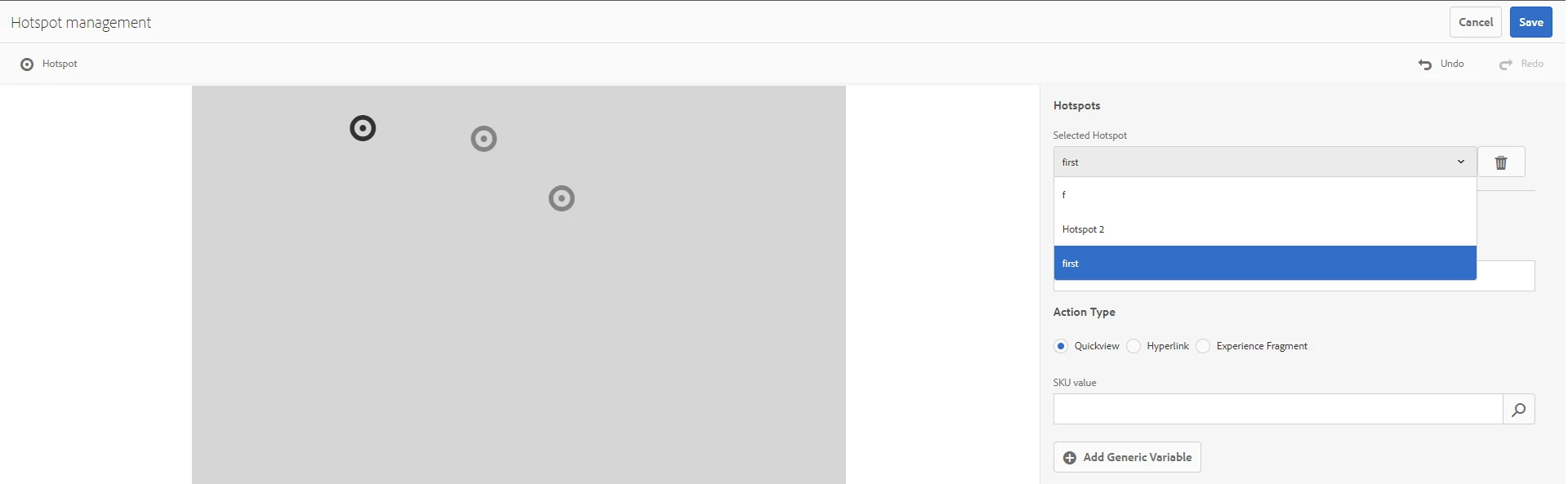
I added 3 hotspots for an image. Their names:

- Hotspot 1

- Hotspot 2

- Hotspot 3


Then I change name property for the first item to 'first'. When I open dropdown with items list I see that only the first letter was used and suddenly the last item gets the new name of the first one. 

It seems like a bug. 

We use AEM 6.5.6.


Any thoughts would be appriciated


Thanks in advance

This post is no longer active and is closed to new replies. Need help? Start a new post to ask your question.
Best answer by TarunKumar

Hi @demobuster ,

When you add hotspots to an image in an Interactive Image or a Carousel Banner, the hotspot information is stored in the same metadata location. That location is relative to the image’s location, regardless of whether it is an Interactive Image or a Carousel Banner.
Can you check in your metadata as what information is being stored in CRX. See if find any anomaly in the data stored, like missing name property or duplicate name property.


Thanks
Tarun

2 replies

TarunKumar
Community Advisor
TarunKumarCommunity AdvisorAccepted solution
Community Advisor
February 13, 2024

Hi @demobuster ,

When you add hotspots to an image in an Interactive Image or a Carousel Banner, the hotspot information is stored in the same metadata location. That location is relative to the image’s location, regardless of whether it is an Interactive Image or a Carousel Banner.
Can you check in your metadata as what information is being stored in CRX. See if find any anomaly in the data stored, like missing name property or duplicate name property.


Thanks
Tarun

kautuk_sahni
Community Manager
Community Manager
February 21, 2024

@demobuster Did you find the suggestions from users helpful? Please let us know if more information is required. Otherwise, please mark the answer as correct for posterity. If you have found out solution yourself, please share it with the community.

Kautuk Sahni