AEM archetype 37 | Community
Skip to main content
Level 2
August 30, 2022
Solved

AEM archetype 37

  • August 30, 2022
  • 3 replies
  • 2792 views

Hi, 


I was trying to build project from archetype 37. 


mvn -B org.apache.maven.plugins:maven-archetype-plugin:3.2.1:generate

"-DarchetypeGroupId=com.adobe.aem"

"-DarchetypeArtifactId=aem-project-archetype"

"-DarchetypeVersion=37"

"-DappTitle=Archetype project"

"-DappId=archetype"

"-DgroupId=com.adobe.aem.guides"

"-DartifactId=aem-guides-archetype"

"-Dpackage=com.adobe.aem.guides.archetype"

"-Dversion=0.0.1-SNAPSHOT"

"-DaemVersion=cloud"

"-D includeDispatcherConfig=n"
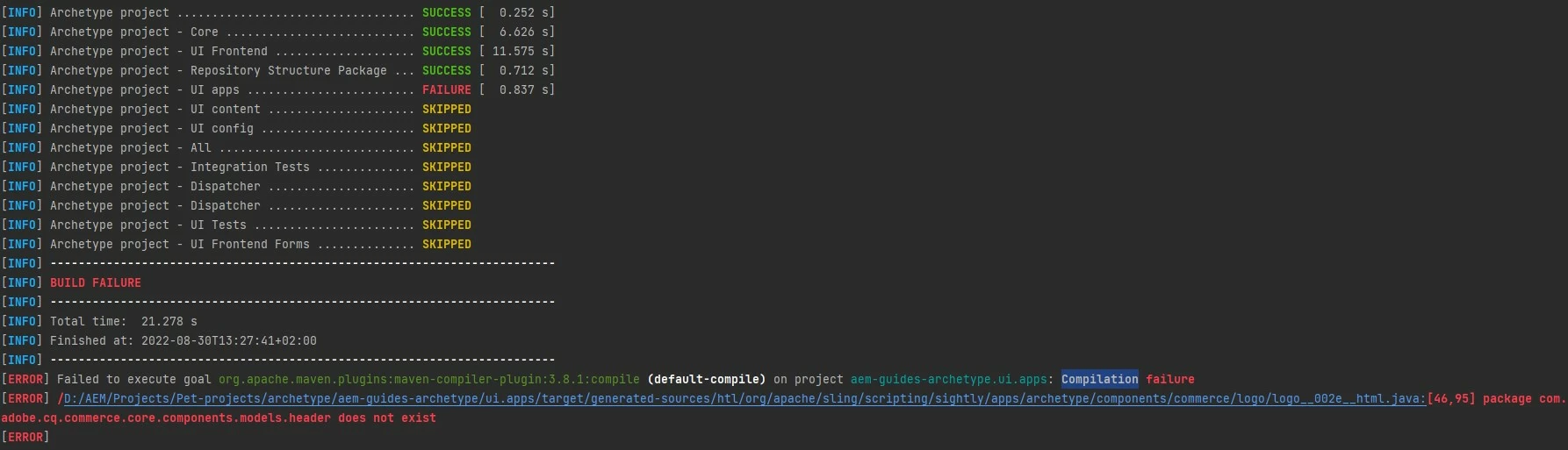
 

I always have some problems to build project from archetype or even if its wknd tutorial. Is it really bad documentation from Adobe about it and they don't care? Because whenever I'm trying to work with it, it always fail somewhere. Or maybe I'm doing something wrong? 

This post is no longer active and is closed to new replies. Need help? Start a new post to ask your question.
Best answer by DawidEaf
mvn -B archetype:generate -D archetypeGroupId=com.adobe.aem -D archetypeArtifactId=aem-project-archetype -D archetypeVersion=37 -D aemVersion=cloud -D appTitle="My Site" -D appId="my-site" -D groupId="com.mysite" -D frontendModule=general -D aemVersion=cloud -D version=0.0.1-SNAPSHOT -D includeDispatcherConfig=n

Just try with the above command, I have add the parameter to "-D includeDispatcherConfig=n" in the above command.

Hope this helps!

Thanks


@shaileshbassi for this error:

 Failed to execute goal org.apache.maven.plugins:maven-archetype-plugin:3.2.0:generate (default-cli) on project standalone-pom: java.nio.file.FileSystemException: C:\Users\user1\Documents\GitHub\myfirstsite\dispatcher\src\conf.d\enabled_vhosts\aem_author.vhost: A required privilege is not held by the client. -> [Help 1]

Solution for this

Open command prompt as Administrator and run the same command it fixes the above error and then project just built.  

3 replies

ShaileshBassi
Community Advisor
Community Advisor
August 30, 2022

@dawideaf I just tried the same via the command and the project got successfully created and I am able to deploy the package on the AEM Cloud environment as well, but the only difference is I did not provided the couple of extra parameters e.g. -Dpackage, etc.

mvn -B archetype:generate -D archetypeGroupId=com.adobe.aem -D archetypeArtifactId=aem-project-archetype -D archetypeVersion=37 -D aemVersion=cloud -D appTitle="My Site" -D appId="my-site" -D groupId="com.mysite" -D frontendModule=general -D aemVersion=cloud -D version=0.0.1-SNAPSHOT

You can try the above command to create the project.

Hope this helps!

Thanks

DawidEafAuthor
Level 2
August 30, 2022

@shaileshbassi thank you for your response. 

I've tried with you commands but still got this error and the same one above.

ShaileshBassi
Community Advisor
Community Advisor
August 30, 2022
mvn -B archetype:generate -D archetypeGroupId=com.adobe.aem -D archetypeArtifactId=aem-project-archetype -D archetypeVersion=37 -D aemVersion=cloud -D appTitle="My Site" -D appId="my-site" -D groupId="com.mysite" -D frontendModule=general -D aemVersion=cloud -D version=0.0.1-SNAPSHOT -D includeDispatcherConfig=n

Just try with the above command, I have add the parameter to "-D includeDispatcherConfig=n" in the above command.

Hope this helps!

Thanks

ksh_ingole7
Community Advisor
Community Advisor
August 30, 2022

Hi @dawideaf 


Seems like an issue with the File/Folder Permission with your User in your System. User might not have the required read/write permission. Kindly open CMD as Admin (Run as Administrator). And run the Maven Archetype command. 

Thanks

Level 6
August 30, 2022

Try this command:


mvn -B archetype:generate -D archetypeGroupId="com.adobe.aem" -D archetypeArtifactId="aem-project-archetype" -D archetypeVersion=26 -D appTitle=" learning" -D appId="learning" -D groupId="com.learningsite"  -D includeDispatcherConfig=n -D aemVersion="6.5.0"