AEM Adaptive Forms - Date auto-formatting not working | Community
Skip to main content
Level 2
November 27, 2019
Solved

AEM Adaptive Forms - Date auto-formatting not working

  • November 27, 2019
  • 1 reply
  • 2020 views

Date auto-formatting doesn't work in AEM adaptive forms.

e.g. If I enter date as 01012000 it changes to below format and doesn't validate

Error shown as -

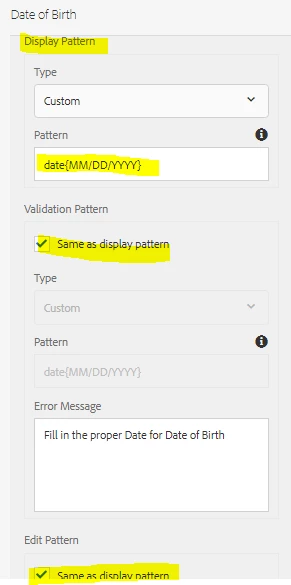
Configuration done is highlighted as below

This post is no longer active and is closed to new replies. Need help? Start a new post to ask your question.
Best answer by Umesh_Sondhi

Hi iabhisheksinha

As per my observation, when you write the display date pattern make sure you are entering the date same as the provided format i.e. MM/DD/YYYY [including '/' as well] in your case. If you enter 12042019 instead of 12/04/2019 [As mentioned in above pattern] then it will be counted as invalid.

Also, if you want to make 12042019 format working, then you have to provide pattern in the format i.e MMDDYYYY or for an alternative you can add custom java script code that will convert the entered number in the date pattern format and output the result.

Hope it helps!

1 reply

Umesh_Sondhi
Umesh_SondhiAccepted solution
Level 4
December 4, 2019

Hi iabhisheksinha

As per my observation, when you write the display date pattern make sure you are entering the date same as the provided format i.e. MM/DD/YYYY [including '/' as well] in your case. If you enter 12042019 instead of 12/04/2019 [As mentioned in above pattern] then it will be counted as invalid.

Also, if you want to make 12042019 format working, then you have to provide pattern in the format i.e MMDDYYYY or for an alternative you can add custom java script code that will convert the entered number in the date pattern format and output the result.

Hope it helps!