AEM-ACS Integration Issue | Community
Skip to main content
saumyaj49332255
Level 2
September 19, 2017
Solved

AEM-ACS Integration Issue

  • September 19, 2017
  • 6 replies
  • 2885 views

Hi,

I am trying to do the AEM-ACS integration for my project.The project runs on AEM 6.3

I have set the configurations required for Adobe Campaign in **Tools->Cloud Services->Adobe Campaign** and the connection is successful.

However, I have also set the other configuration such as

-Day CQ Link Externalizer and Adobe Campaign Integration in system/console/configMgr,

-Setting up cloud services in the page properties and have also set the password for campaign-remote user.

Then , I created a page using OOB template i.e **Adobe Campaign Email(ACS)** under content/campaigns and run the workflow **Approve for Adobe Campaign** on it.

The workflow gets completed and the page shows the Status as approved and gets published.

But the ACS team is not able to receive the page and on connecting with AEM it shows this error.
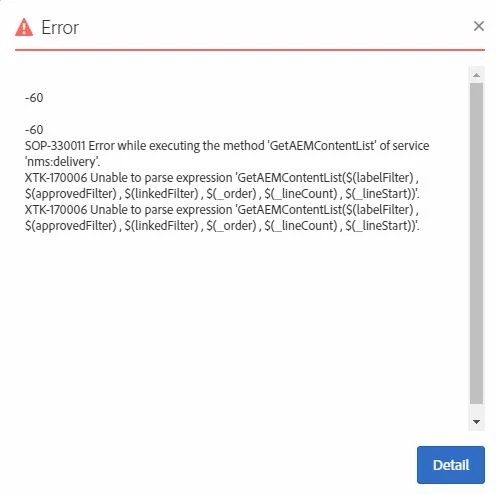
Also giving out some links which I have followed :

https://helpx.adobe.com/experience-manager/using/aem_campaign.html

https://docs.adobe.com/docs/en/aem/6-3/administer/integration/marketing-cloud/campaign/troubleshooting-campaignintegration.html

Can anyone tell me where I have gone wrong?

Thank You !

This post is no longer active and is closed to new replies. Need help? Start a new post to ask your question.
Best answer by ogill

Hi,

I just got the very same error. The way I resolved it was that I had made a mistake and didn't Save the email in Campaign after setting AEM as the content Source for the email.

So

  1. Click on Confirm after you have selected AEM and the AEM account in the Content section of the Email's properties
  2. On the Summary page, make sure you select Save
  3. Then when you edit the email and the AEM icon appears, if you click it, you should get the template being pulled through from AEM

Regards,

Opakr

6 replies

Feike_Visser1
Adobe Employee
Adobe Employee
September 19, 2017

Couple of things here:

- This is a connection from ACS to AEM

- AEM-cloudservices are not used

- Check in the AEM-access.log if you see the incoming request.

kautuk_sahni
Community Manager
Community Manager
September 20, 2017

Make sure:

1.That the URL mentioned in externalized config are reachable. Also, try to switch from localhost to an IP-address.

2.The Authorization header is mandatory as ACS is using Basic Authentication in order to retrieve the content from AEM. In the dispatcher configuration, the Authorization needs to be present in the list of the headers in the section /clientheaders

If it is the case,  check that there is no RequestHeader unset Authorization instruction in any of the configuration file of the web server.

~kautuk

Kautuk Sahni
kautuk_sahni
Community Manager
Community Manager
September 21, 2017

Did you get this working?

~kautuk

Kautuk Sahni
saumyaj49332255
Level 2
September 26, 2017

No , tried each n every step. Still stucked .

Feike_Visser1
Adobe Employee
Adobe Employee
September 26, 2017

Raise a support ticket for this I would advise.

ogillAdobe EmployeeAccepted solution
Adobe Employee
September 26, 2017

Hi,

I just got the very same error. The way I resolved it was that I had made a mistake and didn't Save the email in Campaign after setting AEM as the content Source for the email.

So

  1. Click on Confirm after you have selected AEM and the AEM account in the Content section of the Email's properties
  2. On the Summary page, make sure you select Save
  3. Then when you edit the email and the AEM icon appears, if you click it, you should get the template being pulled through from AEM

Regards,

Opakr