[AEM 6.6] How can I enable a new component group? | Community
Skip to main content
Jeanmaradiaga
Level 3
September 22, 2021
Solved

[AEM 6.6] How can I enable a new component group?

  • September 22, 2021
  • 2 replies
  • 3819 views

I recently moved to AEM 6.6 (Cloud) and tried to created a new component with a new group, the .content.xml looks like this:

<jcr:root xmlns:sling="http://sling.apache.org/jcr/sling/1.0" xmlns:cq="http://www.day.com/jcr/cq/1.0" xmlns:jcr="http://www.jcp.org/jcr/1.0" cq:icon="panel" jcr:description="Basic layout component" jcr:primaryType="cq:Component" jcr:title="Section Container" sling:resourceSuperType="core/wcm/components/container/v1/container" componentGroup="KG AEM Commons - Full Width"/>


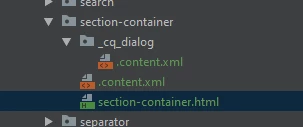
Component Structure:
 

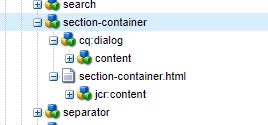
View from the CRX
 

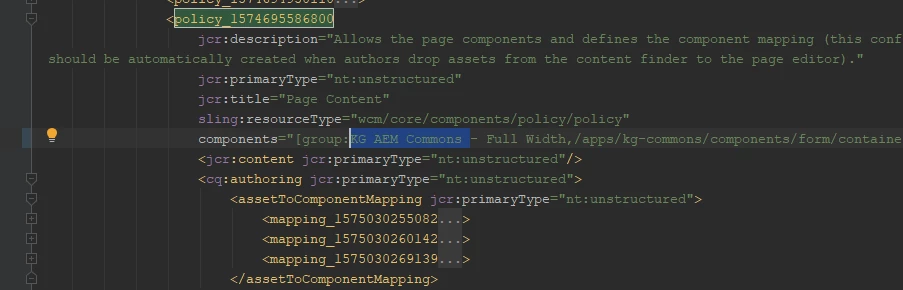
I read something about template policies so under wcm/policies/_content.xml I modified the policy for page to include this new group, but alas it still doesn't show in the sidekick or anywhere else for frag and dropping.
Am I missing anything?

This post is no longer active and is closed to new replies. Need help? Start a new post to ask your question.
Best answer by Rohit-Negi

Hi @jeanmaradiaga 


It looks OK but I am not sure if you are using the correct policy or NOT.

Can you open the template of this page from here: http://<IP>:<Port>/libs/wcm/core/content/sites/templates.html/conf

and create a new policy for this particular template and select your component for this policy.

You can follow this article: https://experienceleague.adobe.com/docs/experience-manager-65/authoring/siteandpage/templates.html?lang=en#editing-a-template-structure-template-author


Thanks!.

2 replies

Asutosh_Jena_
Community Advisor
Community Advisor
September 22, 2021

Hi @jeanmaradiaga 


You are doing it correct. You need to include the component group under the policy for the page, and it will enabled for that specific policy layout container. You need to ensure you are adding for the correct policy or you need to include in all available policy to add the component into all layout containers.


Thanks!

Jeanmaradiaga
Level 3
September 22, 2021

Thanks for the reply!

So I checked and I am adding the new group on the container policy, but when looking for the component on the add component for the container I don't see my new group. Could it be something else? The logs are not throwing me any errors.


Rohit-Negi
Rohit-NegiAccepted solution
Level 3
September 22, 2021

Hi @jeanmaradiaga 


It looks OK but I am not sure if you are using the correct policy or NOT.

Can you open the template of this page from here: http://<IP>:<Port>/libs/wcm/core/content/sites/templates.html/conf

and create a new policy for this particular template and select your component for this policy.

You can follow this article: https://experienceleague.adobe.com/docs/experience-manager-65/authoring/siteandpage/templates.html?lang=en#editing-a-template-structure-template-author


Thanks!.

Jeanmaradiaga
Level 3
September 22, 2021

Amazing, that was it! In case someone stumbles upon this in the future, here are the steps I followed:


  1. Navigated to this page as suggested by @rohit-negi 
  2. Selected my site and page type (content page in this case) and clicked edit (pencil icon)
  3. On the new window I was greeted by the following view:
  4. Here, I selected the third option, policy.

  5. On the allowed components tab (default) I scrolled down and found my new group to be unselected, so I selected it and then I hit "Done" above to save the changes.
  6. After that I went back to my page, reloaded the editor and voila!


    Thanks everyone!