AEM-6.5 Service Pack 23 install does not work | Community
Skip to main content
Level 6
June 12, 2025
Solved

AEM-6.5 Service Pack 23 install does not work

  • June 12, 2025
  • 3 replies
  • 1142 views

Hi all,

I upgraded my local instance of AEM from SP21 to SP23 using the AEM-6.5-Service-Pack-23-6.5.23.zip package.

The http://localhost:4502/system/console/status-productinfo still shows 

 Adobe Experience Manager (6.5.21.0)

Any suggestions why the productinfo does not show 6.5.23.0?


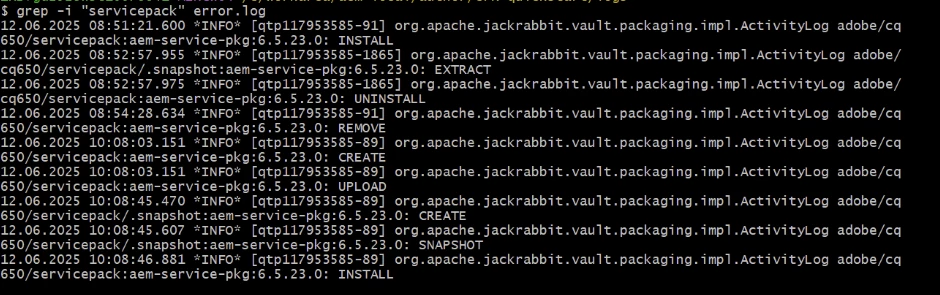
This is the output from the error log:
 

This post is no longer active and is closed to new replies. Need help? Start a new post to ask your question.
Best answer by ButhpurKiran

Hi,


Can you check and validate your build from below 2 points 

1. If all bundles are in active/resolved state in Felix Server (http://localhost:4502/system/console/bundles)

2. Stop AEM instance, and clear the directory <your-local-aem-install-path>/crx-quickstart/launchpad/installer and Restart AEM and Re-Install the AEM-6.5-Service-Pack-23-6.5.23.zip package.


Check error logs for install status. Alternatively, validate version displayed in welcome page( http://localhost:4502/libs/cq/core/content/welcome.html )
(or) 
Inspect /libs/system/aem-service-pckg-6.5.23  path in CRXDE(http://localhost:4502/crx/de)

Thanks,


Kind regards,

Kiran Buthpur

3 replies

ButhpurKiran
ButhpurKiranAccepted solution
Level 4
June 12, 2025

Hi,


Can you check and validate your build from below 2 points 

1. If all bundles are in active/resolved state in Felix Server (http://localhost:4502/system/console/bundles)

2. Stop AEM instance, and clear the directory <your-local-aem-install-path>/crx-quickstart/launchpad/installer and Restart AEM and Re-Install the AEM-6.5-Service-Pack-23-6.5.23.zip package.


Check error logs for install status. Alternatively, validate version displayed in welcome page( http://localhost:4502/libs/cq/core/content/welcome.html )
(or) 
Inspect /libs/system/aem-service-pckg-6.5.23  path in CRXDE(http://localhost:4502/crx/de)

Thanks,


Kind regards,

Kiran Buthpur

anasusticAuthor
Level 6
June 12, 2025

Hi @buthpurkiran 

Thanks a lot for your reply.

Here are my answers:

1) Bundle information: 650 bundles in total - all 650 bundles active

2. I stopped the AEM instance, deleted 900 elements in <your-local-aem-install-path>/crx-quickstart/launchpad/installer, restarted the instance and installed AEM-6.5-Service-Pack-23-6.5.23.zip package


This is the output from my error.log. The last entry belongs to the reinstall.


$ grep "servicepack" error.log
12.06.2025 08:51:21.600 *INFO* [qtp117953585-91] org.apache.jackrabbit.vault.packaging.impl.ActivityLog adobe/cq650/servicepack:aem-service-pkg:6.5.23.0: INSTALL
12.06.2025 08:52:57.955 *INFO* [qtp117953585-1865] org.apache.jackrabbit.vault.packaging.impl.ActivityLog adobe/cq650/servicepack/.snapshot:aem-service-pkg:6.5.23.0: EXTRACT
12.06.2025 08:52:57.975 *INFO* [qtp117953585-1865] org.apache.jackrabbit.vault.packaging.impl.ActivityLog adobe/cq650/servicepack:aem-service-pkg:6.5.23.0: UNINSTALL
12.06.2025 08:54:28.634 *INFO* [qtp117953585-91] org.apache.jackrabbit.vault.packaging.impl.ActivityLog adobe/cq650/servicepack:aem-service-pkg:6.5.23.0: REMOVE
12.06.2025 10:08:03.151 *INFO* [qtp117953585-89] org.apache.jackrabbit.vault.packaging.impl.ActivityLog adobe/cq650/servicepack:aem-service-pkg:6.5.23.0: CREATE
12.06.2025 10:08:03.151 *INFO* [qtp117953585-89] org.apache.jackrabbit.vault.packaging.impl.ActivityLog adobe/cq650/servicepack:aem-service-pkg:6.5.23.0: UPLOAD
12.06.2025 10:08:45.470 *INFO* [qtp117953585-89] org.apache.jackrabbit.vault.packaging.impl.ActivityLog adobe/cq650/servicepack/.snapshot:aem-service-pkg:6.5.23.0: CREATE
12.06.2025 10:08:45.607 *INFO* [qtp117953585-89] org.apache.jackrabbit.vault.packaging.impl.ActivityLog adobe/cq650/servicepack/.snapshot:aem-service-pkg:6.5.23.0: SNAPSHOT
12.06.2025 10:08:46.881 *INFO* [qtp117953585-89] org.apache.jackrabbit.vault.packaging.impl.ActivityLog adobe/cq650/servicepack:aem-service-pkg:6.5.23.0: INSTALL
12.06.2025 14:14:58.823 *INFO* [qtp1507771362-85] org.apache.jackrabbit.vault.packaging.impl.ActivityLog adobe/cq650/servicepack:aem-service-pkg:6.5.23.0: INSTALL


Here you can see the /libs/system/aem-service-pckg-6.5.23:


Unfortunatelly the version still shows: 6.5.21

MukeshYadav_
Community Advisor
Community Advisor
June 12, 2025

Hi @anasustic ,
We have upgraded to sp 23 and its working fine.
Just cross verify if you have updated version in main pom file as well.

<dependency>
<groupId>com.adobe.aem</groupId>
<artifactId>uber-jar</artifactId>
<version>6.5.23</version>
<scope>provided</scope>
</dependency>

Thanks

anasusticAuthor
Level 6
June 12, 2025

Hi @mukeshyadav_ 


Yes we have in the main pom the following property and we deployed it to the instance:

<uber.jar.version>6.5.23</uber.jar.version>
SantoshSai
Community Advisor
Community Advisor
June 13, 2025

Hi @anasustic,

Following the exact steps as you - works for me.

Could you try?

  1. What does it shoes here: http://localhost:4502/system/console/productinfo
  2. Not sure if it's browser cache - may be try checking on a different browser/incognito?
Santosh Sai
anasusticAuthor
Level 6
June 13, 2025

Hi,

I ended up setuping a new instance and installing SP23 on top.

Thanks for all your answers and best regards.