AEM 6.5 Search Component | Community
Skip to main content
Level 2
October 31, 2023
Solved

AEM 6.5 Search Component

  • October 31, 2023
  • 3 replies
  • 995 views

I am a beginner in AEM, and I have a requirement.The search box can display search prompts based on the input. Click on a search prompt to display the search results below. How can I implement this? Can I inherit the search component of the core component? If so,  how should I modify.
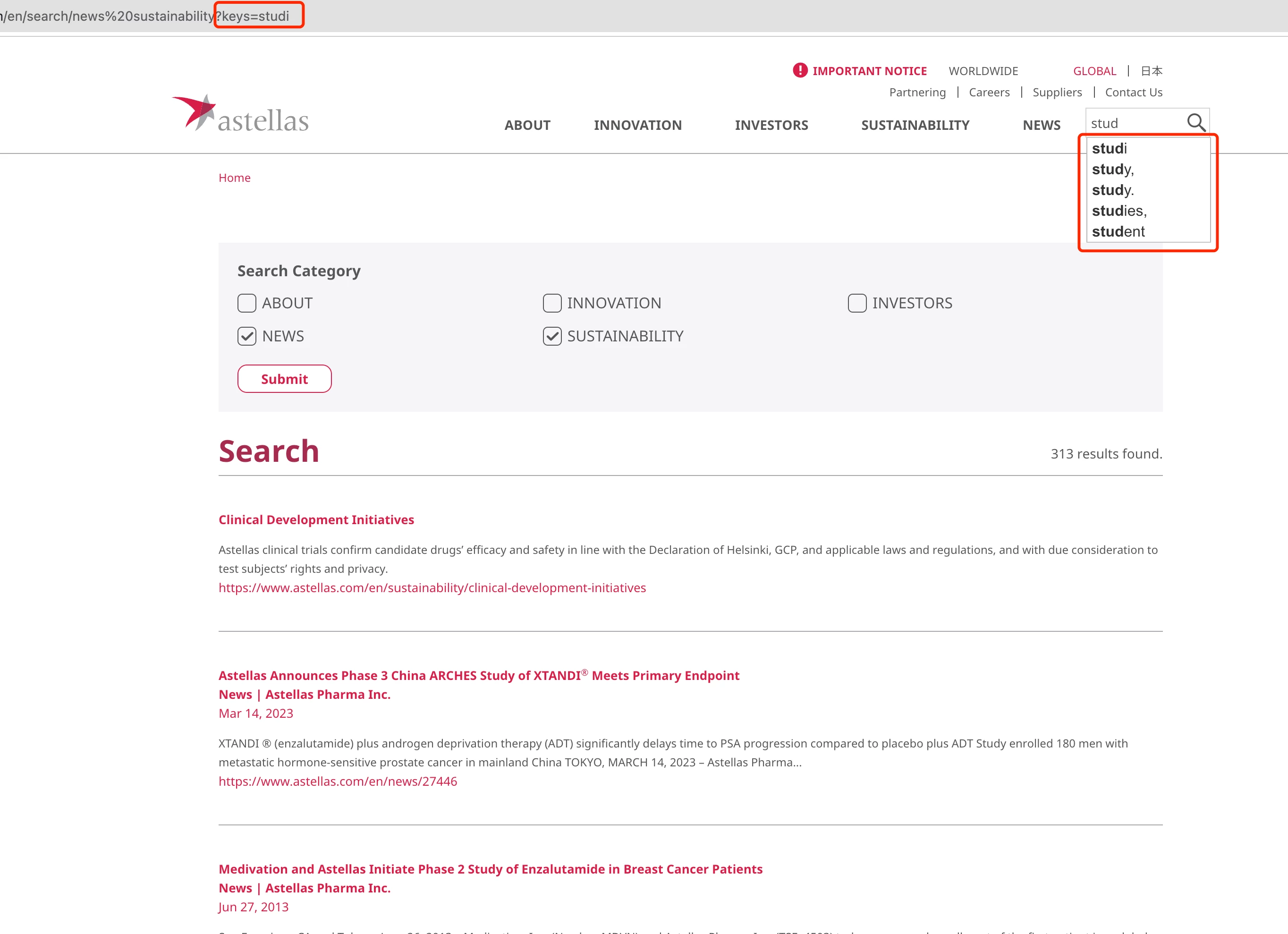
 

Best regards!

This post is no longer active and is closed to new replies. Need help? Start a new post to ask your question.
Best answer by arunpatidar

Addition to what @aanchal-sikka suggested


To fill a search field from URL query parameters, you can use JavaScript to extract the query parameters from the URL and then populate the search field with the value of the desired parameter. Here's an example


//Example Search Field <input type="text" id="searchField" placeholder="Search"> //Javascript, function to autofill search field function fillSearchFieldFromURL() { // Get the current URL var currentURL = window.location.href; // Parse the URL to extract query parameters var urlParams = new URLSearchParams(currentURL); // Get the value of the 'keys' parameter var queryValue = urlParams.get('keys'); // Fill the search field with the query value document.getElementById('searchField').value = queryValue; } // Call the function on DOMContentLoaded document.addEventListener('DOMContentLoaded', fillSearchFieldFromURL);

Remember to adapt this code to your specific use case and HTML structure as needed.


3 replies

aanchal-sikka
Community Advisor
Community Advisor
October 31, 2023

Hello @krist_wang 


OOTB there is Quick Serach component. https://experienceleague.adobe.com/docs/experience-manager-core-components/using/wcm-components/quick-search.html?lang=en


It is used in WKND site as well


Please see if that helps.


Aanchal Sikka
Level 2
October 31, 2023

Hello @aanchal-sikka What I want to achieve is that the auto-complete and search suggestion functions are the same as those on the pictures I upload. 

aanchal-sikka
Community Advisor
Community Advisor
October 31, 2023

@krist_wang 

Apologies, can you please elaborate "functions are the same as those on the pictures I upload"

Aanchal Sikka
arunpatidar
Community Advisor
arunpatidarCommunity AdvisorAccepted solution
Community Advisor
October 31, 2023

Addition to what @aanchal-sikka suggested


To fill a search field from URL query parameters, you can use JavaScript to extract the query parameters from the URL and then populate the search field with the value of the desired parameter. Here's an example


//Example Search Field <input type="text" id="searchField" placeholder="Search"> //Javascript, function to autofill search field function fillSearchFieldFromURL() { // Get the current URL var currentURL = window.location.href; // Parse the URL to extract query parameters var urlParams = new URLSearchParams(currentURL); // Get the value of the 'keys' parameter var queryValue = urlParams.get('keys'); // Fill the search field with the query value document.getElementById('searchField').value = queryValue; } // Call the function on DOMContentLoaded document.addEventListener('DOMContentLoaded', fillSearchFieldFromURL);

Remember to adapt this code to your specific use case and HTML structure as needed.

 
Arun Patidar
kautuk_sahni
Community Manager
Community Manager
November 1, 2023

@krist_wang Did you find the suggestions from users helpful? Please let us know if more information is required. Otherwise, please mark the answer as correct for posterity. If you have found out solution yourself, please share it with the community.

Kautuk Sahni