AEM 6.5: Bulk update page properties for mixed entries | Community
Skip to main content
Level 2
February 14, 2024
Solved

AEM 6.5: Bulk update page properties for mixed entries

  • February 14, 2024
  • 3 replies
  • 1167 views

Hello,


I enabled bulkupdate to add/change properties for multiple pages in bulk. But when pages have mixed entries for tags the option to add/delete is disabled. Anyway to enable this option or override the functionality to add/delete tags?
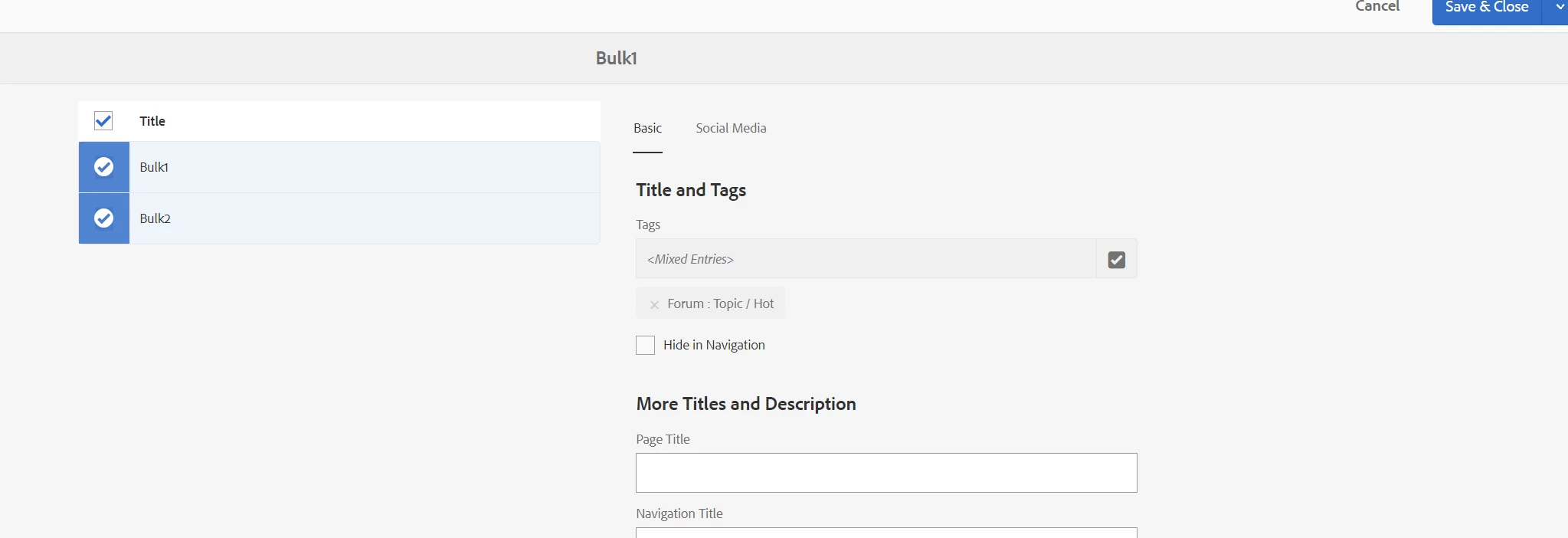


Thanks,

Raj

This post is no longer active and is closed to new replies. Need help? Start a new post to ask your question.
Best answer by Kamal_Kishor

@rajendar_gangan : In my opinion such activities are once in while so you can take a call how to do it. Maybe create some sort of guide for authors to do it or can be performed by developers when required.

This was easiest approach without needing any code changes and deployment when we had to do it in our project, so thought of sharing it. Please feel free to explore other options and figure out the best approach for your case.
thanks.


3 replies

Raja_Reddy
Community Advisor
Community Advisor
February 15, 2024

Hi @rajendar_gangan 

  1. Identify the component or script responsible for the bulk update functionality. This could be a custom component or a script provided by AEM.

  2. Modify the component or script to handle the scenario of mixed tag entries. You will need to override the default behavior to enable the option to add or delete tags.

  3. In the component or script, check if the pages have mixed tag entries. You can do this by iterating through the selected pages and checking the tag entries for each page.

  4. If the pages have mixed tag entries, modify the logic to enable the option to add or delete tags. You may need to update the UI and backend logic to allow for this functionality.

  5. Test the modified bulk update functionality to ensure that it works as expected for pages with mixed tag entries.

Kamal_Kishor
Community Advisor
Community Advisor
February 15, 2024

@rajendar_gangan: Not sure if I have understood your use-case completely but for bulk update of page meta-data (properties), there are many other ways to do it without even changing anything or writing any code.

Please refer already approved response : https://experienceleaguecommunities.adobe.com/t5/adobe-experience-manager/aem-possible-to-add-meta-tags-to-pages-in-bulk/td-p/446511

You can also refer this ACS commons MCP tool for data importer: https://adobe-consulting-services.github.io/acs-aem-commons/features/mcp-tools/data-importer/index.html

thanks.


Level 2
February 15, 2024

@kamal_kishor I achieved it through ACS commons but its not very feasible for Authors. Would like to do it by selecting multiple pages.


Thanks

Kamal_Kishor
Community Advisor
Kamal_KishorCommunity AdvisorAccepted solution
Community Advisor
February 16, 2024

@rajendar_gangan : In my opinion such activities are once in while so you can take a call how to do it. Maybe create some sort of guide for authors to do it or can be performed by developers when required.

This was easiest approach without needing any code changes and deployment when we had to do it in our project, so thought of sharing it. Please feel free to explore other options and figure out the best approach for your case.
thanks.


kautuk_sahni
Community Manager
Community Manager
February 16, 2024

@rajendar_gangan Did you find the suggestions from users helpful? Please let us know if more information is required. Otherwise, please mark the answer as correct for posterity. If you have found out solution yourself, please share it with the community.


Kautuk Sahni