AEM 6.5 and overlays | Community
Skip to main content
January 6, 2020
Solved

AEM 6.5 and overlays

  • January 6, 2020
  • 2 replies
  • 2055 views

Hi Everyone


This is my first posting to the adobe community. 

We are in the process of migrating from AEM 6.2 to Aem 6.5.


I had to create a new table component in 6.5 that completely changed the table properties dialog.  This was no problem in 6.2.


However I've tried doing the same in 6.5 and I cannot get it to work, hoping someone will be able to help.


I know we should not be overlaying these files but i do not want to modify the OFTB files.

My issue is that the new dictionary entries are not appearing. 


I created overlay files for Coral.template.js (modified to use my new entries) and for DefaultI18nProvider.js (contains new entries). 

What is happening is that it is not 'picking' up my new label entries. 

i've included 3 files,

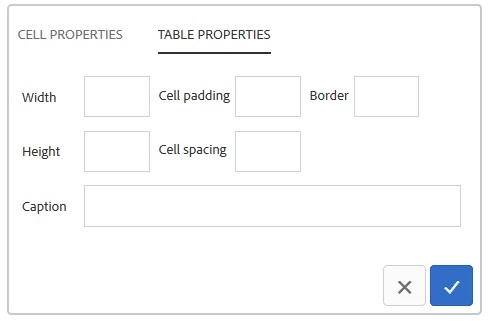
the original table properties dialog:
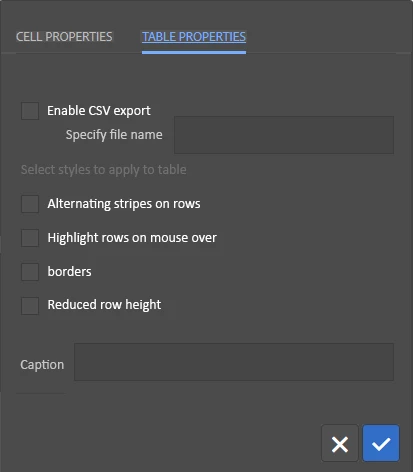
The new table properties dialog we would like (ignore the colors) :
and what I am seeing currently:
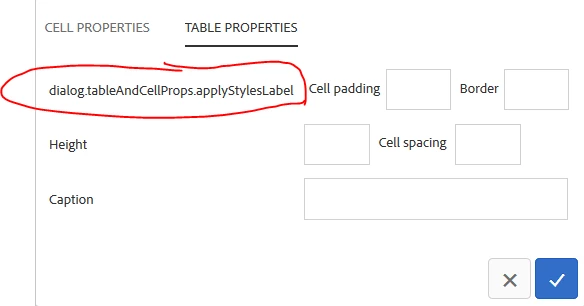
I cannot figure out why it is not picking up my new text, all other files I've overlayed are loaded. 

This is my structure:
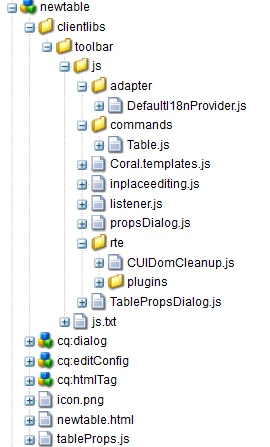
This post is no longer active and is closed to new replies. Need help? Start a new post to ask your question.
Best answer by aemmarc2

The i18n bundle relies on a cache that doesn't necessarily populate new items that are added to the dictionary after the cache was initially built. You'll likely need to trigger the cache to rebuild manually to see your new dictionary entry picked up.


An effective workaround to accomplish this is the following:


1) On the Dictionary Translator page :
 
 
2) Pick your dictionary and make changes.
 
3) Ensure you click Save
 
4) !! IMPORTANT PART !! to rebuild the cache manually, after saving, click the Reset and Refresh button. This will rebuild the cache.
 
5) See that the translated value is indeed picked up on your page / dialog / whatever for that i18n key
 
Let me know if that helps

~Marc

2 replies

Adobe Employee
January 6, 2020

If you have created the nodes with same structure and same name, AEM will always pick files from /apps.


Can you verify the structure Or share the package and I can try to check whats going on?

aemmarc2Adobe EmployeeAccepted solution
Adobe Employee
January 7, 2020

The i18n bundle relies on a cache that doesn't necessarily populate new items that are added to the dictionary after the cache was initially built. You'll likely need to trigger the cache to rebuild manually to see your new dictionary entry picked up.


An effective workaround to accomplish this is the following:


1) On the Dictionary Translator page :
 
 
2) Pick your dictionary and make changes.
 
3) Ensure you click Save
 
4) !! IMPORTANT PART !! to rebuild the cache manually, after saving, click the Reset and Refresh button. This will rebuild the cache.
 
5) See that the translated value is indeed picked up on your page / dialog / whatever for that i18n key
 
Let me know if that helps

~Marc