
AEM 6.4.5 RTE hyperlink | Community
Skip to main content
shikhasoni1
Level 3
May 11, 2022
Solved

AEM 6.4.5 RTE hyperlink
  • May 11, 2022
  • 3 replies
  • 2627 views

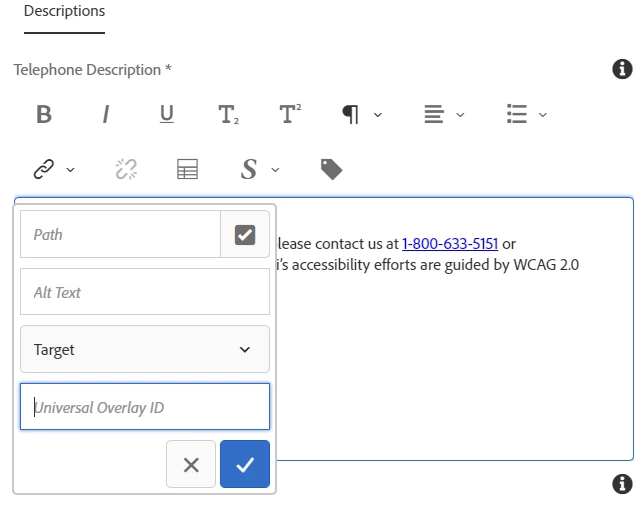
In the RTE, I want to add aria-label="1234" inside anchor tag for that i need to add one more field in hyperlink dropdown. How can i achieve that?

Thanks in advance!

Best answer by aniketp1012


Hi @shikhasoni1 ,


To achieve the above scenario you have to follow 3 steps.


step1-using this it will add aria-label in anchor tag in crx/de but you will not be able to retrieve it in dialog 


  1. Copy /libs/cq/xssprotection/config.xml to /apps/cq/xssprotection/config.xml.
  2. Open /apps/cq/xssprotection/config.xml. In the common-attributes section, add the following target attribute declaration.
    <attribute name="aria-label>
    <regexp-list> <regexp value="[a-zA-Z0-9-_\$]+" />
    </regexp-list>
    </attribute>
  3. Find the tag declaration by searching the term <tag name="a"    >
  4. Add the line below in the list of attributes:        <attribute name="aria-label" />
  5. use below link to add the js 
    http://experience-aem.blogspot.com/2017/09/aem-63-touch-ui-extend-rich-text-link-dialog-add-rel-select.html


After doing the above steps you will get the below error in error.log
org.apache.sling.xss.impl.HtmlToHtmlContentContext AntiSamy warning: The a tag contained an attribute that we could not process. Thearia&#45;label  attribute had a value of "bookmark"


step2- To avoid RTE editor to strip them, I have disabled xss filtering for dialog by adding the property to the text node usinng disableXSSFilteringproperty {Boolean}true


step3-To avoid DOM to strip aria-label, content="unsafe" You should  add in your html code


3 replies

MayurSatav
Community Advisor and Adobe Champion
May 11, 2022

Hi @shikhasoni1 ,


First, check whether the aria-label attribute is enabled or not in XssProtection. You can refer to the below blog of that.

https://medium.com/@mayursatav/enable-html-tags-attributes-in-rte-555dd60d62ee


If it is enabled then go for the further customization the way it is mentioned in the below blog for the attribute plugin

https://www.bounteous.com/insights/2022/01/06/custom-rich-text-editor-plugins-adobe-experience-manager/


shikhasoni1
Level 3
May 13, 2022

Hi Mayur,

Not able to achieve the requirement, after saving and reopening the dialog again the value is showing as undefined.

arunpatidar
Community Advisor
Community Advisor
May 11, 2022
shikhasoni1
Level 3
May 12, 2022

Hi Arun, I followed everything but after saving and reopening the dialog again the value is showing as undefined.


 below is the error in error.log


17.05.2022 21:05:34.012 *INFO* [0:0:0:0:0:0:0:1 [1652801733843] GET /content/hyundai/com/us/en/jcr:content/footerResponsiveGrid/footer.html HTTP/1.1] org.apache.sling.xss.impl.HtmlToHtmlContentContext AntiSamy warning: The a tag contained an attribute that we could not process. The aria&#45;label attribute has been filtered out, but the tag is still in place. The value of the attribute was "4653".


Could you please help on this.

aniketp1012Accepted solution
Level 2
May 19, 2022


Hi @shikhasoni1 ,


To achieve the above scenario you have to follow 3 steps.


step1-using this it will add aria-label in anchor tag in crx/de but you will not be able to retrieve it in dialog 


  1. Copy /libs/cq/xssprotection/config.xml to /apps/cq/xssprotection/config.xml.
  2. Open /apps/cq/xssprotection/config.xml. In the common-attributes section, add the following target attribute declaration.
    <attribute name="aria-label>
    <regexp-list> <regexp value="[a-zA-Z0-9-_\$]+" />
    </regexp-list>
    </attribute>
  3. Find the tag declaration by searching the term <tag name="a"    >
  4. Add the line below in the list of attributes:        <attribute name="aria-label" />
  5. use below link to add the js 
    http://experience-aem.blogspot.com/2017/09/aem-63-touch-ui-extend-rich-text-link-dialog-add-rel-select.html


After doing the above steps you will get the below error in error.log
org.apache.sling.xss.impl.HtmlToHtmlContentContext AntiSamy warning: The a tag contained an attribute that we could not process. Thearia&#45;label  attribute had a value of "bookmark"


step2- To avoid RTE editor to strip them, I have disabled xss filtering for dialog by adding the property to the text node usinng disableXSSFilteringproperty {Boolean}true


step3-To avoid DOM to strip aria-label, content="unsafe" You should  add in your html code


shikhasoni1
Level 3
May 19, 2022

Hey , That's great, it resolved the issue and everything is working fine. Thanks Aniket.

November 22, 2023

Hi,

Are you able to see the value saved for aria-label after reopening the dialog? In our case, the value is being saved and available in source, but the value is not getting retained in plugin.

Can you please help me on this.


Thanks!