dangl95641558
Level 2
3월 26, 2018 6:50 오전 UTC
해결됨

AEM 6.3 - not add component to parsys

Hi All,

I am creating a parsys template that permits to add my some custom components so we can make changes from the front end interface.

This is my code

...

<body class="${currentPage.template.name}">

   <p>Parsys here</p>

   <sly data-sly-resource="${'par_1' @ resourceType='wcm/foundation/components/parsys'}"/>

   <sly data-sly-include="customfooterlibs.html" data-sly-unwrap/>

   <p>end - page</p>

</body>

...

I do not know the reason why it is neither able to drag nor drop any components to this parsys in edit mode. The symbol of adding does not exist and no components available.
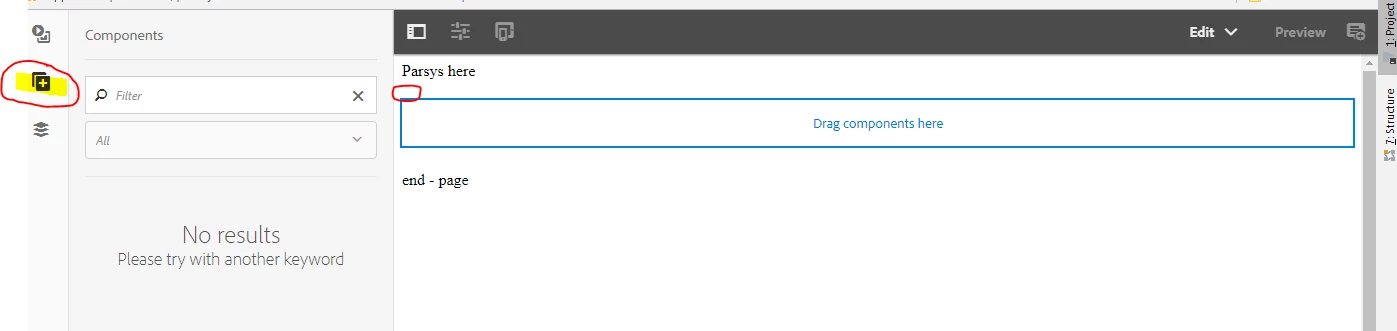
Please help me point out the reasons of error and solutions to fix this.

Thanks

-Dan

이 주제는 답변이 닫혔습니다.
Level 2
3월 27, 2018 7:08 오전 UTC

No, you do not need to add it to the template, but to the design.

/etc/designs/<your-site>

<jcr:content

  jcr:primaryType="nt:unstructured"

  jcr:title="Your custom Design"

  sling:resourceType="wcm/core/components/designer">

  <your-template-name jcr:primaryType="nt:unstructured">

  <par

   jcr:primaryType="nt:unstructured"

   components="[group:<your-component-group>]">

  <section jcr:primaryType="nt:unstructured"/>

  </par>

  </your-template-name>

8 답변

edubey
Level 10
3월 26, 2018 7:58 오전 UTC

I am assuming, it's not editable templates.

Make sure:-

1. your component does have a component group assigned

2. your template does allow those components from design mode.

번역
Level 2
3월 26, 2018 8:37 오전 UTC

Probably because AEM doesn't know which components to allow on your parsys. Please check the following links on how to do it in design mode and how to do it in xml format in the design of your project

Configuring Components in Design Mode

cq5 - Restrict the components in AEM 5.6.1 - Stack Overflow

번역
dangl95641558
dangl95641558작성자
Level 2
3월 26, 2018 8:53 오전 UTC

The components to drag all have component group name. But my page does not have design mode too. So I am considering if AEM 6.3 still supports design mode or not.

<jcr:root xmlns:cq="http://www.day.com/jcr/cq/1.0" xmlns:jcr="http://www.jcp.org/jcr/1.0"
   jcr:primaryType="cq:Component"
   jcr:title="Hello World Component"
   componentGroup="seconddemo63"/>

번역
Level 2
3월 26, 2018 9:04 오전 UTC

Is the template you're using an editable template? Because if so, you can simply edit the template itself to allow components to be added

번역
dangl95641558
dangl95641558작성자
Level 2
3월 26, 2018 9:10 오전 UTC

No, it's not editable template. I am trying to create basic template of AEM 6.3 having parsys allowing to drag components in either Touch UI or Classic UI. In previous versions of AEM, there was no problems like this with me.

번역
Level 2
3월 26, 2018 9:28 오전 UTC

Try adding component groups as allowed components, like in the second like I've provided to you.

번역
dangl95641558
dangl95641558작성자
Level 2
3월 27, 2018 3:01 오전 UTC

Is this correct:

<jcr:content
   jcr:primaryType="cq:PageContent"
   sling:resourceType="seconddemo63/components/structure/page">

   <par
   jcr:primaryType="nt:unstructured"
   sling:resourceType="foundation/components/parsys"
   components="[seconddemo63/components/content/helloworld]">

   </par>

</jcr:content>

I put the code "components="...">" above in template but it does not work.

번역
Level 2
3월 27, 2018 7:08 오전 UTC

No, you do not need to add it to the template, but to the design.

/etc/designs/<your-site>

<jcr:content

  jcr:primaryType="nt:unstructured"

  jcr:title="Your custom Design"

  sling:resourceType="wcm/core/components/designer">

  <your-template-name jcr:primaryType="nt:unstructured">

  <par

   jcr:primaryType="nt:unstructured"

   components="[group:<your-component-group>]">

  <section jcr:primaryType="nt:unstructured"/>

  </par>

  </your-template-name>

번역