CT1012
Level 4
Jul 26, 2018 1:55 PM UTC
Solved

AEM 6.3 How to show/hide tabs in a component based on the dropdown

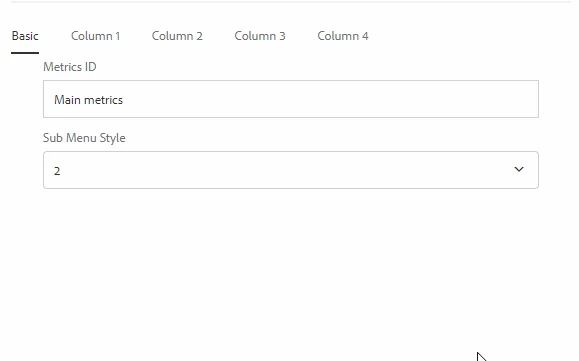
I'm trying to show/hide add tabs as per the number i select in the drop down

PFA image for the dialog. If i select 2 from the sub Menu Style , only column1 and column 2 should be visible.

I tried some approach from

Home · aman02deep/aem-6.2 Wiki · GitHub

aem-6.2/tabshideshow.js at master · aman02deep/aem-6.2 · GitHub but they aren't working for me

It would be helpful if you provide me the same functionality with checkbox alongside drop down selection

TIA
This post is no longer active and is closed to new replies. Need help? Start a new post to ask your question.
m_naveed
m_naveedAccepted solution
Nov 6, 2018 12:51 AM UTC

Since release 3.19.0, ACS AEM Commons provides the functionality to show/hide dialog fields and tabs using dropdown selection or checkbox selection or the combination of both. Moreover, a required field validator is also available which applies validation only when the field is visible.

ACS AEM Commons: Show/Hide dialog fields/tabs with dropdown, checkbox or the combination of both

4 replies

m_naveed
m_naveedAccepted solution
Nov 6, 2018 12:51 AM UTC

Since release 3.19.0, ACS AEM Commons provides the functionality to show/hide dialog fields and tabs using dropdown selection or checkbox selection or the combination of both. Moreover, a required field validator is also available which applies validation only when the field is visible.

ACS AEM Commons: Show/Hide dialog fields/tabs with dropdown, checkbox or the combination of both

Translate
Mar 22, 2024 7:03 AM UTC

When we drag a tab component, I want tab 1 and tab 2 to appear, but I also want a picture that the author can move to appear by default instead of tab 1 text. Is that possible?

Translate
arunpatidar
Community Advisor
Community Advisor
Nov 6, 2018 7:29 AM UTC

Hi,

For checkbox you can use same code except binding on select event, you need to call your code to show hide on change event.

e.g.

$(".checkbox").change(function() {

    if(this.checked) {

        //Do stuff

    }

});

Translate
Arun Patidar
Nov 4, 2022 2:40 PM UTC

Hi @ct1012, If you have found the solution for this. Can you please share.

Translate