AEM 6.3 : Getting properties of dynamic child node created in multifield component after it is authored | Community
Skip to main content
CT1012
Level 4
July 26, 2018
Solved

AEM 6.3 : Getting properties of dynamic child node created in multifield component after it is authored

  • July 26, 2018
  • 4 replies
  • 2946 views

Hi I'm using AEM 6.3 Touch-UI

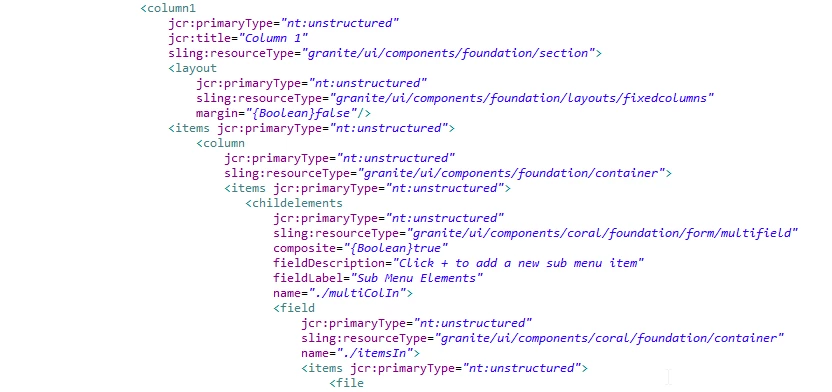
This is the dailog.xml for multi field in separate column
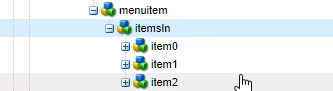
This is the dynamic node structure  item0, item1 and item2 created under page after I've authored the multi field component thrice...
I tried to pas the parameters through <sly data-sly-use.linkInfo="subLinkLogic.js" @ resPath = item.path>

with the below code, will the linkType property of the dynamic nodes is set to childLinkType ?

TIA

"use strict";

use(function () {

var locResPath = this.resPath;

granite.resource.resolve(locResPath).then(function(child) {

        properties.resolve(child);

    });

    return properties;

    var childLinkType = locResPath.properties.get("linkType");

This post is no longer active and is closed to new replies. Need help? Start a new post to ask your question.
Best answer by Ratna_Kumar

Hi,

As Scott stated, I too prefer sling models to work with Multifield in AEM 6.3.

And also, it is very easy as compared to WCMUsePOJO.

You can refer the article provided by Scott..It works nicely: Building Experience Manager Components using Granite/Coral Resource Types

Thanks,

Ratna Kumar.

4 replies

smacdonald2008
Level 10
July 26, 2018

Using a Multifield in AEM 6.3 is best when working with AEM Sling Models.

Building Experience Manager Components using Granite/Coral Resource Types

You use the @Inject annotation to inject the Multifield:

@Inject

    @Optional

    public Resource products;  //products corresponds to the multifield dialog node.

This shows you how to work with a MF and display the results in the component.

Using JavaSctipt to read a multifield is not best practice. Sling Models is much better.

Then you write out the values like this:

<h2>This is your AEM HTML Template Language component with a Multifield</h2>

<div

    data-sly-use.multiItems="com.aem.summit.core.models.HeroSlingModel">

    <div data-sly-list.head="${multiItems.products.listChildren}">

        <p><b>Description:</b> ${head.product}</p>

       <p><b>Selected Path value:</b> ${head.pathbr}</p>

        <p><b>Date:</b> ${'yyyy-MM-dd HH:mm:ss.SSSXXX' @ format= head.startDate, timezone='UTC'}</p>

       <p><b>Country:</b> ${head.size}</p

       <p><b>CHeckbox:</b> ${head.show}</p>

       <p><b>Fruit:</b> ${head.fruit}</p>   

      <hr>

   </div>

</div>

Ratna_Kumar
Ratna_KumarAccepted solution
Level 10
July 26, 2018

Hi,

As Scott stated, I too prefer sling models to work with Multifield in AEM 6.3.

And also, it is very easy as compared to WCMUsePOJO.

You can refer the article provided by Scott..It works nicely: Building Experience Manager Components using Granite/Coral Resource Types

Thanks,

Ratna Kumar.

CT1012
CT1012Author
Level 4
July 30, 2018

That actually worked, thank you

smacdonald2008
Level 10
July 30, 2018

Thats the purpose of the community articles - to show working examples. I am glad you got it working.