indrasena_reddy
Level 2
Dec 1, 2018 2:06 AM UTC
Solved

AEM 6.3 etc/map is not working on preprod environment.

Hi Team,

We are using the etc/map for URL shortening for one of our site. Below are the configurations. Everything is working fine on QA environment but after moving to

pre-prod(UAT) environment URL shortening is not working. On mouse hover it is showing as full content path(/content/test/en/work.html) on all the links on page instead of short one(/work.html) even after implementing the etc/map configurations. Can you please analysis and suggest us the solution how to resolve the issue.

Requirement

1. Convert the Full content path to short one (/content/test/en/work.html --------->  /work.html).
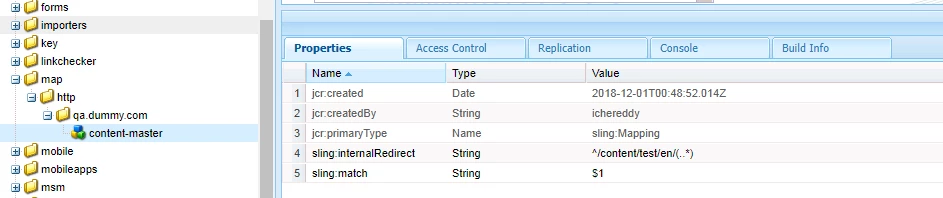
This post is no longer active and is closed to new replies. Need help? Start a new post to ask your question.
anubhas68994354Accepted solution
Adobe Employee
Dec 3, 2018 6:28 AM UTC

Hi Indra,

Please compare the configuration: Day Cq Link Checker Service on your pre prod environment with your QA environment.

You can also test resolving the link by using the URL : http://localhost:port/system/console/jcrresolver

3 replies

smacdonald2008
Level 10
Dec 1, 2018 7:17 PM UTC

When something in AEM works on one environment and not on the other - check you logs to see if you can determine the cause why its not working. Are you seeing anything in the log file. 

Translate
anubhas68994354Adobe EmployeeAccepted solution
Adobe Employee
Dec 3, 2018 6:28 AM UTC

Hi Indra,

Please compare the configuration: Day Cq Link Checker Service on your pre prod environment with your QA environment.

You can also test resolving the link by using the URL : http://localhost:port/system/console/jcrresolver

Translate
chandu_t
Level 3
Dec 3, 2018 9:38 AM UTC

Hi,

You can check in system console config, for Apache Sling Resource Resolver Factory. Edit that config and see if Mapping Location is set to /etc/map or something else. If its not, point to /etc/map, then after few seconds it should work.

Translate