AEM 6.3 - Datepicker in dialog does not prepopulate previously saved value | Community
Skip to main content
Level 2
November 2, 2017
Solved

AEM 6.3 - Datepicker in dialog does not prepopulate previously saved value

  • November 2, 2017
  • 14 replies
  • 11402 views

Hello Everyone,

I am using resource type 'granite/ui/components/coral/foundation/form/datepicker'

Following is the snippet from dialog xml file:

<multi class="full-width" jcr:primaryType="nt:unstructured"
      sling:resourceType="granite/ui/components/foundation/form/multifield"
      fieldDescription="Click 'Add Field' for new event info"
      fieldLabel="Manual Event Info">

     <field jcr:primaryType="nt:unstructured" name="./lsaManualEvents"
         acs-commons-nested="JSON_STORE"
         sling:resourceType="granite/ui/components/foundation/form/fieldset">

         <layout jcr:primaryType="nt:unstructured" method="absolute" sling:resourceType="granite/ui/components/foundation/layouts/fixedcolumns"/>

         <items jcr:primaryType="nt:unstructured">

             <column jcr:primaryType="nt:unstructured" sling:resourceType="granite/ui/components/foundation/container">

                  <items jcr:primaryType="nt:unstructured">

                           <title fieldLabel="Event Title" jcr:primaryType="nt:unstructured" name="./event_title"          

                                                                                sling:resourceType="granite/ui/components/foundation/form/textfield"/>

                          <subtitle fieldLabel="Event Subtitle" jcr:primaryType="nt:unstructured" name="./event_subtitle"                                                                                 sling:resourceType="granite/ui/components/foundation/form/textfield"/>

                            <building_name fieldLabel="Building" jcr:primaryType="nt:unstructured" name="./building_name"                                                                                 sling:resourceType="granite/ui/components/foundation/form/textfield"/>

                            <room fieldLabel="Room" jcr:primaryType="nt:unstructured" name="./room"                                                                            sling:resourceType="granite/ui/components/foundation/form/textfield"/>


                           <date fieldLabel="Event Date"
                                           jcr:primaryType="nt:unstructured" name="./datetime_start"
                                           sling:resourceType="granite/ui/components/coral/foundation/form/datepicker"
                                           emptyText="MM/DD/YYYY HH:mm" required="{Boolean}false" type="datetime" displayedFormat="MM/DD/YYYY HH:mm"                                              valueFormat="MM/DD/YYYY HH:mm"/>


                            <link fieldLabel="Full URL" jcr:primaryType="nt:unstructured" name="./website"                                                        sling:resourceType="granite/ui/components/foundation/form/textfield"/>

                  </items>

             </column>

           </items>

      </field>

   </multi>

When I open the dialog, the previously stores date time value is not pre populated. Following is the snapshot:
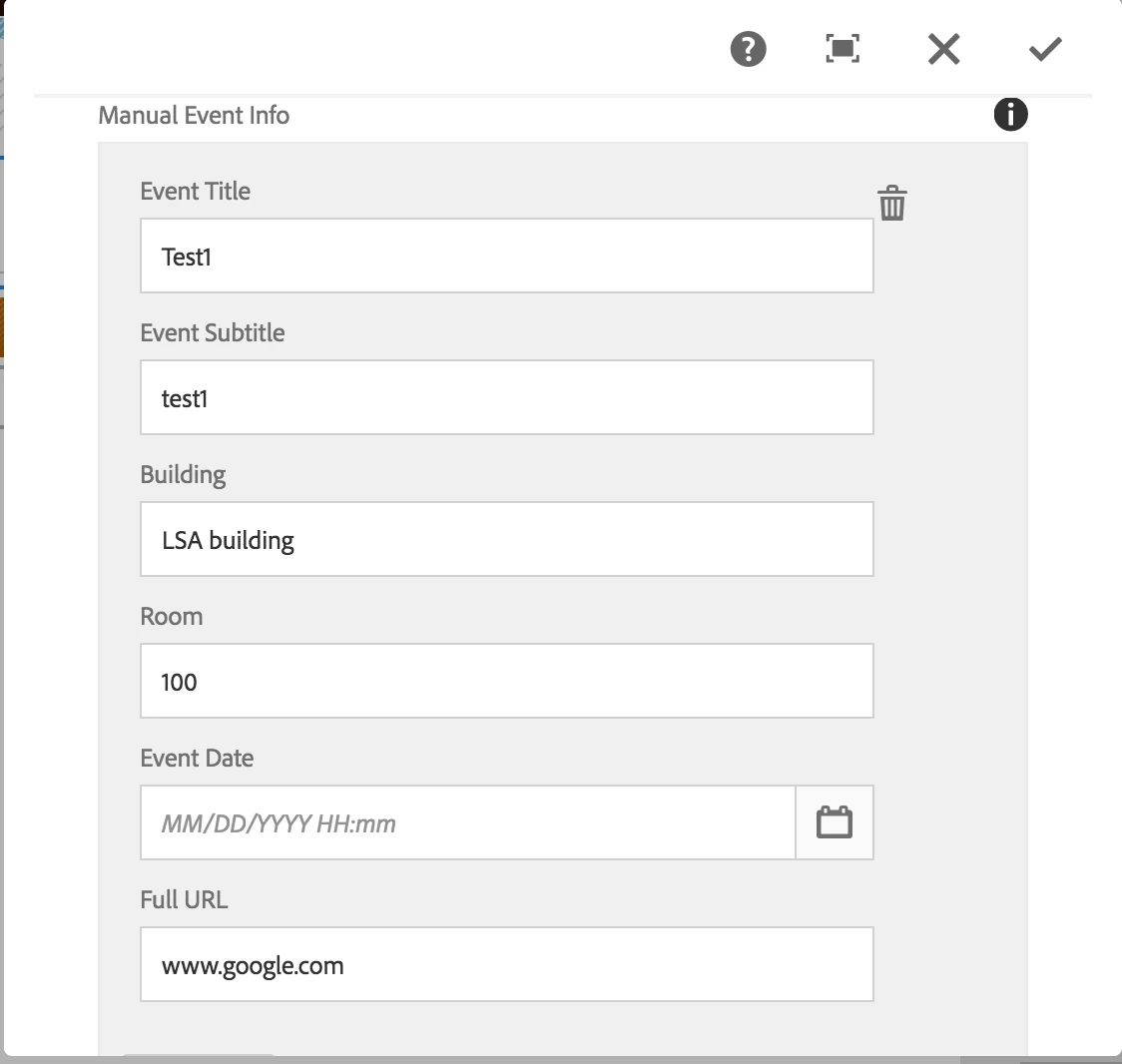
When I inspect the "Event Date" field, following is the HTML snippet:

<coral-datepicker class="coral-Form-field coral-InputGroup" type="datetime" name="./datetime_start" displayformat="MM/DD/YYYY HH:mm" valueformat="MM/DD/YYYY HH:mm" headerformat="MMMM YYYY" value="" placeholder="MM/DD/YYYY HH:mm" data-foundation-validation="" data-validation="" role="datepicker" aria-disabled="false" aria-invalid="false" aria-readonly="false" aria-required="false" aria-haspopup="true" aria-expanded="false" aria-owns="coral-id-617"><input type="hidden" handle="hiddenInput" value="2017-11-23T13:25:00.000-05:00" name="./datetime_start">

<input is="coral-textfield" class="coral-Textfield coral-InputGroup-input" type="text" handle="input" role="textbox" placeholder="MM/DD/YYYY HH:mm" aria-invalid="false">

<div class=" coral-InputGroup-button" handle="toggleButtonContainer">

  <button is="coral-button" class="coral-Button coral-Button--secondary" size="M" variant="secondary" type="button" icon="calendar" iconsize="S" handle="toggle" aria-haspopup="true" aria-label="Calendar" title="Calendar"><coral-icon class="coral-Icon coral-Icon--sizeS coral-Icon--calendar" icon="calendar" size="S" role="img" aria-label="calendar"></coral-icon><coral-button-label></coral-button-label></button>

</div>

<coral-popover class="coral3-Popover" aria-hidden="true" tabindex="0" closable="off" role="dialog" aria-live="assertive" handle="popover" id="coral-id-617" alignmy="right top" alignat="right bottom" collision="fit" style="display: none;"><div coral-tabcapture="top" tabindex="0"></div><div class="coral-Dialog-header coral-Popover-header" hidden="">

<coral-icon class="coral-Icon coral-Dialog-typeIcon coral-Icon--sizeS" icon="" size="S" handle="icon"></coral-icon>

<div handle="headerContent" class=" coral-Dialog-title coral-Heading coral-Heading--2"><coral-popover-header></coral-popover-header></div>

<button is="coral-button" class="coral-Button coral-Dialog-closeButton coral-Button--minimal" size="M" variant="minimal" handle="closeButton" type="button" icon="close" iconsize="XS" aria-label="Close" title="Close" coral-close="" style="display: none;"><coral-icon class="coral-Icon coral-Icon--close coral-Icon--sizeXS" icon="close" size="XS" role="img" aria-label="close"></coral-icon><coral-button-label></coral-button-label></button></div><div class="coral3-Popover-content"><coral-popover-content></coral-popover-content></div><div coral-tabcapture="intermediate" tabindex="0"></div><div coral-tabcapture="bottom" tabindex="0"></div></coral-popover></coral-datepicker>

Could someone please help me here?

Thank you for your time.

Best Regards,

Ananta
This post is no longer active and is closed to new replies. Need help? Start a new post to ask your question.
Best answer by manoj_devapath

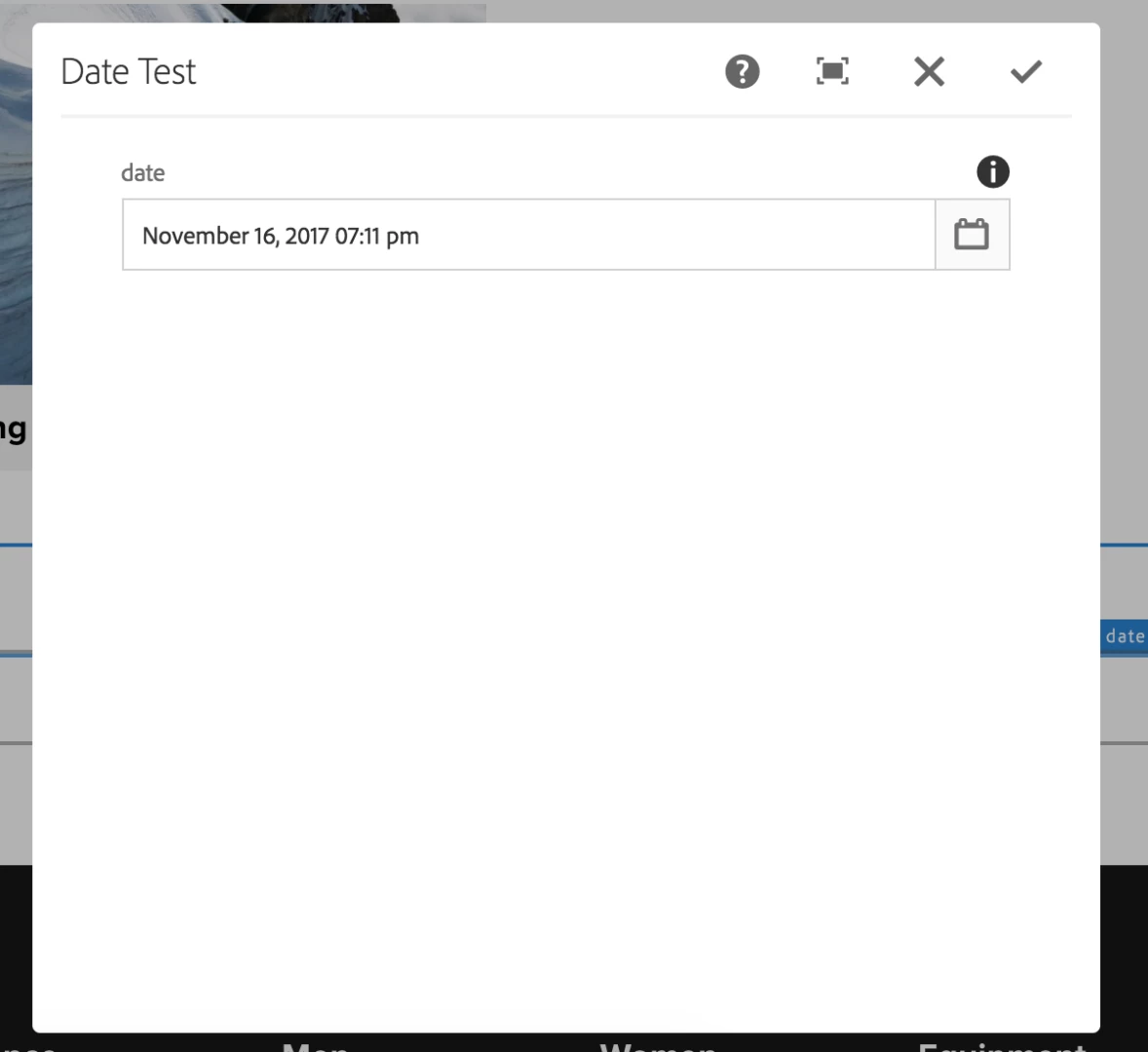
tested "granite/ui/components/coral/foundation/form/datepicker"  worked perfectly in AEM 6.3

               <date

                        jcr:primaryType="nt:unstructured"

                        sling:resourceType="granite/ui/components/coral/foundation/form/datepicker"

                        displayedFormat="MMMM DD, YYYY hh:mm a"

                        displayTimezoneMessage="{Boolean}true"

                        fieldDescription="Date Test."

                        fieldLabel="date"

                        name="./isReadOnlyonTime"

                        renderReadOnly="{Boolean}false"

                        type="datetime"/>

14 replies

ananta99Author
Level 2
November 3, 2017

Thanks mjb54261515​, kautuksahni​ and smacdonald2008​ for your inputs. If you refer to my initial post, I am using the datepicker inside a multifield and that is when the datepicker does not populate the previous saved value. Could you please give your advice in this scenario?

Best Regards,

Ananta

smacdonald2008
Level 10
November 3, 2017

It should work the same way. If not - its a bug - in which case - the recommend way to proceed is to log a ticket so this can be fixed.

ananta99Author
Level 2
November 6, 2017

smacdonald2008kautuksahnimjb54261515

After investigating further, I got it working as follows:

<multi class="full-width" jcr:primaryType="nt:unstructured"

    sling:resourceType="granite/ui/components/coral/foundation/form/multifield"

    fieldDescription="Click 'Add Field' for new event info" composite="{Boolean}true"

    fieldLabel="Manual Event Info">

        <field jcr:primaryType="nt:unstructured" name="./lsaManualEvents"

        sling:resourceType="granite/ui/components/coral/foundation/container">

            <items jcr:primaryType="nt:unstructured">

                <column jcr:primaryType="nt:unstructured" sling:resourceType="granite/ui/components/foundation/container">

                    <items jcr:primaryType="nt:unstructured">

                        <title fieldLabel="Event Title" jcr:primaryType="nt:unstructured" name="./event_title"                  sling:resourceType="granite/ui/components/foundation/form/textfield"/>

                        <subtitle fieldLabel="Event Subtitle" jcr:primaryType="nt:unstructured" name="./event_subtitle" sling:resourceType="granite/ui/components/foundation/form/textfield"/>

                        <building_name fieldLabel="Building" jcr:primaryType="nt:unstructured" name="./building_name" sling:resourceType="granite/ui/components/foundation/form/textfield"/>

                        <room fieldLabel="Room" jcr:primaryType="nt:unstructured" name="./room" sling:resourceType="granite/ui/components/foundation/form/textfield"/>

                        <date fieldLabel="Event Date"

                            jcr:primaryType="nt:unstructured" name="./datetime_start"

                            sling:resourceType="granite/ui/components/coral/foundation/form/datepicker" type="datetime" displayedFormat="YYYY-MM-DD HH:mm" required="{Boolean}true" valueFormat="YYYY-MM-DD[T]HH:mm:ss.000Z"/>

                        <link fieldLabel="Full URL" jcr:primaryType="nt:unstructured" name="./website"                     sling:resourceType="granite/ui/components/foundation/form/textfield"/>

                    </items>

                </column>

            </items>

        </field>

</multi>

Sady_Rifat
Community Advisor
Community Advisor
October 14, 2020

Hi there, I also faced this similar issue.
Then I used 

sling:resourceType="granite/ui/components/foundation/form/datepicker"

instead of 

sling:resourceType="granite/ui/components/coral/foundation/form/datepicker"

 And this is able to prepopulate the previous value.