
Adobe Targeting configurations | Community
Skip to main content
Umamaheswari_Yakkala
Community Advisor
Community Advisor
August 28, 2018
Solved

Adobe Targeting configurations

  • August 28, 2018
  • 7 replies
  • 2267 views

Hi Team,

We are trying to push experience fragments to the targeting system.

we are able to push the experience fragments to the targeting but the problem is in the offer details we are always seeing localhost:4503 in the offer details.

Not sure it is coming from where? and how to resolve it.

This is the first time we are doing it.

Any help or pointers that helps a lot.

Thanks
This post is no longer active and is closed to new replies. Need help? Start a new post to ask your question.
Best answer by kautuk_sahni

Hi,

I would need bit more clarity on the problem statement.

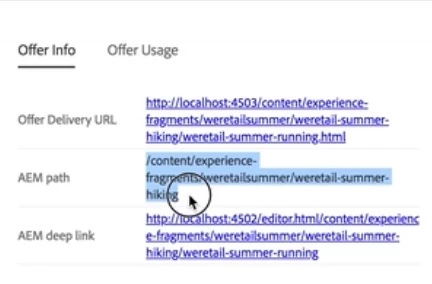
If you are looking at the details of Experience Fragment offer within the Adobe Target, then it should come like this:-

You can go to AEM Deep link (Author Instance) to make any changes to the Experience Fragment and then publish it.

Offer Delivery URL can be changed from (Not Tested):- http://localhost:4502/system/console/configMgr/com.day.cq.commons.impl.ExternalizerImpl

-Kautuk

7 replies

kautuk_sahni
Community Manager
kautuk_sahniCommunity ManagerAccepted solution
Community Manager
August 29, 2018

Hi,

I would need bit more clarity on the problem statement.

If you are looking at the details of Experience Fragment offer within the Adobe Target, then it should come like this:-

You can go to AEM Deep link (Author Instance) to make any changes to the Experience Fragment and then publish it.

Offer Delivery URL can be changed from (Not Tested):- http://localhost:4502/system/console/configMgr/com.day.cq.commons.impl.ExternalizerImpl

-Kautuk

Kautuk Sahni
Umamaheswari_Yakkala
Community Advisor
Community Advisor
August 29, 2018

Hi Kautuk,

Exactly we are seeing the same.. in offer details but why it is showing localhost:4503, it should be our server right?

or where do we need to update those configurations to show our server name instead of the localhost:4503.

Thanks

Uma

kautuk_sahni
Community Manager
Community Manager
August 29, 2018
Kautuk Sahni
edubey
Level 10
August 29, 2018

Yes, you have to update externalizer config for offers in target to have proper url instead of localhost:4503

You can change from localhost:4503 to www.example.com

Umamaheswari_Yakkala
Community Advisor
Community Advisor
August 29, 2018

Ok, Got it. Let me try that.  I believe that it is not gonna affect other things right?

I will update the results soon.

edubey
Level 10
August 29, 2018

well it may not affect but might change anything in your app which is using externalizer configs. Also consider, that's the main point of using externalizer to create public facing urls instead of localhost and all.

Umamaheswari_Yakkala
Community Advisor
Community Advisor
August 29, 2018

Thanks Kautuk and edubey , now I am able to see actual server URL as a deeplink in the offer details.

Thanks

Uma