Adobe 6.5 cloud: "package file parameter missing" during package upload | Community
Skip to main content
Level 2
September 14, 2021
Question

Adobe 6.5 cloud: "package file parameter missing" during package upload

  • September 14, 2021
  • 3 replies
  • 3076 views

Hi all,

I just started a new local env with SDK 2021.9.5800.20210903T095431Z (released on 6 sep 2021) on Windows 10 but I'm facing an issue during some packages upload on CRX.

With some packages I get the failure message "package file parameter missing".
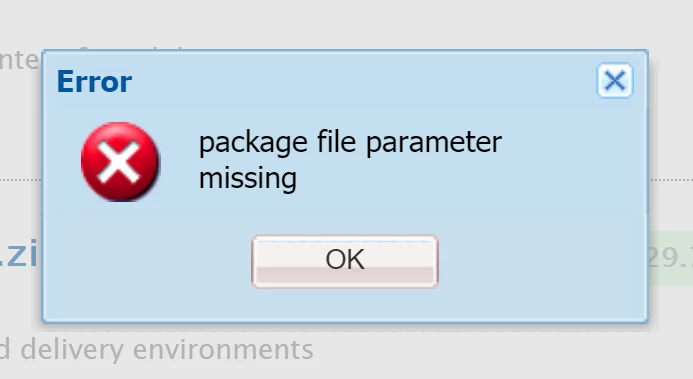
 

But these package are not corrupted, they are the same ones I used to upload on a local server using a previous version of the SDK, without any problem.


Reading on other questions, I found out that this problem could be related to the lack of space of the java temp folder, so I figured out how to change the Java temp path with a custom folder but still I get the same error message.

I just added properly these configuration on the start bat and on my starting command:

-XX:+HeapDumpOnOutOfMemoryError
-XX:HeapDumpPath=absPathOfMyNewJavaTemp
-Djava.io.tmpdir=absPathOfMyNewJavaTemp

Checking on System Properties of the server, java temp folder was changed successfully, but the issue persists and packages cannot be uploaded with the same failure message.


I tried to increase also "Xmx" and "MaxPermSize" parameters size on the running command, but it didn't work.


Can someone help me to solve this issue?


Thanks in advance,


Luca


----------------------------------

EDIT:

I tried out to build up an older instance of an AEM SDK (dec 2021), and I still have the same issue.


So I think no more this could be an issue related to the SDK.

By the way, I noticed that on the Java temp directory (already customized as explained before), every upload creates a "dat" file related to each "big" package I try to upload via crx.


This dat file increases its size as long as the package is uploading on crx, but it just reaches the limit of 45,7 MB and then the upload crashes with always that same error dialog.


Could anyone help me? 

Could this be related to my temp folder?


Thanks in advance,

Luca


This post is no longer active and is closed to new replies. Need help? Start a new post to ask your question.

3 replies

kchaurasiya
Level 5
September 14, 2021

@stochino Can you please cleared your browser cache and check or you can also try to upload the package from other browsers. Please post if you still face the issue.


If you are trying on your local instance then you can also use the below curl command to upload the package from backend. Ideally it should done from package manager if you have any urgent then try it.


curl -u admin:admin -F cmd=upload -F force=true -F package=@test-2.0.zip http://localhost:4502/crx/packmgr/service/.json
 
Thank You.
Keshav Chaurasiya
StochinoAuthor
Level 2
September 15, 2021

I just tried from other browsers.

The issue is still present.

Unfortunately, I am not able to upload packages via curl on my remote envs, so I cannot consider that way as a final solution.

kchaurasiya
Level 5
September 15, 2021

@stochino Can you create one more time fresh local AEM environment and check whether you are able to upload the package or not. If you are able to upload the package that means your old environment is corrupted if not able to upload the package on your new local instance then, i assuming there might be issue with AEM license may be old license. Please check and let me know.

Thank You.

Keshav Chaurasiya

Kiran_Vedantam
Community Advisor
Community Advisor
September 14, 2021

Hi @stochino,


You can try below steps

  1. Logout and Login into the AEM
  2. Clear the cache of the browser
  3. Try uploading in incognito mode
  4. Try creating an install folder in crx-quickstart folder , rop the package in it and restart the instance

Hope this helps!


Thanks,

Kiran Vedantam.

StochinoAuthor
Level 2
September 15, 2021

I just tried all solutions you suggested.

The issue is still present.

Ravi_Joshi
Level 4
September 18, 2021

@stochino I am also having the same problem. In my case the package size was small so I used "crx-quickstart/install" folder to load the package on server startup . 

But I think that would not be a proper solution to the problem.

As per my analysis I have also tried all the suggested methods but nothing worked. Please do let me know if you have any progress on the solution or the root cause for the same.

kautuk_sahni
Community Manager
Community Manager
September 21, 2021

@ravi_joshi , good to have great SME like you in the AEM community and thank you for answering. 

Kautuk Sahni