Adding self signed certificate into AEM 6.4 trustore | Community
Skip to main content
rajneeshg
Level 2
June 14, 2018

Adding self signed certificate into AEM 6.4 trustore

  • June 14, 2018
  • 4 replies
  • 13849 views

We are trying to integrate AEM Author(calling client) with a external REST service using SSL. On adding the public self signed certificate of the service onto AEM's trustStore we still see a SSLHandshake exception.

Used this section to add the self signed certificate into AEM TrustStore - http://localhost:4502/libs/granite/security/content/truststore.html
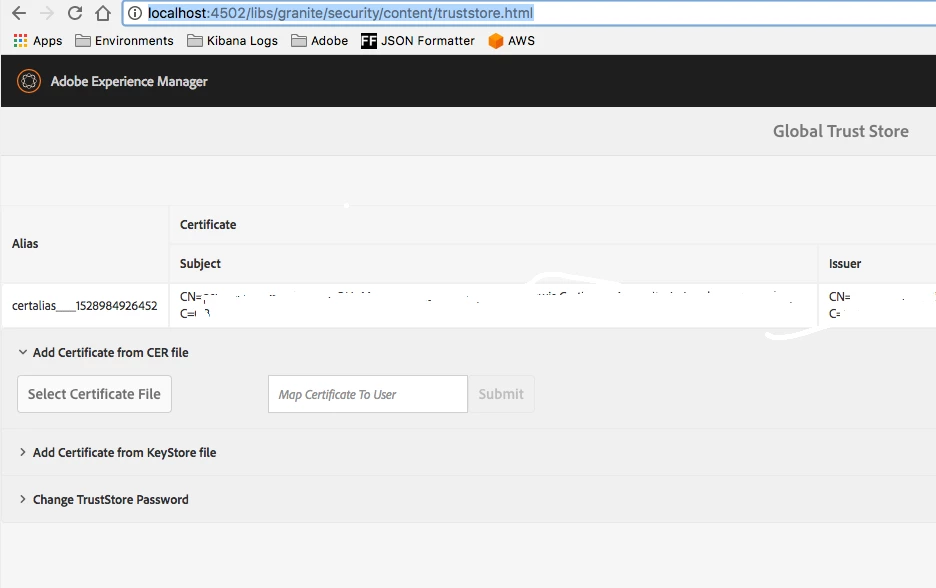
Please can you advice if I am missing anything?

No change in the error after adding the certificate to the trustStore.

javax.net.ssl.SSLHandshakeException: sun.security.validator.ValidatorException: PKIX path building failed: sun.security.provider.certpath.SunCertPathBuilderException: unable to find valid certification path to requested target

  at sun.security.ssl.Alerts.getSSLException(Alerts.java:192)

The documentation around how to manage certificate looks outdated to me. https://helpx.adobe.com/experience-manager/6-4/forms/using/admin-help/certificates.html#managing_certificateshttps://helpx.adobe.com/experience-manager/6-4/forms/using/admin-help/certificates.html#managing_certificates

Any better documentation which could be used to understand how to manage certificates in AEM?

This post is no longer active and is closed to new replies. Need help? Start a new post to ask your question.

4 replies

smacdonald2008
Level 10
June 14, 2018

We passed this to the Doc team.

Level 3
April 8, 2020

@smacdonald2008 looks like the doc is still not updated and equivalent doc doenst exist for 6.5


@rajneeshg can you guide me here.. i am trying to read the truststore with KeyStore trustStore = keyStoreService.getTrustStore(resourceResolver); but this is returning null.. resourceResolver.getUserID is giving me the system user and has admin privileges. Not sure what i am missing here.. 


i am on 6.5.2

Level 3
April 9, 2020

Actually i was able to figure out the null issue.. now i am getting this error: javax.net.ssl.SSLHandshakeException: Received fatal alert: certificate_required

I installed my ca and client cert http://localhost:4502/libs/granite/security/content/truststore.html and also added them to my jvm keystore


in my code i added:

String certificatesTrustStorePath = "/Library/Java/JavaVirtualMachines/jdk-11.0.6.jdk/Contents/Home/lib/security/cacerts";			
System.setProperty("javax.net.ssl.trustStore", certificatesTrustStorePath);
System.setProperty("javax.net.ssl.trustStorePassword", "changeit");

CloseableHttpResponse response = httpClient.execute(httpPost); --> ERROR

Still i keep getting this error as certificate_required... Hope the documentation was clear

@smacdonald2008 @ahmedmusallam 

rajneeshg
rajneeshgAuthor
Level 2
June 15, 2018

It would be good to know if the trustStore management is the section used to manage self signed third party certificates, and if there are any additional steps required after adding the certificate to the trustStore.

Based on my tests it appears just adding the certificate dosen't do the trick.

nchandra
Level 2
June 19, 2018

I got the same issue long time back, we solved it by adding the certs to JDK cacerts using keytool. try this and see if that helps or not.

Below are some keytool commands to import certs

cd <JDK_CACERTS_PATH>   -- generally cacerts will be here C:\Program Files\Java\jdk1.8.0_92\jre\lib\security

keytool -import -trustcacerts -alias XXX_ROOT -file <CERTS_PATH>/XXX_Root_CA.crt -keystore cacerts -storepass changeit

Thanks,

Chandra

rajneeshg
rajneeshgAuthor
Level 2
June 19, 2018

Thanks, did get it working eventually by adding the certificate to JVM keystore, however I believe there should be a easier way to get this done via the AEM console and moreover the documentation for 6.4 looks outdated.

smacdonald2008
Level 10
June 19, 2018

We will be logging a doc bug based on this community thread!

Level 3
February 4, 2022

Hello @smacdonald2008 


Any upadtes on this issue ? Seems it's still the case for AEM 6.5.9. I was not able to find any updated docs on that issue


Cheers!