Adding restriction to the comment field | Community
Skip to main content
Level 3
March 4, 2025
Solved

Adding restriction to the comment field

  • March 4, 2025
  • 1 reply
  • 515 views

How to add minimum characters restriction for the "Step Back Item" comment field in the aem/inbox.

I overriden the comment field but when i try to add js it is not reflecting.
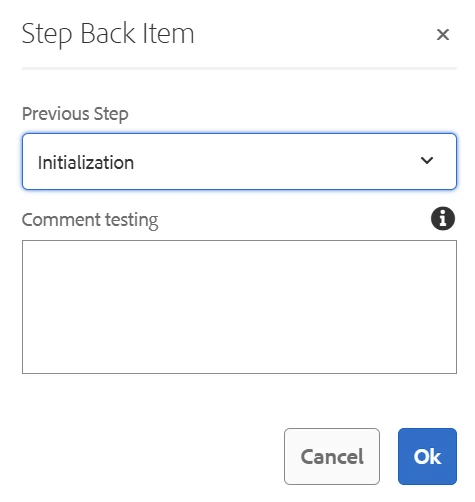
I am using AEM 6.5 version

Best answer by konstantyn_diachenko

Hi @helptech ,


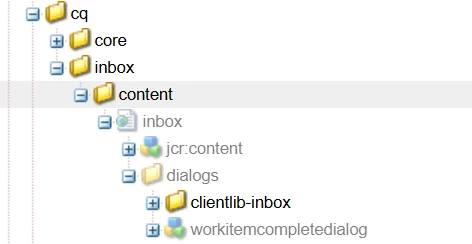
Does your /apps/cq/inbox/content/inbox/dialogs/clientlib-inbox have jcr:primaryType="cq:ClientLibraryFolder" ? Does it have js.txt that references your js file?


If yes, please try to rebuild clientlibraries via http://localhost:4502/libs/granite/ui/content/dumplibs.html


Best regards,

Kostiantyn Diachenko.

1 reply

konstantyn_diachenko
Community Advisor
Community Advisor
March 4, 2025

Hi @helptech ,


Could you please provide more details how you add clientlibs (categories) and validation code?


I checked this code and would suggest you to create clientlibrary with categories=[cq.inbox.gui.validation].


Please, use Granite UI JS validation to validate your field.

Example of node (overlay /apps/cq/inbox/content/inbox/dialogs/workitemcompletedialog/items/form/items/comment):

<comment jcr:primaryType="nt:unstructured" fieldLabel="Comment" name="comment" rows="4" sling:resourceType="granite/ui/components/coral/foundation/form/textarea" validation="textarea.min-length"> <granite:data jcr:primaryType="nt:unstructured" min-length="5"/> </comment>


Example of JS code:

(function(window, $, Granite) { "use strict"; $(window).adaptTo("foundation-registry").register("foundation.validation.validator", { selector: "[data-foundation-validation~='textarea.min-length']", validate: function(el) { var v = el.value; var minLength = $(el).data("minLength"); if (minLength) { return; } return v && v.length < minLength ? Granite.I18n.get("Your validation message") : null; } }); })(window, Granite.$, Granite);


Best regards,

Kostiantyn Diachenko.

Kostiantyn Diachenko, Community Advisor, Certified Senior AEM Developer, creator of free AEM VLT Tool, maintainer of AEM Tools plugin.
HelpTechAuthor
Level 3
March 5, 2025

Hi @konstantyn_diachenko 
I am creating the clientlibrary under the dialog /apps/cq/inbox/content/inbox/dialogs/clientlib-inbox, when i tried adding the category and the js still the js is not getting reflected and I am unable to get the validation work.


konstantyn_diachenko
Community Advisor
konstantyn_diachenkoCommunity AdvisorAccepted solution
Community Advisor
March 5, 2025

Hi @helptech ,


Does your /apps/cq/inbox/content/inbox/dialogs/clientlib-inbox have jcr:primaryType="cq:ClientLibraryFolder" ? Does it have js.txt that references your js file?


If yes, please try to rebuild clientlibraries via http://localhost:4502/libs/granite/ui/content/dumplibs.html


Best regards,

Kostiantyn Diachenko.

Kostiantyn Diachenko, Community Advisor, Certified Senior AEM Developer, creator of free AEM VLT Tool, maintainer of AEM Tools plugin.