Adding Lottie Files easy in AEM | Community
Skip to main content
This post is no longer active and is closed to new replies. Need help? Start a new post to ask your question.
Best answer by Asutosh_Jena_

Hi @albintribelounge 


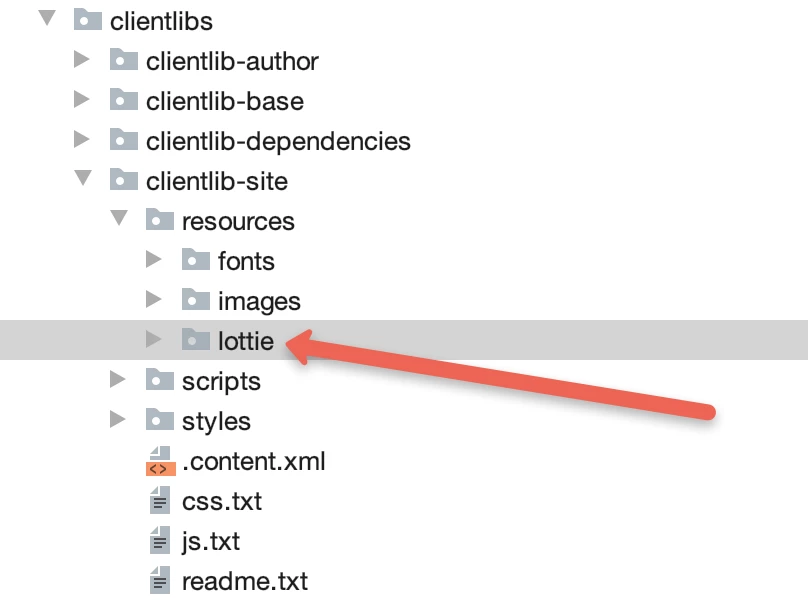
Lottie files are nothing but the JSON files which will be loaded in your JS code. So create a separate folder called lottie in the same location where you have resources and then load the JSON file into it. Now refer these files in the JS as needed. Please see the screenshot below with the file system.


Thanks!

2 replies

Sanjay_Bangar
Community Advisor
Community Advisor
September 29, 2021

Hi @albintribelounge ,

            There are 2 ways you can add.

1.directly add file in the asset and give the reference wherever you required.

2.Create the common ClientLibs and inside that create folder source and add your files inside source.


Asutosh_Jena_
Community Advisor
Asutosh_Jena_Community AdvisorAccepted solution
Community Advisor
September 29, 2021

Hi @albintribelounge 


Lottie files are nothing but the JSON files which will be loaded in your JS code. So create a separate folder called lottie in the same location where you have resources and then load the JSON file into it. Now refer these files in the JS as needed. Please see the screenshot below with the file system.


Thanks!