Add field description property dynamically to the dialog through JS | Community
Skip to main content
Level 6
March 10, 2021
Solved

Add field description property dynamically to the dialog through JS

  • March 10, 2021
  • 3 replies
  • 2999 views

I have a JS file for my validation of colorfield. In the process of validation, if any inaccessible color is added to the colorfield, then i want to add the field description with a msg for the user. 

i have a granite:data node as a child node to the colorfield. The granide:data node is having selector : contain. I am also able to successfully fetch and validate the color values that are getting selected in the swatch. I am also able to show the coral alert. But the problem is that it keeps coming one after the other. How can that fade away? or how can hi have only a single alert?

Below is my JS code:

$(window).adaptTo("foundation-registry").register("foundation.validation.validator", {
selector: "[data-contain]",
validate: function(el) {
var input = el.value;

var id = $(".cq-dialog").find("#colorId")[0]; //added ID to my colorfield, in case this can be used to get field description
if (input !== "#000000") //checking for inaccessible colors
{
var alert = new Coral.Alert();
alert.variant = "error";
alert.id="erroralert";
alert.header.textContent = Granite.I18n.get("ERROR");
alert.content.innerHTML = Granite.I18n.get("Failed to load log content.");
$("#colorId").append(alert);
}
});
This post is no longer active and is closed to new replies. Need help? Start a new post to ask your question.
Best answer by Anudeep_Garnepudi

@shaheena_sheikh 

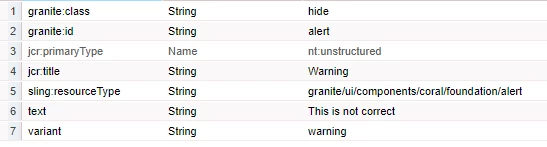
Coral Alert is a widget/field like other fields refer below link. Create a node above or below your color field and configure as in below image.

https://helpx.adobe.com/experience-manager/6-2/sites/developing/using/reference-materials/granite-ui/api/jcr_root/libs/granite/ui/components/coral/foundation/alert/index.html


Javascript:

Just hide or show based on condition.

if (input !== "#000000") { $("#alert").removeClass("hide"); } else { $("#alert").addClass("hide"); }


Note: granite:class hide - to hide initially, granite:id alert to target from JavaScript

3 replies

Anudeep_Garnepudi
Community Advisor
Anudeep_GarnepudiCommunity AdvisorAccepted solution
Community Advisor
March 10, 2021

@shaheena_sheikh 

Coral Alert is a widget/field like other fields refer below link. Create a node above or below your color field and configure as in below image.

https://helpx.adobe.com/experience-manager/6-2/sites/developing/using/reference-materials/granite-ui/api/jcr_root/libs/granite/ui/components/coral/foundation/alert/index.html


Javascript:

Just hide or show based on condition.

if (input !== "#000000") { $("#alert").removeClass("hide"); } else { $("#alert").addClass("hide"); }


Note: granite:class hide - to hide initially, granite:id alert to target from JavaScript

AG
Level 6
March 10, 2021

I dont want to add the return msg, because this will not let the user save the dialog if there's a wrong color chosen and it will force them to correct the colour. But i dont want to force the user to correct the value. I only want to give them a msg through field description that they have chosen a wrong color and then let them save the wrong value if they want.

VeenaVikraman
Community Advisor
Community Advisor
March 10, 2021

@shaheena_sheikh to hide your fields via Jquery , find the field element via jquery and add .addClass("hide");  Similarly , to make it visible , you can do .removeClass("hide"); 


You can check http://localhost:4502/crx/de/index.jsp#/libs/cq/gui/components/authoring/dialog/dropdownshowhide/clientlibs/dropdownshowhide/js/dropdownshowhide.js 


https://github.com/arunpatidar02/aem63app-repo/blob/master/js/dropdownshowhide-multifield-multivalued.js 


for some sample reference.


Thanks

Veena

Level 6
March 10, 2021
this will hide the entire color field, whereas i only want to hide field description of the colorfield
VeenaVikraman
Community Advisor
Community Advisor
March 10, 2021
Level 6
March 10, 2021
yes, coral alert would help. But i am not sure how i can add this to my JS