Add empty rows into dynamic subform | Adobe Higher Education
Skip to main content
April 15, 2024
Beantwoord

Add empty rows into dynamic subform

  • April 15, 2024
  • 1 reactie
  • 616 Bekeken

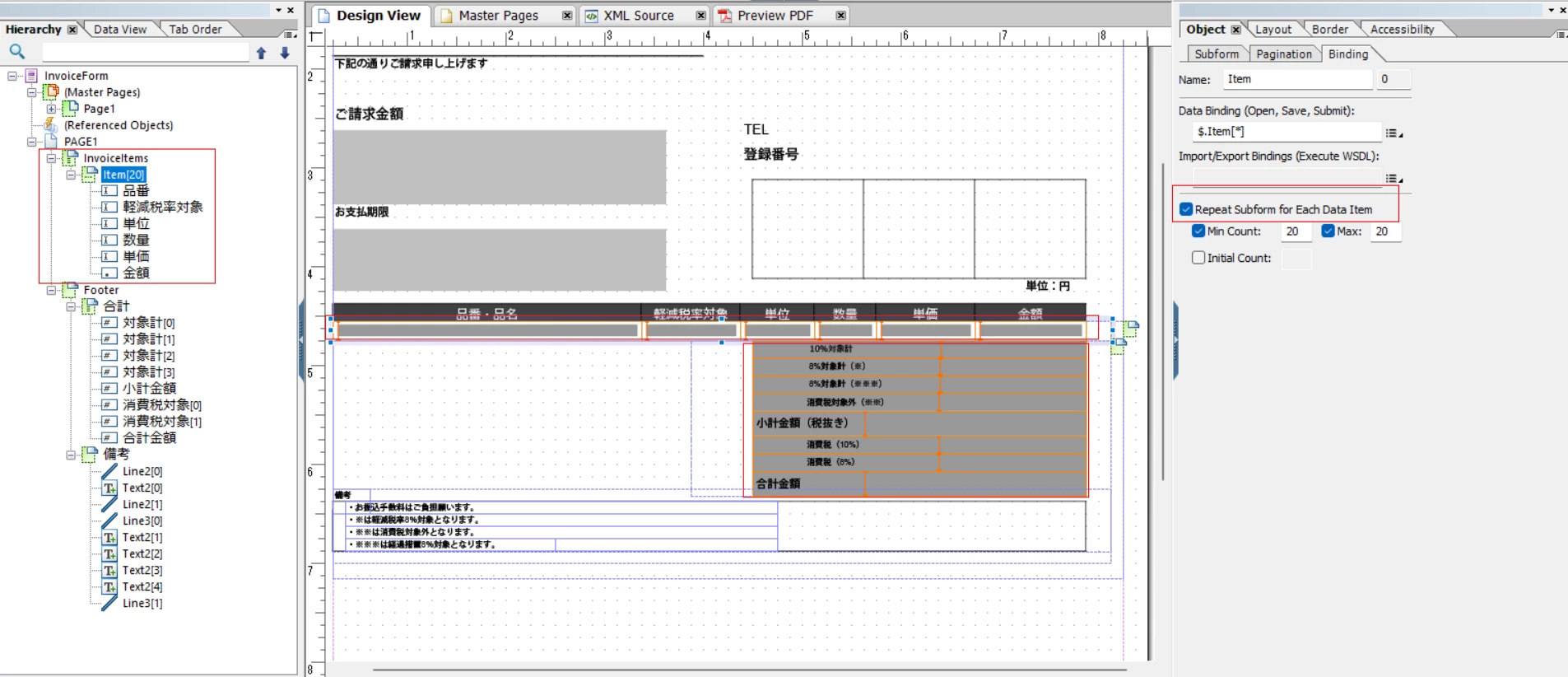
I created a dynamic subform which flows and repeat subform for each data item. I also put a summary next to it.One page can only contains 30 rows of the subform,and if row number is bigger than 19 the summary will flow to the second page.
My question is , I want to put empty rows into this subform. For example if 20 rows come in, I need to put 10 empty rows into the first page and put 19 empty rows into the second page.
Is there any functions in livecycle desginer could realize it without script?
If there is no way,how to make it through script?
Er kunnen geen reacties meer worden geplaatst op dit onderwerp.
Beste antwoord door ZhouSZ

Hi 
I reposted one under the discussion tab, thank you very much

1 reactie

arunpatidar
Community Advisor
Community Advisor
April 15, 2024

Hi @zhousz 
Could you please check this directly within Adobe LiveCycle community to get faster and relevant response.


https://community.adobe.com/t5/acrobat/livecycle/m-p/10270680 

Arun Patidar
ZhouSZAuteurAntwoord
April 16, 2024

Hi 
I reposted one under the discussion tab, thank you very much