Level 3
Oct 26, 2024 12:37 AM UTC

Add a ToolTip to Search icon

Hi
we have requirement to add a tooltip to search button icon.
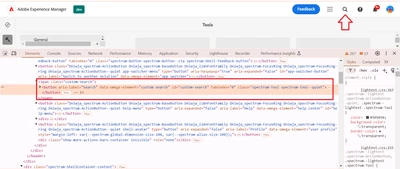
 

#custom-search {
    position: relative;
    cursor: pointer;
}
 
#custom-search::after {
    content: "This is a tooltip text"; /* Tooltip text */
    visibility: hidden;
    width: 120px;
    background-color: #747474;
    color: #fff;
    font-size: 15px;
    text-align: center;
    border-radius: 5px;
    padding: 5px;
    position: absolute;
    z-index: 1;
    top: 150%;
    transform: translateX(-50%);
    margin-left: 100px;
    opacity: 0;
    transition: opacity 0.3s;
}
 
#custom-search:hover::after {
    visibility: visible;
    opacity: 1;
}


If i add the above css code in the custom-client-lib file under /apps/example-projects/clientlibs/custom-client-lib then under which clientlib categories it need to be added?
please help us solve the requirement.


@estebanbustamante 
@arunpatidar 
@Harwinder-singh 
@sravs 
@abhishekanand_

This post is no longer active and is closed to new replies. Need help? Start a new post to ask your question.

16 replies

Dipti_Chauhan
Community Advisor
Community Advisor
Oct 28, 2024 2:09 AM UTC

Hi

 Search icon already have a tooltip. You want to change the text or you want to change the styling?

Thanks

Dipti

Translate
Vishal33Author
Level 3
Oct 28, 2024 7:04 AM UTC

Hi @dipti_chauhan 

Thank you for your reply

Actually, the search implementation is different for local-sdk and cloud-environment
In local-sdk it implemented using coral class and in dev its implemented using react-spectrum.

And In dev environment it does not have a tooltip but in local environment it has.


So can you please help us solve how to add tool tip in dev environment for search icon.

@EstebanBustamante 
@arunpatidar 
@Harwinder-singh 
@sravs 
@abhishekanand_

Translate
PRATHYUSHA_VP
Community Advisor
Community Advisor
Oct 28, 2024 7:24 AM UTC

If you want to change the styling for AEM home screen / search icon, it's part of coralui3.css from foundation granite clientlibs.


It is not recommended to override the coralui3.css instead you can create your custom client libs css files to override the search icon css properties and add those client lib in the page screen


Hope this helps


Thanks

Translate
Prathyusha - AEM Developer
PRATHYUSHA_VP
Community Advisor
Community Advisor
Oct 29, 2024 9:15 AM UTC

It's part of coralui3 categories. Please check for further action


@vishal33 

Thanks


Translate
Prathyusha - AEM Developer
Vishal33Author
Level 3
Oct 29, 2024 9:30 AM UTC

Thanks for your reply @prathyusha_vp 
If I add coralui3 category in custom client-libs under ex: /apps/project/custom-clientlibs.
below code will work fine correct?

#custom-search { position: relative; cursor: pointer; } #custom-search::after { content: "This is a tooltip text"; /* Tooltip text */ visibility: hidden; width: 120px; background-color: #747474; color: #fff; font-size: 15px; text-align: center; border-radius: 5px; padding: 5px; position: absolute; z-index: 1; top: 150%; transform: translateX(-50%); margin-left: 100px; opacity: 0; transition: opacity 0.3s; } #custom-search:hover::after { visibility: visible; opacity: 1; }


Translate
arunpatidar
Community Advisor
Community Advisor
Oct 28, 2024 7:51 AM UTC

Hi @vishal33 
You can check the loaded clientlibs from network tab of browser and use one of the category related to console etc,

Translate
Arun Patidar
EstebanBustamante
Adobe Champion and Community Advisor
Oct 28, 2024 1:36 PM UTC

Hi,


First of all, it doesn’t make sense to customize a search icon; it should be understandable enough without needing an extra description. Anyways, as Arun suggested, you can check the network tab to see which categories are loading. I think the granite.ui.shell category will work.


Hope this helps!

Translate
Esteban Bustamante
kautuk_sahni
Level 9
Nov 25, 2024 2:18 PM UTC

@vishal33 Did you find the suggestions helpful? Please let us know if you require more information. Otherwise, please mark the answer as correct for posterity. If you've discovered a solution yourself, we would appreciate it if you could share it with the community. Thank you!

Translate
Kautuk Sahni