Add a tool on the toolbar | Community
Skip to main content
Level 2
June 22, 2022
Solved

Add a tool on the toolbar

  • June 22, 2022
  • 2 replies
  • 894 views

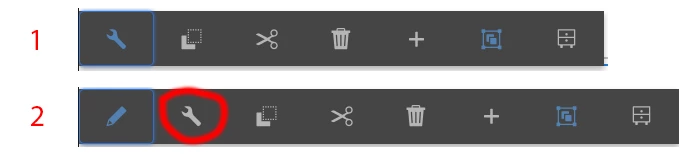
Some components in my AEM have a wrench tool, but others don't!  Please take a look at my attachment below.

How to add a wrench in #1 toolbar?

Please give me a hand.

Thanks!
 

This post is no longer active and is closed to new replies. Need help? Start a new post to ask your question.
Best answer by Anmol_Bhardwaj

Hi @pd04 ,


I can see wrench in both the images. I think what you are looking for is the "edit" option or In-palce editing option for the component.

That can be achieved through adding a node inside cq:editConfig under the component. The node would be cq:inplaceEditing, with the following properties

 

You can go through this video, for a detailed demo:

https://www.youtube.com/watch?v=B9WFykOTh3w 

2 replies

Jennifer_Dungan
Community Advisor and Adobe Champion
June 22, 2022

I believe this has been posted into the wrong forum.. you will likely have better luck with one of the AEM communities (this is Adobe Analytics, so most of us here don't work with AEM specifically)


Good Luck tracking down the mysterious wrench option!

yuhuisg
Community Advisor
Community Advisor
June 24, 2022
Anmol_Bhardwaj
Community Advisor
Anmol_BhardwajCommunity AdvisorAccepted solution
Community Advisor
June 23, 2022

Hi @pd04 ,


I can see wrench in both the images. I think what you are looking for is the "edit" option or In-palce editing option for the component.

That can be achieved through adding a node inside cq:editConfig under the component. The node would be cq:inplaceEditing, with the following properties


You can go through this video, for a detailed demo:

https://www.youtube.com/watch?v=B9WFykOTh3w