Accessing Component Style using sightly | Community
Skip to main content
Level 2
May 21, 2020
Solved

Accessing Component Style using sightly

  • May 21, 2020
  • 2 replies
  • 10448 views

Hi All,


I have a business use case where I want to access component style system authored in editable template policy. I looked for an API and nothing similar available.


There is a property same in my content component node with cq:styleId. usiing this style id I want to access my style name authored in component style system as template policy.


Thanks in Advance.

This post is no longer active and is closed to new replies. Need help? Start a new post to ask your question.
Best answer by Vijayalakshmi_S

Hi @toimrank,

We can write a query to get the style node (configured as policy) with the Id from the component node available under respective page content. 
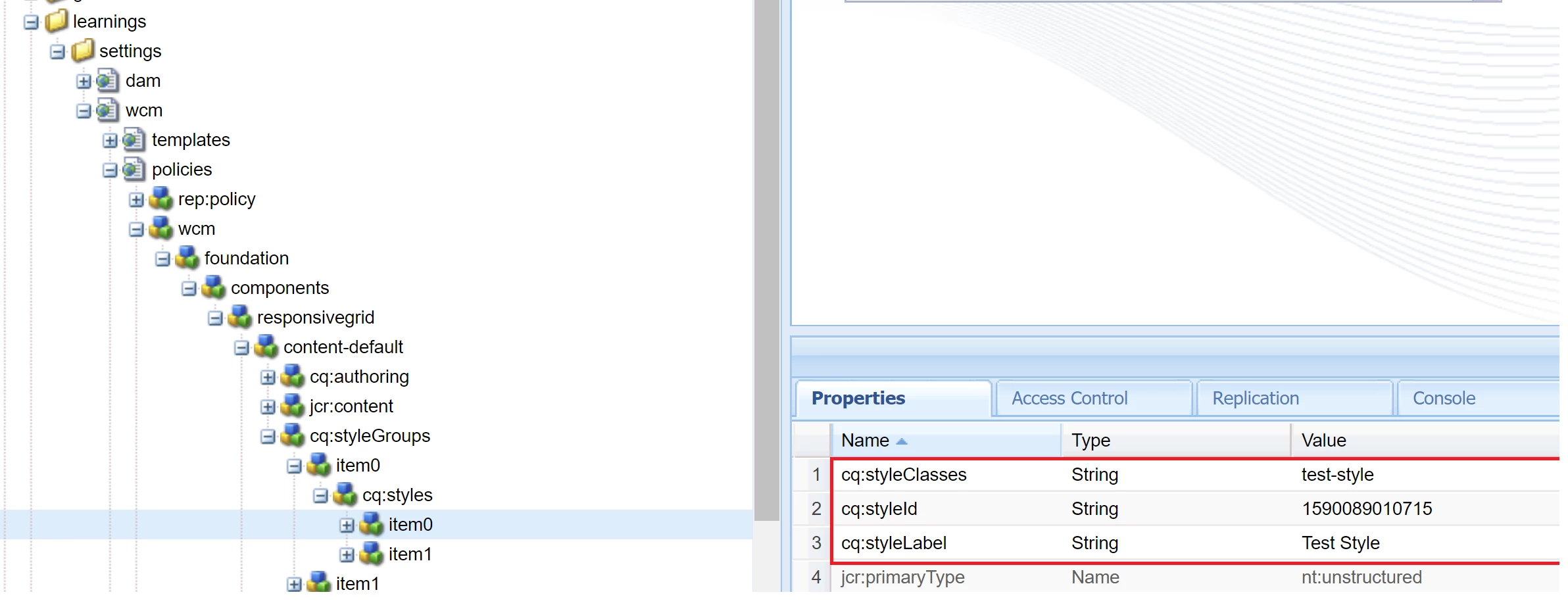
(Style node in policy will have details of style label, style class and style id - Sample screenshot for reference below)
Sample query:

path=/conf/yourproject/settings/wcm/policies
type=nt:unstructured
1_property=cq:styleId
1_property.1_value=1590089010715
1_property.2_value=1590089575644
p.limit=-1

Where

  • path can be refined to specific component policy under main"policies" path based on the need
  • property.value predicate to be framed dynamically from the component node available under the desired content path(cq:styleIds - String[])
    For how many ever style Ids you have, frame property.value predicates accordingly.
  • Returned query result set will be the highlighted node and hence access to style label and class.

To be implemented in Sling Models or WCMUsePojo and expose the style class via getters for access in sightly.

Screenshot for reference:
2 replies

Vijayalakshmi_S
Vijayalakshmi_SAccepted solution
Level 10
May 21, 2020

Hi @toimrank,

We can write a query to get the style node (configured as policy) with the Id from the component node available under respective page content. 
(Style node in policy will have details of style label, style class and style id - Sample screenshot for reference below)
Sample query:

path=/conf/yourproject/settings/wcm/policies
type=nt:unstructured
1_property=cq:styleId
1_property.1_value=1590089010715
1_property.2_value=1590089575644
p.limit=-1

Where

  • path can be refined to specific component policy under main"policies" path based on the need
  • property.value predicate to be framed dynamically from the component node available under the desired content path(cq:styleIds - String[])
    For how many ever style Ids you have, frame property.value predicates accordingly.
  • Returned query result set will be the highlighted node and hence access to style label and class.

To be implemented in Sling Models or WCMUsePojo and expose the style class via getters for access in sightly.

Screenshot for reference:

toimrankAuthor
Level 2
May 21, 2020
Thanks for your comment.
Level 2
May 21, 2020

Hi toimrank 


Please use the following to retrieve policy manager

ContentPolicyManager policyManager = resourceResolver.adaptTo(ContentPolicyManager.class);

ValueMap policyProperties = contentPolicy.getProperties();


toimrankAuthor
Level 2
May 21, 2020
Thanks. This will be returning the values at policy node. Is there any way to get the styles using "cq:styleId" from ContentPolicyManager ? or there is any other API for it ?