Replace asset, keep metadata | Community
Skip to main content
January 31, 2025
Solved

Replace asset, keep metadata

  • January 31, 2025
  • 3 replies
  • 1017 views

Does AEM allow replacement of an asset (image or pdf) whilst retaining metadata, title etc?

I have read that this should be possible via a 'replace' button when the asset is selected but I don't see this option. 

This post is no longer active and is closed to new replies. Need help? Start a new post to ask your question.
Best answer by EstebanBustamante

Hi @jamesbr23 


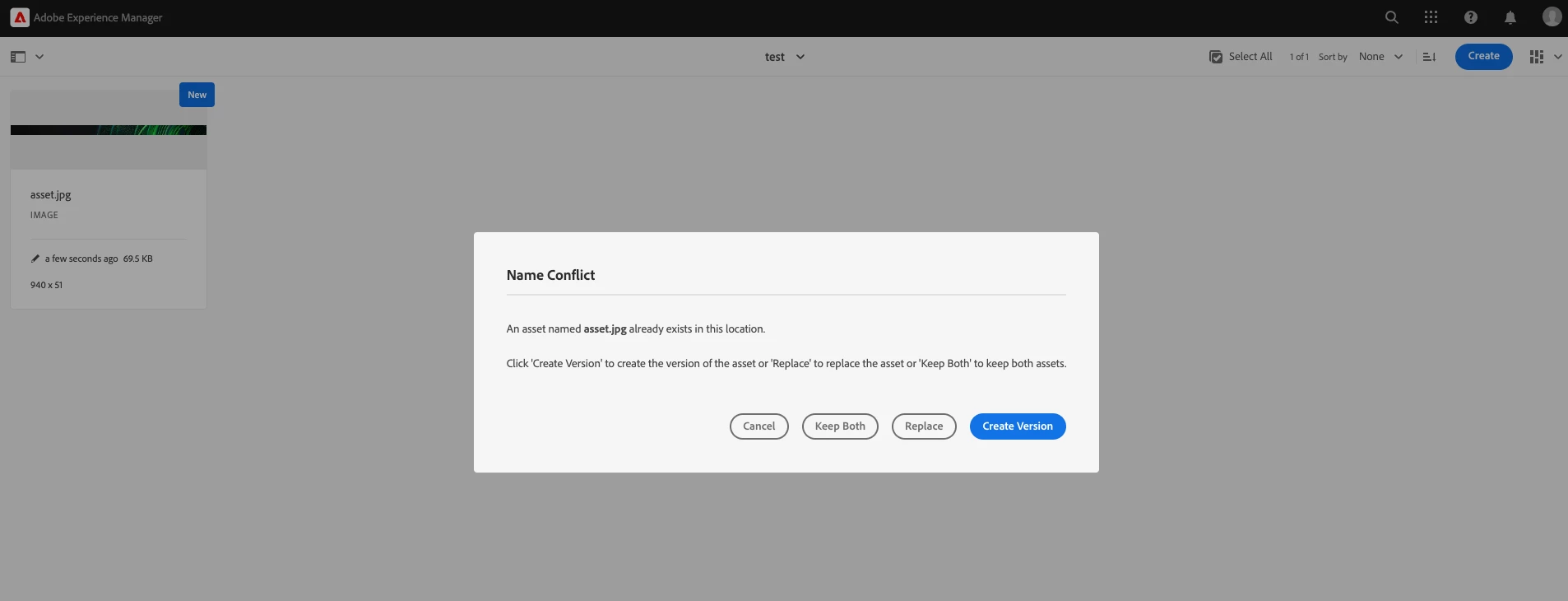
You will see the "replace" option when you upload an asset with the same name. 


Hope this helps

3 replies

kautuk_sahni
Community Manager
Community Manager
February 3, 2025

@estebanbustamante@tarunkumar@kapil_rajoria@himanshu_jain@raja_reddy@veena1@chinmayish@sh1ju@preetpal_bindra@rahulmohan Kindly take a moment to review this question and share your valuable insights. Your expertise would be greatly appreciated!

Kautuk Sahni
EstebanBustamante
Community Advisor and Adobe Champion
EstebanBustamanteCommunity Advisor and Adobe ChampionAccepted solution
Community Advisor and Adobe Champion
February 3, 2025

Hi @jamesbr23 


You will see the "replace" option when you upload an asset with the same name. 


Hope this helps

Esteban Bustamante
JamesBr23Author
February 4, 2025

Thanks for the responses, but I cannot replicate this; indeed, if I upload a new image with same name as existing asset, I am offered the option of 'Replace', and this works. However, all that does is overwrite the original image AND metadata. Any metadata entered for the first upload is wiped when I replace the asset. Am I missing a step? Thank you.

Himanshu_Jain
Community Advisor
Community Advisor
February 3, 2025

Hi @jamesbr23 ,

Use same filename while reuploading you will get replace option.


Thanks

Himanshu

Himanshu Jain