Personalized Targeted XF is rendering with full HTML DOM on page | Community
Skip to main content
Level 2
March 3, 2026
Question

Personalized Targeted XF is rendering with full HTML DOM on page

  • March 3, 2026
  • 1 reply
  • 52 views

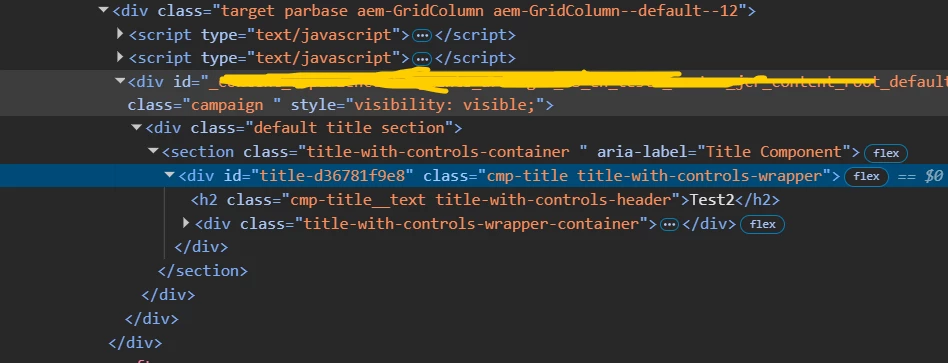
I have a XF which is targeted using context hub and when i try to refer it via OTB Experience-Fragment component then everything works fine like its rendering the proper content and not full html in dom
 

but when i do the same with custom xf reference component then its loading the full html in dom
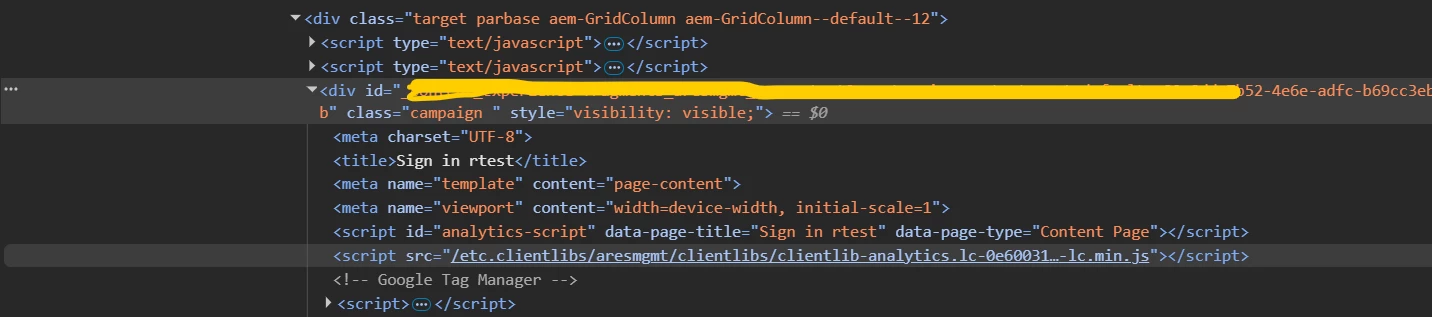

I am using the same code as OTB to render the html and making sure my XF path is till /jcr:content since in OTB component also we load the path till /jcr:content. Also if i give a non targeted XF then everything works fine

1 reply

AmitVishwakarma
Community Advisor
Community Advisor
March 3, 2026

Hi ​@JavedZi For targeted XFs, AEM/ContextHub doesn’t inject the “normal” XF .html into the page. It injects the offer rendition of the fragment (via selectors like .nocloudconfigs.atoffer.html behind the scenes).In your custom component that offer URL is returning the full XF page:

<!doctype html>
<html>
<head>...clientlibs, meta...</head>
<body>...root responsivegrid...<h2>test</h2>...</body>
</html>

That whole document is then dropped inside the <div class="campaign">, which is why you see a nested full DOM.

The core Experience Fragment component does not render the full page for offers – it uses the XF page’s special offer/fragment scripts so only the inner fragment HTML (the part under xfpage’s body) is sent to Target/ContextHub. That’s why the OOTB component works and your custom one doesn’t.

Don’t re‑implement XF rendering. Make your component a thin proxy around the core XF component.

  1. Create your custom component node (e.g. /apps/<project>/components/custom-xf-reference):
    /apps/<project>/components/custom-xf-reference
    - sling:resourceSuperType = "core/wcm/components/experiencefragment/v1/experiencefragment"

    see https://experienceleague.adobe.com/en/docs/experience-manager-core-components/using/wcm-components/experience-fragment

  2. Add only your dialog / extra fields to this node.
    Make sure the actual XF path property is still the one used by the core component (usually fragmentVariationPath or fragmentPath depending on your version). Do not change the rendering scripts.

If you need wrapper markup, create a custom-xf-reference.html like:

<sly data-sly-resource="${resource @ resourceType='core/wcm/components/experiencefragment/v1/experiencefragment'}"></sly>

or with your own wrapper:
 

<div class="my-xf-wrapper">
<sly data-sly-resource="${resource @ resourceType='core/wcm/components/experiencefragment/v1/experiencefragment'}"></sly>
</div>

Key points:

  • Use data-sly-resource, not data-sly-include.
  • Do not call /content/experience-fragments/...html directly.
  • Let the core component decide which selectors/renditions to use for targeting and offers.

Once you do this, your custom component and the OOTB Experience Fragment component share the same underlying rendering, so targeted XFs will again inject only the inner fragment markup, not a full <html> document.

Amit Vishwakarma - Adobe Commerce Champion 2025 | 16x Adobe certified | 4x Adobe SME
JavedZiAuthor
Level 2
March 3, 2026

Thanks for detailed explanation ​@AmitVishwakarma  but i need that xf field in composite multifield so cant use the same field. I was using pathbrowser field in my composite multifield to select multiple xfs and was using data-sly-resource to render xf

AmitVishwakarma
Community Advisor
Community Advisor
March 4, 2026

Hi ​@JavedZi You can keep the XF field inside a composite multifield – the problem isn’t the pathbrowser, it’s how the XF is rendered.

  • In the composite multifield, just store each XF path (e.g. property xfPath).
  • In a Sling Model, read all those xfPath values into a List<String>.
  • In HTL, do not include the XF page HTML directly. For each path, delegate to the Core XF component like this:
    <sly data-sly-use.multiXf="com.myproj.core.models.MultiXfModel" />

    <sly data-sly-list.xfPath="${multiXf.xfPaths}">
    <div class="my-xf-wrapper">
    <sly data-sly-resource="${'xf-' + xfList.count
    @ resourceType='core/wcm/components/experiencefragment/v1/experiencefragment',
    fragmentVariationPath=xfPath}"></sly>
    </div>
    </sly>

    Key points:

    • Composite multifield + pathbrowser = OK.

    • Always render via resourceType='core/wcm/components/experiencefragment/v1/experiencefragment' and fragmentVariationPath (or fragmentPath depending on version).

    • Never call /content/experience-fragments/...html directly – that’s what causes the full HTML DOM to appear, instead of just the fragment, for targeted XFs.

Amit Vishwakarma - Adobe Commerce Champion 2025 | 16x Adobe certified | 4x Adobe SME